11 12
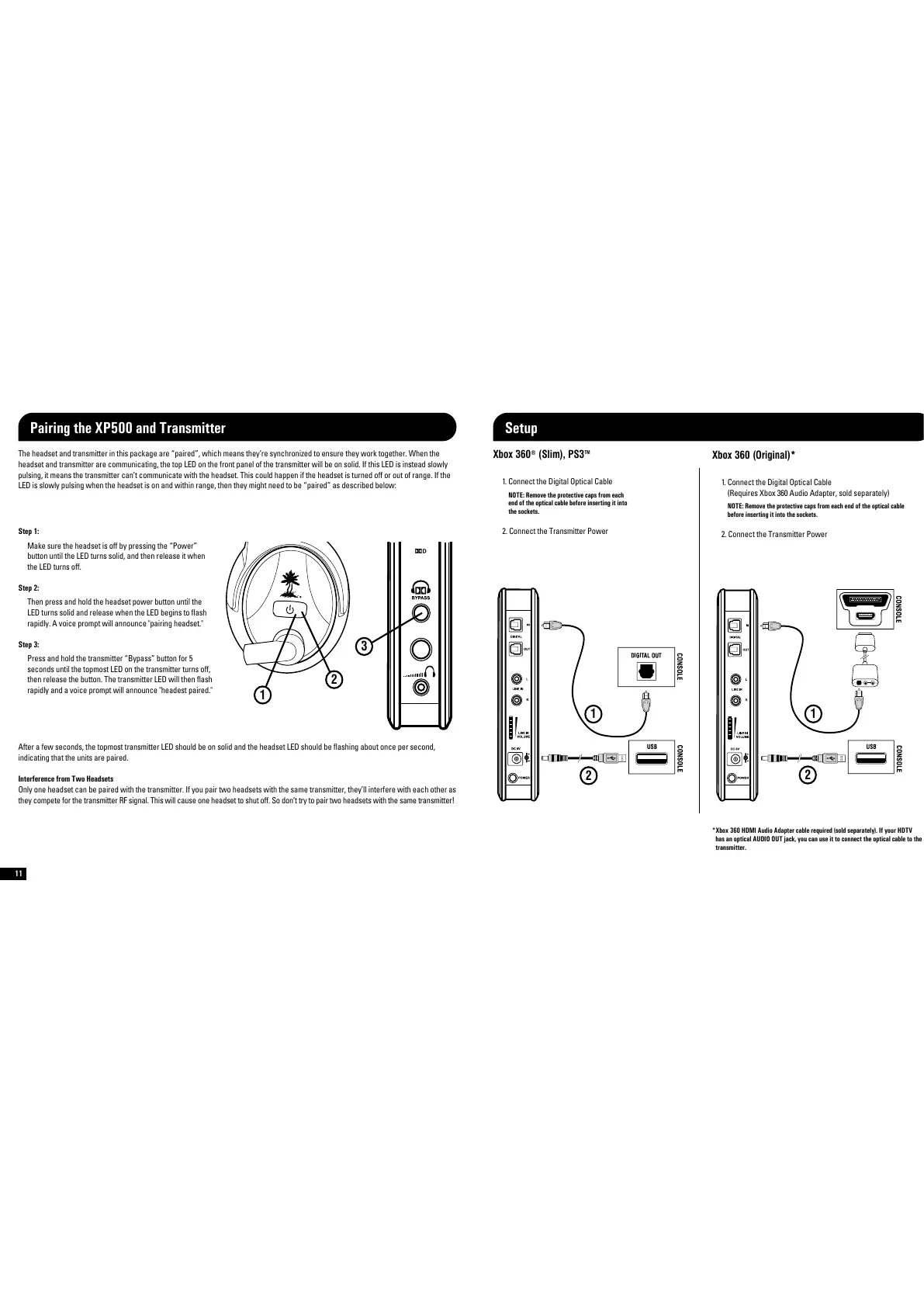
The headset and transmitter in this package are paired”, which means they’re synchronized to ensure they work together. When the
headset and transmitter are communicating, the top LED on the front panel of the transmitter will be on solid. If this LED is instead slowly
pulsing, it means the transmitter can’t communicate with the headset. This could happen if the headset is turned off or out of range. If the
LED is slowly pulsing when the headset is on and within range, then they might need to be paired” as described below
1
2
3
Step 1:
Make sure the headset is off by pressing the Power”
button until the LED turns solid, and then release it when
the LED turns off.
Step 2:
Then press and hold the headset power button until the
LED turns solid and release when the LED begins to ash
rapidly. A voice prompt will announce pairing headset.
Step 3:
Press and hold the transmitter Bypass” button for 5
seconds until the topmost LED on the transmitter turns off,
then release the button. The transmitter LED will then ash
rapidly and a voice prompt will announce headest paired.
After a few seconds, the topmost transmitter LED should be on solid and the headset LED should be ashing about once per second,
indicating that the units are paired.
Interference from Two Headsets
Only one headset can be paired with the transmitter. If you pair two headsets with the same transmitter, they’ll interfere with each other as
they compete for the transmitter RF signal. This will cause one headset to shut off. So don’t try to pair two headsets with the same transmitter!
1. Connect the Digital Optical Cable
NOTE: Remove the protective caps from each
end of the optical cable before inserting it into
the sockets.
2. Connect the Transmitter Power
1
2
Xbox 360
®
(Slim), PS3
TM
Xbox 360 (Original)*
1. Connect the Digital Optical Cable
Requires Xbox 360 Audio Adapter, sold separately)
NOTE: Remove the protective caps from each end of the optical cable
before inserting it into the sockets.
2. Connect the Transmitter Power
1
2
* Xbox 360 HDMI Audio Adapter cable required (sold separately). If your HDTV
has an optical AUDIO OUT jack, you can use it to connect the optical cable to the
transmitter.
Pairing the XP500 and Transmitter Setup













 To Next Page