EasyManua.ls Logo

Turtle Beach Ear Force X32 - User Manual

Turtle Beach Ear Force X32
32 pages
Print Icon
To Next Page IconTo Next Page
Loading...
1
TB521-2266-01

Other manuals for Turtle Beach Ear Force X32

Question and Answer IconNeed help?

Do you have a question about the Turtle Beach Ear Force X32 and is the answer not in the manual?

Summary

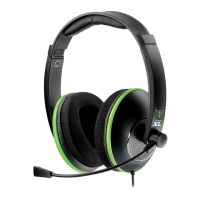
X32 Headset Overview

X32 Transmitter Overview

Pairing Headset and Transmitter

Preparation for Pairing

Ensure headset and transmitter are off and separated.

Pairing the Transmitter

Power on transmitter and press PAIR button until LED flashes rapidly.

Pairing the Headset

Press and hold headset power button until double beep.

Confirming Pairing

Wait for LEDs to indicate successful pairing.

Xbox 360 E Setup (HDMI)

Xbox 360 E Setup (Composite)

Transmitter Connections

Diagram showing transmitter connection for composite setup.

TV Connections

Diagram showing TV connection for composite setup.

Xbox 360 Setup (HDMI Cable)

Transmitter and Console Connections

Connecting the transmitter USB cable to the console.

Alternate HDMI Setup

Xbox 360 Setup (A;V Cable)

Xbox 360 Chat Setup

Upgrading to Surround Sound

Safety Notice

Hearing Damage Warning

Warning about potential permanent hearing damage from high volume use.

Safe Listening Practices

Recommendations for safe headset usage and volume adjustment.

Troubleshooting

Troubleshooting: No Sound

Steps to diagnose and resolve issues with no audio output.

Troubleshooting: Audio Drops

Solutions for audio dropouts, popping, or clicking sounds.

Troubleshooting: Voice Chat Drops

Resolving issues with dropped voice chat connections.

Summary

X32 Headset Overview

X32 Transmitter Overview

Pairing Headset and Transmitter

Preparation for Pairing

Ensure headset and transmitter are off and separated.

Pairing the Transmitter

Power on transmitter and press PAIR button until LED flashes rapidly.

Pairing the Headset

Press and hold headset power button until double beep.

Confirming Pairing

Wait for LEDs to indicate successful pairing.

Xbox 360 E Setup (HDMI)

Xbox 360 E Setup (Composite)

Transmitter Connections

Diagram showing transmitter connection for composite setup.

TV Connections

Diagram showing TV connection for composite setup.

Xbox 360 Setup (HDMI Cable)

Transmitter and Console Connections

Connecting the transmitter USB cable to the console.

Alternate HDMI Setup

Xbox 360 Setup (A;V Cable)

Xbox 360 Chat Setup

Upgrading to Surround Sound

Safety Notice

Hearing Damage Warning

Warning about potential permanent hearing damage from high volume use.

Safe Listening Practices

Recommendations for safe headset usage and volume adjustment.

Troubleshooting

Troubleshooting: No Sound

Steps to diagnose and resolve issues with no audio output.

Troubleshooting: Audio Drops

Solutions for audio dropouts, popping, or clicking sounds.

Troubleshooting: Voice Chat Drops

Resolving issues with dropped voice chat connections.

Turtle Beach Ear Force X32 Specifications

General IconGeneral
Headset typeBinaural
Product typeHeadset
Certification- FCC - CE - C-Tick: N21006 - RoHS - IC: 3879A-2265 - IC: 3879A-2266 - TSAA: 04T-00517011
Wearing styleHead-band
Recommended usageGaming
Frequency band2.4/5 GHz
Wireless range9 m
Connectivity technologyWireless
Impedance- Ω
Magnet type-
Ear couplingCircumaural
Headphone frequency20 - 20000 Hz
Headphone sensitivity120 dB
Microphone muteYes
Microphone frequency50 - 15000 Hz
Connector(s)aux in, 3.5mm
CompatibilityXbox 360
Compatible battery sizesAAA
Number of batteries supported2

Related product manuals