EasyManua.ls Logo

Turtle Beach Ear Force X41 - User Manual

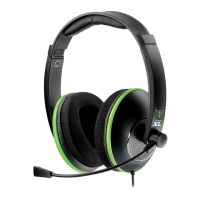
Turtle Beach Ear Force X41
16 pages
Print Icon
To Next Page IconTo Next Page
Loading...
XBOX LIVE
®
Chat plus
Wireless Digital RF Game Audio with
Dolby
®
Headphone 7.1 Surround Sound
System Requirements
Users Guide
Package Contents
XBOX 360
®
game console with one of
the following cables to support digital
output:
• XBOX 360 Component HD AV cable
• VGA HD AV cable
• S-Video AV cable
Advanced SCART AV cable
XBOX LIVE requires a subscription.
• X41 wireless headset
• Removable boom microphone
• X41 wireless transmitter
• DC power cable
• Digital Optical cable
• (2) AAA batteries
• XBOX
®
talkback cable
• This User’s Guide
For more products, accessories and our product
support knowledge base, please visit
TurtleBeach.com
For warranty information, please visit http://turtlebeach.com/support
Question and Answer IconNeed help?

Do you have a question about the Turtle Beach Ear Force X41 and is the answer not in the manual?

Summary

Safety Notice

Technical Specifications

X41 Transmitter Specifications

Outlines technical details of the wireless transmitter, including frequency and power.

Troubleshooting Tips

No Sound Issues

Addresses problems related to no audio output from the headset.

Audio Interruption Problems

Explains causes for audio drops, popping, or clicking sounds.

Setting up the XBOX 360 and Ear Force X41

Connect XBOX to Transmitter

Connects the XBOX 360 AV cable and digital optical cable to the transmitter.

Connect Power

Connects the X41 DC power cable to the transmitter and a USB port.

Insert Headset Batteries

Installs AAA batteries into the headset's right ear cup.

Turn On Headset Power

Turns on the headset and checks for communication with the transmitter.

Configure XBOX Audio Settings

Sets the XBOX 360 to output Dolby Digital 5.1 for optimal audio.

Pairing the X41 Headset and Transmitter

Pairing Procedure

Step-by-step guide to synchronize the headset and transmitter.

Configuring the XBOX LIVE settings

XBOX LIVE Voice Settings

Configures the XBOX Dashboard for voice chat.

Summary

Safety Notice

Technical Specifications

X41 Transmitter Specifications

Outlines technical details of the wireless transmitter, including frequency and power.

Troubleshooting Tips

No Sound Issues

Addresses problems related to no audio output from the headset.

Audio Interruption Problems

Explains causes for audio drops, popping, or clicking sounds.

Setting up the XBOX 360 and Ear Force X41

Connect XBOX to Transmitter

Connects the XBOX 360 AV cable and digital optical cable to the transmitter.

Connect Power

Connects the X41 DC power cable to the transmitter and a USB port.

Insert Headset Batteries

Installs AAA batteries into the headset's right ear cup.

Turn On Headset Power

Turns on the headset and checks for communication with the transmitter.

Configure XBOX Audio Settings

Sets the XBOX 360 to output Dolby Digital 5.1 for optimal audio.

Pairing the X41 Headset and Transmitter

Pairing Procedure

Step-by-step guide to synchronize the headset and transmitter.

Configuring the XBOX LIVE settings

XBOX LIVE Voice Settings

Configures the XBOX Dashboard for voice chat.

Turtle Beach Ear Force X41 Specifications

General IconGeneral
Driver unit50 mm
Magnet typeNeodymium
Headphone frequency20 - 20000 Hz
Headphone sensitivity120 dB
Wireless range9.15 m
Connectivity technologyWireless
Compatible battery sizesAAA
Microphone frequency50 - 15000 Hz
Product typeHeadset
Weight and Dimensions IconWeight and Dimensions
Weight240 g

Related product manuals