EasyManua.ls Logo

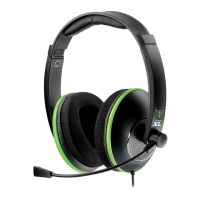
Turtle Beach Ear Force XP SEVEN - User Manual

Turtle Beach Ear Force XP SEVEN
30 pages
Print Icon
To Next Page IconTo Next Page
Loading...
User Guide
WIRED
For: Xbox 360® I PS3™ I PC I
Mac® I Mobile
Question and Answer IconNeed help?

Do you have a question about the Turtle Beach Ear Force XP SEVEN and is the answer not in the manual?

Summary

Headset Overview

Operating Modes

Describes the two operating modes (Headset and Speaker) for the control unit.

Package Contents

Feature; Function Map

Console Interface

Details the ports and connections on the console interface unit.

Audio Control Unit

Maps numbered functions and controls on the Audio Control Unit (ACU).

Audio Control Unit (ACU) Functions

Additional Chat Functions

Explains Voice Morphing and Chat Boost features for enhanced chat experience.

Using your XP SEVEN Headset on Xbox 360

Xbox 360 Audio Configuration

Guides users through setting up audio output and voice settings on Xbox 360.

Using your XP SEVEN Headset on PS3

PS3 Audio Configuration

Details how to configure audio device settings and audio multi-output on PS3.

Connecting your XP SEVEN Headset to a PC; Mac

Using your XP SEVEN on a PC

USB Hub Configuration

Instructs on selecting a free USB hub and using USBView for PC connection.

Playback Device Configuration

Details setting the headset as default playback and communication devices in Windows.

Speaker Configuration and Microphone Setup

Guides through speaker testing and setting up the microphone as default.

Audio Levels and Properties

Explains how to adjust audio levels and properties for game and chat audio.

Using your XP SEVEN on a Mac

Mac Audio Configuration

Details setting audio input/output devices and configuring chat programs on Mac.

Using your XP SEVEN Headset with Other Devices

Speaker Mode

Dolby Digital Processing

Surround Sound Angles

Presets

Game Presets

Lists and describes the built-in game audio presets for enhanced gaming experience.

Chat Presets

Lists and describes chat presets for voice modification and chat volume enhancement.

Presets; Specifications

Speaker Presets

Lists and describes speaker audio presets available in Speaker Mode.

Specifications

Provides technical details on audio connections and power requirements.

Regulatory Compliance Statements

Declaration of Conformity

LIMITED ONE YEAR WARRANTY FOR TURTLE BEACH PRODUCTS

EXCLUSIONS FROM LIMITED WARRANTY

Summary

Headset Overview

Operating Modes

Describes the two operating modes (Headset and Speaker) for the control unit.

Package Contents

Feature; Function Map

Console Interface

Details the ports and connections on the console interface unit.

Audio Control Unit

Maps numbered functions and controls on the Audio Control Unit (ACU).

Audio Control Unit (ACU) Functions

Additional Chat Functions

Explains Voice Morphing and Chat Boost features for enhanced chat experience.

Using your XP SEVEN Headset on Xbox 360

Xbox 360 Audio Configuration

Guides users through setting up audio output and voice settings on Xbox 360.

Using your XP SEVEN Headset on PS3

PS3 Audio Configuration

Details how to configure audio device settings and audio multi-output on PS3.

Connecting your XP SEVEN Headset to a PC; Mac

Using your XP SEVEN on a PC

USB Hub Configuration

Instructs on selecting a free USB hub and using USBView for PC connection.

Playback Device Configuration

Details setting the headset as default playback and communication devices in Windows.

Speaker Configuration and Microphone Setup

Guides through speaker testing and setting up the microphone as default.

Audio Levels and Properties

Explains how to adjust audio levels and properties for game and chat audio.

Using your XP SEVEN on a Mac

Mac Audio Configuration

Details setting audio input/output devices and configuring chat programs on Mac.

Using your XP SEVEN Headset with Other Devices

Speaker Mode

Dolby Digital Processing

Surround Sound Angles

Presets

Game Presets

Lists and describes the built-in game audio presets for enhanced gaming experience.

Chat Presets

Lists and describes chat presets for voice modification and chat volume enhancement.

Presets; Specifications

Speaker Presets

Lists and describes speaker audio presets available in Speaker Mode.

Specifications

Provides technical details on audio connections and power requirements.

Regulatory Compliance Statements

Declaration of Conformity

LIMITED ONE YEAR WARRANTY FOR TURTLE BEACH PRODUCTS

EXCLUSIONS FROM LIMITED WARRANTY

Turtle Beach Ear Force XP SEVEN Specifications

General IconGeneral
Headset typeBinaural
Product typeHeadset
Product colorBlack, White
Wearing styleHead-band
Recommended usageGaming
USB connectivityYes
Connectivity technologyWired
Impedance- Ω
Magnet type-
Ear couplingCircumaural
Headphone frequency- Hz
Microphone connectivity2.5 mm
Cables includedAudio (3.5mm)

Related product manuals