6
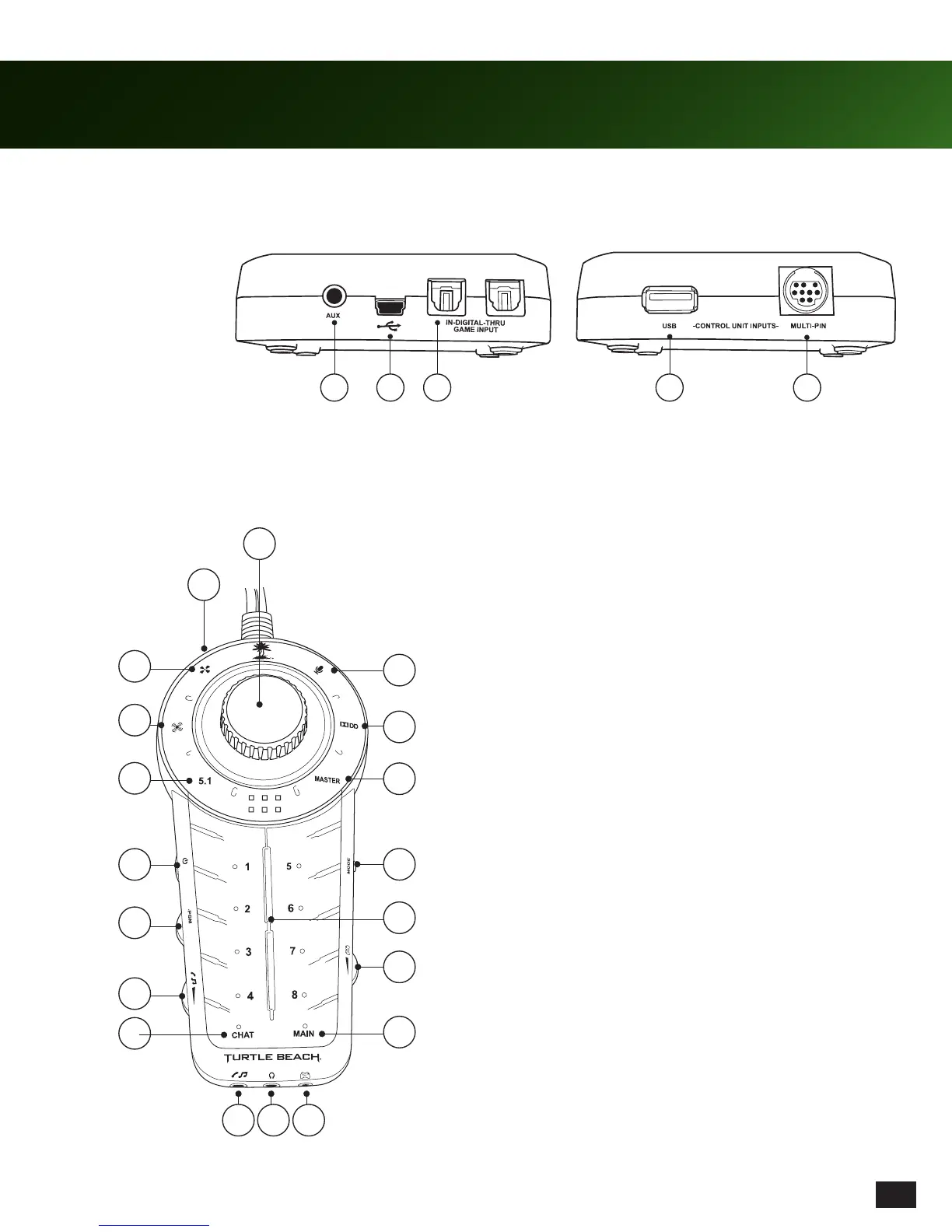
Feature / Function Map
Console Interface
Audio Control Unit
Refer to page 7 for a description of button functions.
1. Master Game Volume Knob / Mute
2. External Speaker Jack (located on side of controller)
3. Speaker Angles (Capacitive Touch)*
4. Surround Sound Toggle (Capacitive Touch)*
5. Speaker Selection (Capacitive Touch)
6. Power Switch
7. Programmable Control Dial
8. Auxiliary / Phone Volume Control Dial
9. Chat Preset Button (Capacitive Touch)
10. Auxiliary Input Jack (4-pole, 3.5mm)
11. Headset Jack (4-pole, 3.5mm)
12. Talkback Cable Jack (2.5mm, cable not included)
13. Main Preset Button (Capacitive Touch)
14. Chat Volume Control
15. Preset buttons (Capacitive Touch)
16. Mode Button
17. Master Game Volume (Capacitive Touch)
18. Dolby® Digital Indicator*
19. Mic Mute (Capacitive Touch)*
*When a function is enabled, the associated LED turns white. When disabled, LED turns red.*
1. Auxiliary Input
2. USB Input
3. Digital Input & Output
4. USB Output
5. 9-pin DIN
1
9
10
4
5
6
7
2
3
11
8
12
18
13
14
15
16
17
19
41 2 3 5














 To Next Page