11
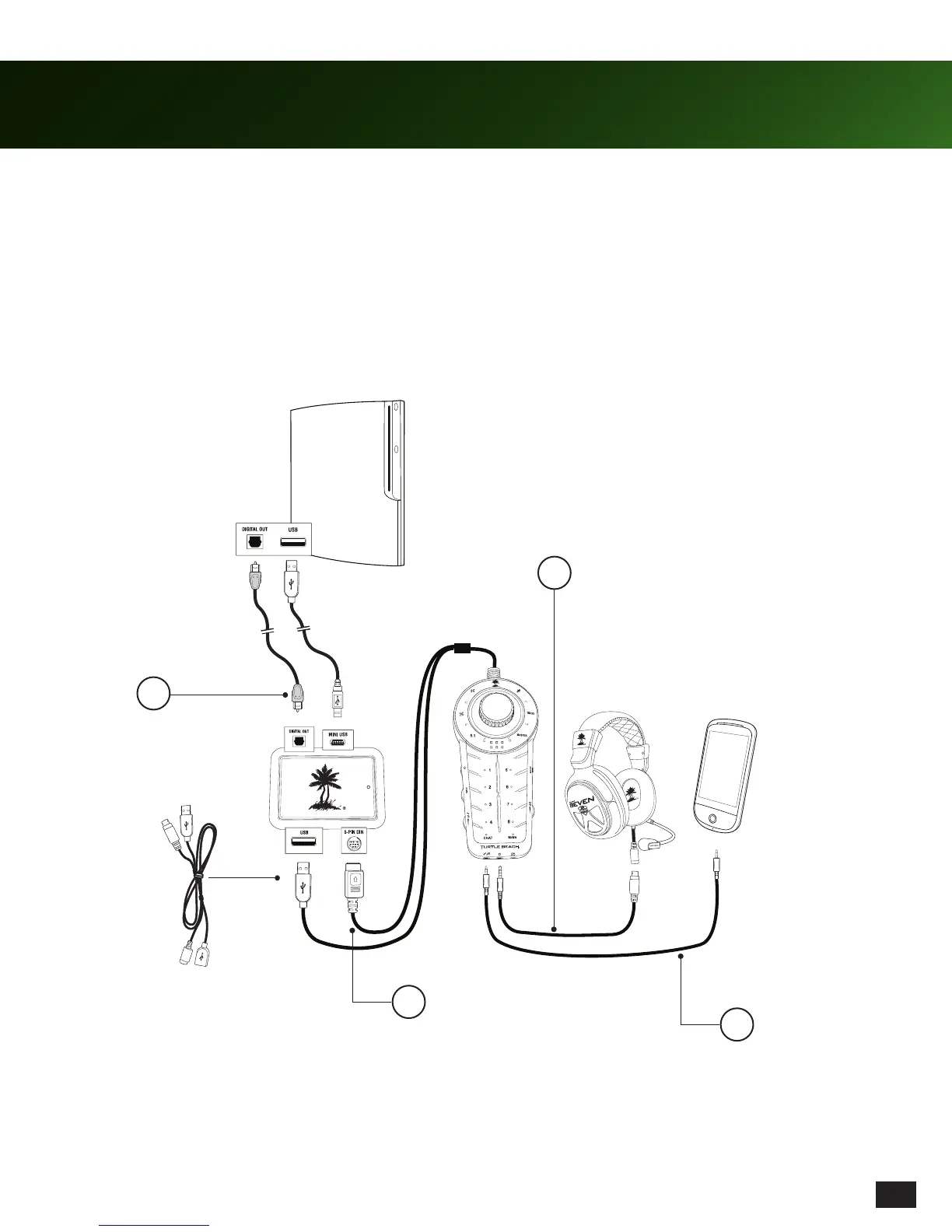
Using your XP SEVEN Headset on PS3™
1. Connect the Console Interface to the PS3 game console using the Digital Optical Cable and Console Interface USB
cable as shown below. Connect the Digital Optical Cable to the Console Interface’s DIGITAL IN jack.
2. Connect the Audio Control Unit to the Console Interface as shown below. Utilize the Audio Control Unit Extender Cable
as necessary.
3. Connect the XP SEVEN Headset to the Audio Control Unit using the Headset Breakaway Cable as shown below.
4. Connect your mobile phone or digital media player with the included 3.5mm stereo cable.
USB
Optical Cable
Headset Breakaway Cable
Smartphone not included
1
2
3
4
Audio Control Unit Extender Cable
(use if necessary)














 To Next Page