EasyManua.ls Logo

Turtle Beach Ear Force XLa - User Manual

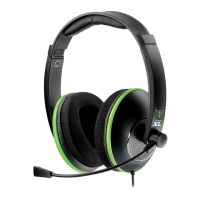
Turtle Beach Ear Force XLa
9 pages
Print Icon
To Next Page IconTo Next Page
Loading...
AMPLIFIED STEREO
GAMING HEADSET
User Guide
Question and Answer IconNeed help?

Do you have a question about the Turtle Beach Ear Force XLa and is the answer not in the manual?

Summary

About the XLa Headset

Headset Features

Details key features like Amplified Audio, Bass Boost, Independent Volume Controls, and Microphone Monitor.

XLa Headset Controls Overview

Headset Controls

Explains the function of the Chat Volume Control, Game Volume, and Mic Mute Switch on the headset.

Xbox 360 Connection Setup

HDMI Connection Setup

Step-by-step guide for connecting the headset to an Xbox 360 using an HDMI connection.

RCA Connection Setup

Instructions for connecting the headset to an Xbox 360 console using RCA audio cables.

Xbox 360 Chat Configuration

Chat Setup Guide

Details the steps for configuring voice chat settings on the Xbox 360 console.

Product Specifications and Maintenance

Technical Specifications

Lists the technical details and specifications of the Ear Force XLa headset.

Headset Maintenance

Provides guidance on how to properly care for and maintain the headset.

Safety and Compliance Information

Safety Notice

Warns about potential hearing damage from high volumes and provides safety recommendations.

Declaration of Conformity

States the product's compliance with electromagnetic compatibility directives and standards.

FCC Compliance and Warranty

FCC Declaration of Conformity

Details the FCC compliance statement and user information regarding radio frequency energy.

Limited Warranty

Outlines the terms, conditions, and exclusions of the limited warranty for Turtle Beach products.

Summary

About the XLa Headset

Headset Features

Details key features like Amplified Audio, Bass Boost, Independent Volume Controls, and Microphone Monitor.

XLa Headset Controls Overview

Headset Controls

Explains the function of the Chat Volume Control, Game Volume, and Mic Mute Switch on the headset.

Xbox 360 Connection Setup

HDMI Connection Setup

Step-by-step guide for connecting the headset to an Xbox 360 using an HDMI connection.

RCA Connection Setup

Instructions for connecting the headset to an Xbox 360 console using RCA audio cables.

Xbox 360 Chat Configuration

Chat Setup Guide

Details the steps for configuring voice chat settings on the Xbox 360 console.

Product Specifications and Maintenance

Technical Specifications

Lists the technical details and specifications of the Ear Force XLa headset.

Headset Maintenance

Provides guidance on how to properly care for and maintain the headset.

Safety and Compliance Information

Safety Notice

Warns about potential hearing damage from high volumes and provides safety recommendations.

Declaration of Conformity

States the product's compliance with electromagnetic compatibility directives and standards.

FCC Compliance and Warranty

FCC Declaration of Conformity

Details the FCC compliance statement and user information regarding radio frequency energy.

Limited Warranty

Outlines the terms, conditions, and exclusions of the limited warranty for Turtle Beach products.

Turtle Beach Ear Force XLa Specifications

General IconGeneral
Cable length4.57 m
Headset typeBinaural
Product typeHeadset
Product colorBlack
Wearing styleHead-band
Volume controlRotary
Recommended usageGaming
Compatible productsXbox 360
Sound pressure level (max)120 dB
Impedance- Ω
Driver unit40 mm
Magnet typeNeodymium
Ear couplingSupraaural
Headphone frequency20 - 20000 Hz
USB connectorUSB Type-A
3.5 mm connector-
USB connectivityNo
Connectivity technologyWired
MaterialFaux leather, Foam
Quantity1
Microphone typeBoom
Package typeBlister
Package depth205 mm
Package width80 mm
Package height275 mm
Package weight401 g

Related product manuals