EasyManua.ls Logo

Turtle Beach Elite 800X - User Manual

Turtle Beach Elite 800X
34 pages
Print Icon
To Next Page IconTo Next Page
Loading...
WIRELESS NOISECANCELLING DTS SURROUND SOUND HEADSET
USER GUIDE
Designed for
Question and Answer IconNeed help?

Do you have a question about the Turtle Beach Elite 800X and is the answer not in the manual?

Summary

Package Contents

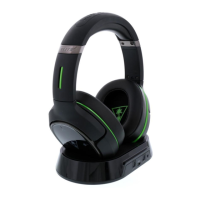
Turtle Beach Elite 800 X Headset

The primary wireless gaming headset unit.

Elite 800 X Transmitter & Magnetic Charging Stand

Central hub for charging and wireless transmission.

USB Transmitter Cable

Cable for connecting the transmitter to the console.

USB Programming Cable

Cable for firmware updates and personalization.

Mobile Cable

Cable for wired connection to mobile devices.

Digital Optical Cable

Cable for audio connection to consoles.

Elite 800 X Quickstart Guide

Quick guide for initial setup and operation.

Turtle Beach Elite Program Welcome

Information regarding the Elite program membership.

Elite 800 X Preset Reference

Guide to audio presets for the headset.

About the Elite 800 X

Overview of Elite 800 X Features

General introduction to the Turtle Beach Elite 800X headset.

Silence is Golden (Active Noise Cancellation)

Feature on Active Noise Cancellation for distraction-free audio.

Crystal Clear Wireless Technology

Highlights the intelligent channel-hopping wireless technology.

DTS Headphone:X 7.1 Surround Sound

Describes the 3D spatial audio experience provided by DTS technology.

Enhanced DTS Surround Sound Modes & Presets

Details custom sound modes and genre-specific presets for immersion.

Hidden, High-Quality Microphones

Features dual hidden microphones for clear voice communication.

Magnetic Charging Stand

Description of the low-profile stand for charging without cables.

Mobile Connectivity for Texts and Calls

Explains pairing with a mobile phone for notifications and calls.

Rechargeable Battery Performance

Information on the built-in battery providing over 10 hours of wireless use.

Companion App for Control

Details the Ear Force Audio Hub app for wireless control and personalization.

Swappable Rocker Plates Customization

Features on customizing the headset with interchangeable rocker plates.

Separate Volume Controls

Allows adjustment of game and chat volume levels on the headset.

Mic Monitoring Feature

Explains Mic Monitoring to hear own voice and avoid shouting.

Dynamic Chat Boost Technology

Automatically adjusts chat volume during loud gameplay spikes.

Easy Setup Process

Describes the simple setup using USB and optical connections.

Parts and Controls Overview

Headset Controls: Left Earcup

Details the buttons and indicators on the left earcup.

Headset Controls: Right Earcup

Details the buttons and indicators on the right earcup.

DTS Headphone:X Surround Modes

Explains different surround sound modes like Game, Movie, and Music.

Transmitter: Front Panel

Details the front panel of the wireless transmitter.

Transmitter: Back Panel Connections

Details the rear panel connections of the wireless transmitter.

Headset Charging

Charging via Transmitter Stand

Instructions for charging the headset using the magnetic stand.

Charging via USB Cable

Instructions for charging the headset directly with a USB cable.

Battery Care and Storage Guidelines

Guidelines for maintaining battery health and proper storage.

Xbox One Setup

Physical Connections for Xbox One

Diagram and description of connecting the headset and transmitter to Xbox One.

Configure Xbox One Audio Settings

Steps to configure audio output and format in Xbox One settings.

Wired Setup

Connecting to Mobile Devices via Cable

Instructions for using the mobile cable for wired connections.

Benefits of Wired Connection

Notes on using stereo audio and features when powered off or on.

Bluetooth Pairing

Prepare Mobile Device for Pairing

Steps to enable Bluetooth and navigate settings on a mobile device.

Initiate Headset Pairing Mode

How to activate pairing mode on the Elite 800X headset.

Complete Bluetooth Pairing Process

Steps to select and confirm the headset on the mobile device.

Bluetooth Operation

Bluetooth Multifunction Button Actions

Explains button functions in Call and Stereo modes.

Right Earcup Bluetooth Controls

Details specific button functions for Bluetooth operation on the right earcup.

Pairing the Headset and Transmitter

Initiate Transmitter Pairing Process

Steps to start the pairing process via the transmitter.

Initiate Headset Pairing Process

Steps to start the pairing process via the headset.

Confirm Pairing Success

How to verify successful pairing through LED indicators.

Active Noise Cancellation (ANC)

How Active Noise Cancellation Works

Explains the technology behind suppressing ambient noise.

Turning ANC On

Instructions on how to activate Active Noise Cancellation.

Turning ANC Off

Instructions on how to deactivate Active Noise Cancellation.

ANC Usage Notes and Limitations

Important notes regarding Bluetooth status and headset power for ANC.

Adjusting the Sound

Adjusting Game;Media Volume

Controls for game and media audio levels on the headset.

Adjusting Chat Volume

Controls for chat audio levels on the headset.

Microphone On;Off Control

How to mute or unmute the microphone.

Microphone Preset Selection

Description of different microphone sound profiles for environments.

Adjusting Active Noise Cancelling

How to turn ANC on or off and associated LED indicators.

Adjusting Surround Sound Modes

How to cycle through DTS Headphone:X surround sound modes.

Selecting Turtle Beach Presets

How to cycle through Turtle Beach Signature Presets.

DTS Headphone:X Game Mode Presets

Details on Game Mode surround sound presets like Shooter and Racing.

DTS Headphone:X Movie Mode Presets

Details on Movie Mode surround sound presets like Action and Horror.

DTS Headphone:X Music Mode Presets

Details on Music Mode surround sound presets like Stadium and Dance.

DTS Headphone:X Stereo Mode Presets

Details on Stereo Mode presets like Natural Sound and Bass Booster.

Firmware Upgrades and Personalization

Turtle Beach Windows Ear Force Audio Hub

Information on using the Windows application for firmware upgrades.

Turtle Beach Android Ear Force Audio Hub

Information on using the Android app for presets and control.

Replacing Rocker Plates

Customizing Your Headset with Plates

Instructions and link for customizing the headset with new rocker plates.

Specifications

Headset Specifications

Technical details of the headset components and features.

Transmitter Specifications

Technical details of the transmitter components and features.

Troubleshooting Tips

No Sound Issues

Common causes and solutions for lack of audio output.

Audio Drops, Popping, or Clicking Sounds

Troubleshooting steps for intermittent audio problems.

Voice Chat Drops and Solutions

Explains causes and solutions for voice chat interruptions.

Voice Chat Input Device Issues

Ensures the headset is selected as the input device.

Mic Muted Troubleshooting

Steps to check if the microphone is muted.

Bluetooth Connectivity Troubleshooting

Guidance for troubleshooting Bluetooth connectivity problems.

Important Safety Information

Hearing Damage Prevention Warnings

Warnings about high volume usage and potential hearing damage.

Safe Listening Practices

Guidelines for safe volume adjustment and listening habits.

Regulatory Compliance Statements

FCC Compliance Notices

Lists FCC IDs and statements for the device.

Class B Interference Statement

Explains compliance with Class B digital device limits.

RF Radiation Exposure & Hazard Statement

Information on RF exposure requirements and safe installation.

Non-Modification Statement

Statement regarding the use of approved antennas and modifications.

FCC Deployment Statement

Specifies indoor deployment restrictions for certain frequency bands.

Canadian ICES Statements

Compliance statements for Canadian regulations.

Canadian RF Radiation Exposure & Hazard Statement

RF exposure information specific to Canadian standards.

Canadian Deployment Statement

Indoor deployment restrictions for Canada.

Waste Disposal Information

Instructions on proper disposal and recycling of electronic waste.

EU CE Marking and Conformance Standards

Explains CE marking and lists relevant safety, EMC, and radio standards.

EU Safety Standards

Lists specific safety certifications and licenses.

EU EMC Standards

Lists electromagnetic compatibility standards.

EU Radio Standards

Lists radio frequency and transmission standards.

EU SAR Standards

Lists Specific Absorption Rate (SAR) standards.

EU Environmental Standards

Lists environmental directives and regulations.

Declarations of Conformity (Multiple Languages)

Lists declarations of conformity in multiple languages.

Declarations of Conformity (Continued)

Continues declarations of conformity in multiple languages.

Limited One Year Warranty

Warranty Coverage and Period

Details the duration and scope of the limited one-year warranty.

Warranty Service Process

Outlines the procedure for obtaining warranty service, including RMA.

Purchasers Remedy and VTB Liability

Specifies the exclusive remedy for defects and VTB's liability limits.

General Warranty Exclusions

Lists conditions and situations not covered by the warranty.

Notes on Replacement Parts Warranty

Warranty terms for replacement parts and discontinued products.

Specific Usage Exclusions

Exclusions for commercial use, modification, or misuse.

Damage and Alteration Exclusions

Exclusions for damage from external causes or unauthorized alterations.

Summary

Package Contents

Turtle Beach Elite 800 X Headset

The primary wireless gaming headset unit.

Elite 800 X Transmitter & Magnetic Charging Stand

Central hub for charging and wireless transmission.

USB Transmitter Cable

Cable for connecting the transmitter to the console.

USB Programming Cable

Cable for firmware updates and personalization.

Mobile Cable

Cable for wired connection to mobile devices.

Digital Optical Cable

Cable for audio connection to consoles.

Elite 800 X Quickstart Guide

Quick guide for initial setup and operation.

Turtle Beach Elite Program Welcome

Information regarding the Elite program membership.

Elite 800 X Preset Reference

Guide to audio presets for the headset.

About the Elite 800 X

Overview of Elite 800 X Features

General introduction to the Turtle Beach Elite 800X headset.

Silence is Golden (Active Noise Cancellation)

Feature on Active Noise Cancellation for distraction-free audio.

Crystal Clear Wireless Technology

Highlights the intelligent channel-hopping wireless technology.

DTS Headphone:X 7.1 Surround Sound

Describes the 3D spatial audio experience provided by DTS technology.

Enhanced DTS Surround Sound Modes & Presets

Details custom sound modes and genre-specific presets for immersion.

Hidden, High-Quality Microphones

Features dual hidden microphones for clear voice communication.

Magnetic Charging Stand

Description of the low-profile stand for charging without cables.

Mobile Connectivity for Texts and Calls

Explains pairing with a mobile phone for notifications and calls.

Rechargeable Battery Performance

Information on the built-in battery providing over 10 hours of wireless use.

Companion App for Control

Details the Ear Force Audio Hub app for wireless control and personalization.

Swappable Rocker Plates Customization

Features on customizing the headset with interchangeable rocker plates.

Separate Volume Controls

Allows adjustment of game and chat volume levels on the headset.

Mic Monitoring Feature

Explains Mic Monitoring to hear own voice and avoid shouting.

Dynamic Chat Boost Technology

Automatically adjusts chat volume during loud gameplay spikes.

Easy Setup Process

Describes the simple setup using USB and optical connections.

Parts and Controls Overview

Headset Controls: Left Earcup

Details the buttons and indicators on the left earcup.

Headset Controls: Right Earcup

Details the buttons and indicators on the right earcup.

DTS Headphone:X Surround Modes

Explains different surround sound modes like Game, Movie, and Music.

Transmitter: Front Panel

Details the front panel of the wireless transmitter.

Transmitter: Back Panel Connections

Details the rear panel connections of the wireless transmitter.

Headset Charging

Charging via Transmitter Stand

Instructions for charging the headset using the magnetic stand.

Charging via USB Cable

Instructions for charging the headset directly with a USB cable.

Battery Care and Storage Guidelines

Guidelines for maintaining battery health and proper storage.

Xbox One Setup

Physical Connections for Xbox One

Diagram and description of connecting the headset and transmitter to Xbox One.

Configure Xbox One Audio Settings

Steps to configure audio output and format in Xbox One settings.

Wired Setup

Connecting to Mobile Devices via Cable

Instructions for using the mobile cable for wired connections.

Benefits of Wired Connection

Notes on using stereo audio and features when powered off or on.

Bluetooth Pairing

Prepare Mobile Device for Pairing

Steps to enable Bluetooth and navigate settings on a mobile device.

Initiate Headset Pairing Mode

How to activate pairing mode on the Elite 800X headset.

Complete Bluetooth Pairing Process

Steps to select and confirm the headset on the mobile device.

Bluetooth Operation

Bluetooth Multifunction Button Actions

Explains button functions in Call and Stereo modes.

Right Earcup Bluetooth Controls

Details specific button functions for Bluetooth operation on the right earcup.

Pairing the Headset and Transmitter

Initiate Transmitter Pairing Process

Steps to start the pairing process via the transmitter.

Initiate Headset Pairing Process

Steps to start the pairing process via the headset.

Confirm Pairing Success

How to verify successful pairing through LED indicators.

Active Noise Cancellation (ANC)

How Active Noise Cancellation Works

Explains the technology behind suppressing ambient noise.

Turning ANC On

Instructions on how to activate Active Noise Cancellation.

Turning ANC Off

Instructions on how to deactivate Active Noise Cancellation.

ANC Usage Notes and Limitations

Important notes regarding Bluetooth status and headset power for ANC.

Adjusting the Sound

Adjusting Game;Media Volume

Controls for game and media audio levels on the headset.

Adjusting Chat Volume

Controls for chat audio levels on the headset.

Microphone On;Off Control

How to mute or unmute the microphone.

Microphone Preset Selection

Description of different microphone sound profiles for environments.

Adjusting Active Noise Cancelling

How to turn ANC on or off and associated LED indicators.

Adjusting Surround Sound Modes

How to cycle through DTS Headphone:X surround sound modes.

Selecting Turtle Beach Presets

How to cycle through Turtle Beach Signature Presets.

DTS Headphone:X Game Mode Presets

Details on Game Mode surround sound presets like Shooter and Racing.

DTS Headphone:X Movie Mode Presets

Details on Movie Mode surround sound presets like Action and Horror.

DTS Headphone:X Music Mode Presets

Details on Music Mode surround sound presets like Stadium and Dance.

DTS Headphone:X Stereo Mode Presets

Details on Stereo Mode presets like Natural Sound and Bass Booster.

Firmware Upgrades and Personalization

Turtle Beach Windows Ear Force Audio Hub

Information on using the Windows application for firmware upgrades.

Turtle Beach Android Ear Force Audio Hub

Information on using the Android app for presets and control.

Replacing Rocker Plates

Customizing Your Headset with Plates

Instructions and link for customizing the headset with new rocker plates.

Specifications

Headset Specifications

Technical details of the headset components and features.

Transmitter Specifications

Technical details of the transmitter components and features.

Troubleshooting Tips

No Sound Issues

Common causes and solutions for lack of audio output.

Audio Drops, Popping, or Clicking Sounds

Troubleshooting steps for intermittent audio problems.

Voice Chat Drops and Solutions

Explains causes and solutions for voice chat interruptions.

Voice Chat Input Device Issues

Ensures the headset is selected as the input device.

Mic Muted Troubleshooting

Steps to check if the microphone is muted.

Bluetooth Connectivity Troubleshooting

Guidance for troubleshooting Bluetooth connectivity problems.

Important Safety Information

Hearing Damage Prevention Warnings

Warnings about high volume usage and potential hearing damage.

Safe Listening Practices

Guidelines for safe volume adjustment and listening habits.

Regulatory Compliance Statements

FCC Compliance Notices

Lists FCC IDs and statements for the device.

Class B Interference Statement

Explains compliance with Class B digital device limits.

RF Radiation Exposure & Hazard Statement

Information on RF exposure requirements and safe installation.

Non-Modification Statement

Statement regarding the use of approved antennas and modifications.

FCC Deployment Statement

Specifies indoor deployment restrictions for certain frequency bands.

Canadian ICES Statements

Compliance statements for Canadian regulations.

Canadian RF Radiation Exposure & Hazard Statement

RF exposure information specific to Canadian standards.

Canadian Deployment Statement

Indoor deployment restrictions for Canada.

Waste Disposal Information

Instructions on proper disposal and recycling of electronic waste.

EU CE Marking and Conformance Standards

Explains CE marking and lists relevant safety, EMC, and radio standards.

EU Safety Standards

Lists specific safety certifications and licenses.

EU EMC Standards

Lists electromagnetic compatibility standards.

EU Radio Standards

Lists radio frequency and transmission standards.

EU SAR Standards

Lists Specific Absorption Rate (SAR) standards.

EU Environmental Standards

Lists environmental directives and regulations.

Declarations of Conformity (Multiple Languages)

Lists declarations of conformity in multiple languages.

Declarations of Conformity (Continued)

Continues declarations of conformity in multiple languages.

Limited One Year Warranty

Warranty Coverage and Period

Details the duration and scope of the limited one-year warranty.

Warranty Service Process

Outlines the procedure for obtaining warranty service, including RMA.

Purchasers Remedy and VTB Liability

Specifies the exclusive remedy for defects and VTB's liability limits.

General Warranty Exclusions

Lists conditions and situations not covered by the warranty.

Notes on Replacement Parts Warranty

Warranty terms for replacement parts and discontinued products.

Specific Usage Exclusions

Exclusions for commercial use, modification, or misuse.

Damage and Alteration Exclusions

Exclusions for damage from external causes or unauthorized alterations.

Turtle Beach Elite 800X Specifications

General IconGeneral
Headset typeBinaural
Product typeHeadset
CertificationCE, RoHS
Product colorBlack, Green
Wearing styleHead-band
Volume controlTouch
Recommended usageGaming
Compatible productsXbox One
Mac compatibilityYes
Mac operating systems supportedMac OS X 10.12 Sierra, Mac OS X 10.13 High Sierra
Mobile operating systems supportedAndroid 4.3, Android 4.4, Android 5.0, Android 5.1, Android 6.0, Android 7.1, Android 7.1.2
Windows operating systems supportedWindows 10, Windows 7, Windows 8, Windows 8.1
Microphone typeBuilt-in
USB connectorMicro-USB
Frequency band2.4, 5 GHz
3.5 mm connectorNo
Connectivity technologyWireless
Quantity1
Cables includedMicro-USB, Optical
Dolby technologiesDolby Surround 7.1
Impedance- Ω
Driver unit50 mm
Ear couplingCircumaural
Headphone frequency20 - 20000 Hz
Continuous audio playback time10 h
MaterialLeather, Memory foam, Synthetic
Package depth300 mm
Package width140 mm
Package height275 mm
Package weight1917 g

Related product manuals