3130
How To Use Your TUSHY Ace
Before using your TUSHY Ace, make sure it is plugged into a
grounded, 3-prong 120V outlet, there are batteries in the remote
and your water valve is open.
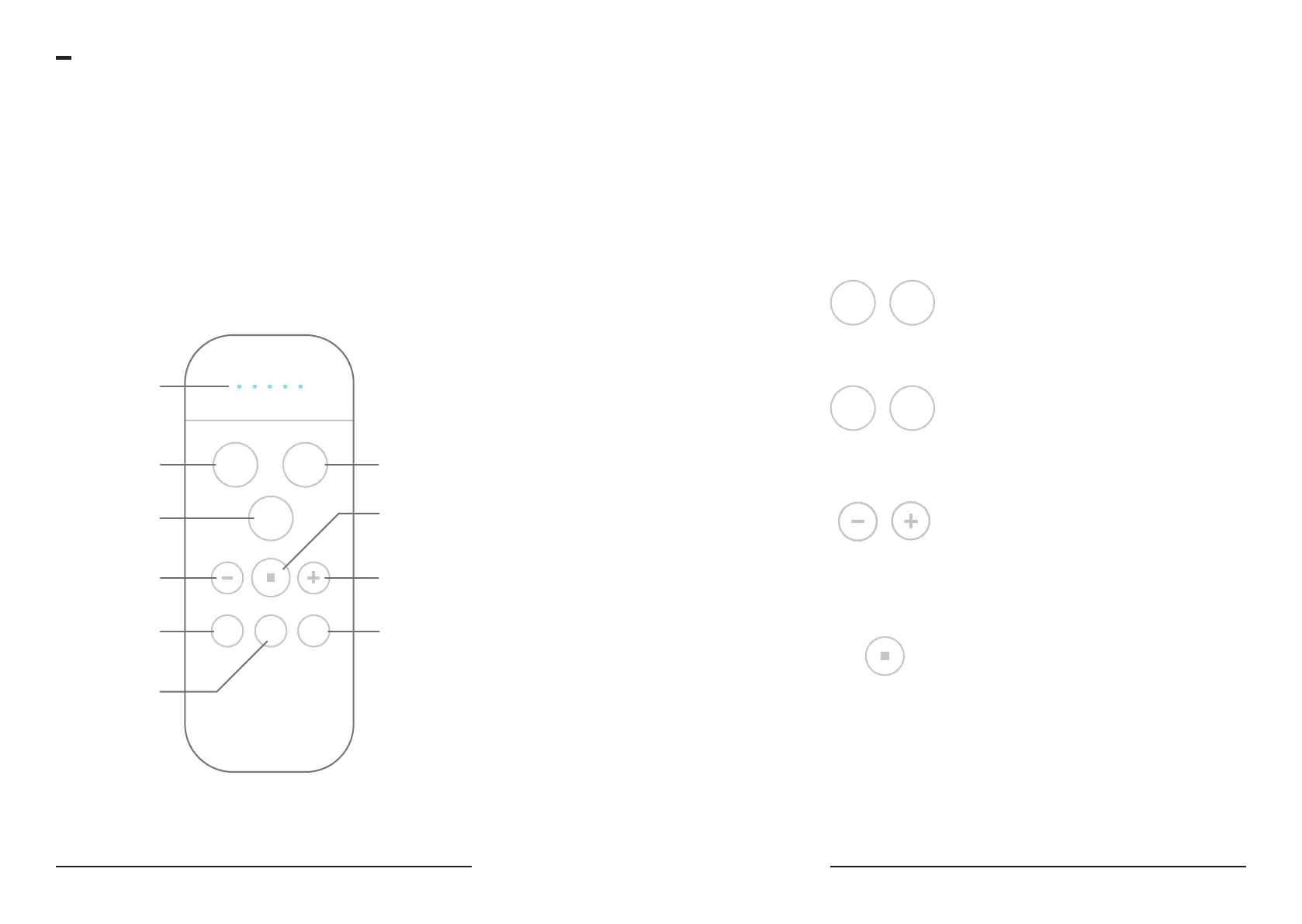
Remote Functions:
SINGLE TAP FUNCTIONS
Pressure,
Temperature,
+ Nozzle Angle
LED Indicator
Bum Wash
Bum + Front Dry
Front Wash
Stop
Decrease Function
(Angle, Temperature,
Pressure)
Increase Function
(Angle, Temperature,
Pressure)
Nozzle Angle Control
Seat Temperature
Control
Water
Temperature
Control
ANGLE
SEAT
TEMP
BUM FRONT
DRY
WATER
TEMP
To operate your TUSHY Ace with the remote, tap the setting button
you want to change (nozzle angle, pressure, or temperature), then
use the increase or decrease buttons to adjust that setting. Next, press
Bum or Front wash to activate the spray. You can also change these
settings during operation to fine tune your preferences.
Once you have completed your wash, tap the Dry button to activate
the bum dryer. Use the Stop button to stop any function.
Manual Self-Cleaning Function
Press and hold the Seat Temperature and Water
Temperature buttons for 5 seconds to activate
the self-cleaning function. The Ace automatically
cleans the nozzle after every use, but you can do
it manually too if you’re a clean freak!
Special functions/modes
Oscillating Power Wash
Double click on the Bum or Front wash buttons
to activate the power wash setting which will
oscillate the nozzle during wash sequence.
BUM
SEAT
TEMP
FRONT
WATER
TEMP
Soft Reset
Press and hold both the + and - buttons for 5
seconds to reset the TUSHY Ace to factory con-
ditions. Try this if your Ace is acting a little funky.
Mute Function
Want Ace to whisper softly into your rear?
Activate the Mute Function by holding the stop
button for 10 seconds.
After 5 seconds, you’ll notice the lights turning
white—keep holding!
These lights will act as a visual countdown for
5 more seconds. Once they turn completely o,
you’re muted!
10 Seconds


 To Next Page