6. Power ON/OFF and Standby mode
TWIG earbuds are turned on/off automatically depending on whether the case is connected without
any separate operation.
(Power ON when the case is opened / Power OFF when the earbuds are in the case and the case is closed.)
1) Turning on the earbuds
When the case is opened, the earbuds will turn on automatically and connect to a device with a connection
history. If there is no device with a previous connection history nearby, the earbuds will automatically enter
pairing mode.
※Wheninpairingmode,theearbudswillturnoffafter5minutesiftheBluetoothhasnotbeenconnectedto.
2) Turning off the earbuds
Insert the earbuds into the case and close it to turn off the earbuds.
※Youcanturnon/offtheearbudsonlywhenthereisremainingbatterypowerinthecase.
7. Connecting/pairing with other Bluetooth devices
7.1 Connecting to other devices (maintaining the existing connection history)
①DisconnecttheBluetoothconnectionfromthecurrentdevice.
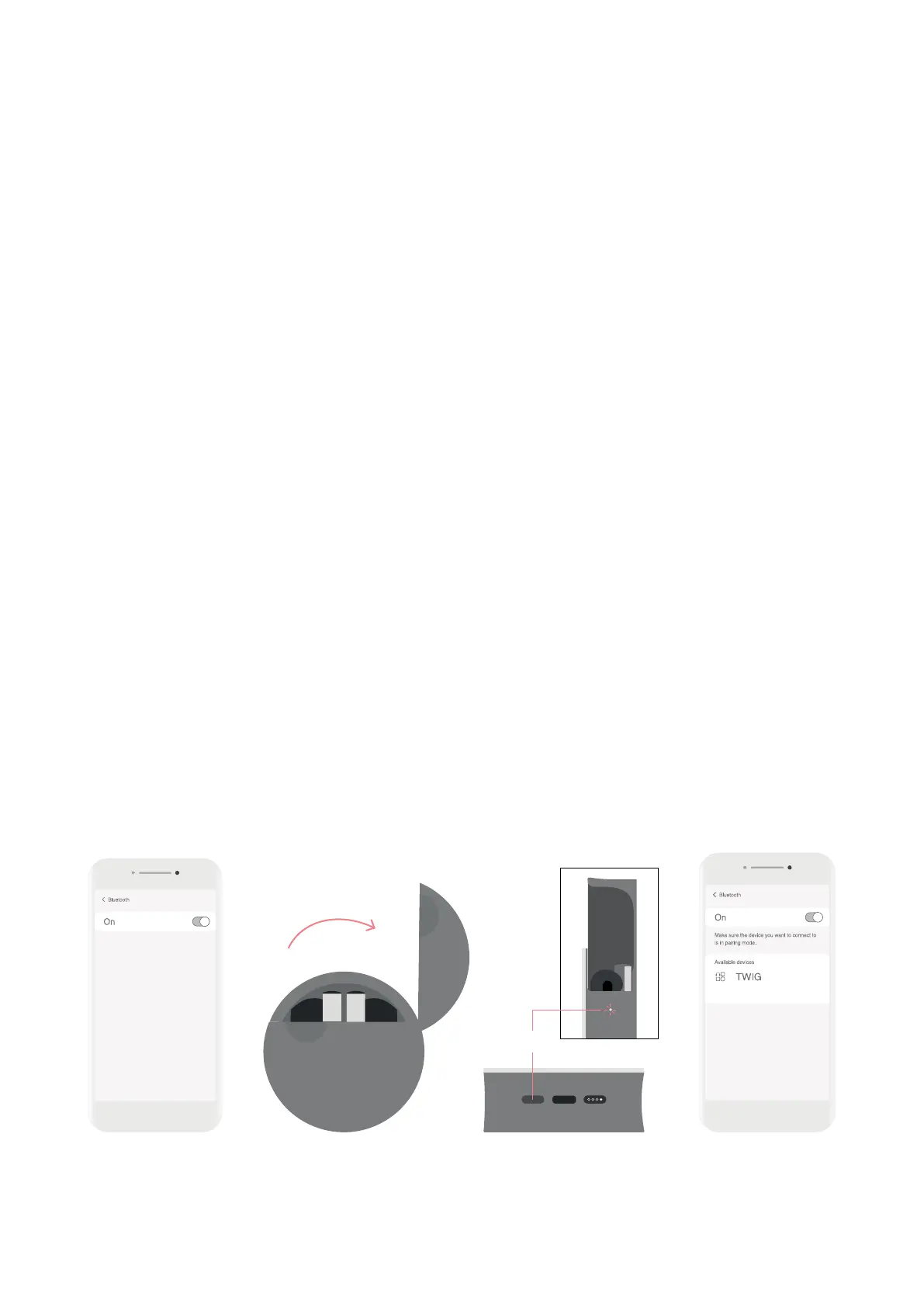
②IntheBluetoothsettingsofthedeviceyouwanttoconnect,searchforthedeviceandselect‘TWIG’.
※Whenthecaseisopen,theearbudswillautomaticallyenterpairingmodeifthereisnodevicenearby
with a connection history.
7.2 Manual Pairing (Delete all pairing history)
①Placebothearbudsinthecaseandwiththecasestillopenpressthebuttononthebottomofthecase
for 8 seconds.
②Thelightswillblink4timesthenwillgointomanualpairingmodeanddeleteallpreviouspairinghistory.
※IfyouusethisForcedPairingMode,youmustreconnectdeviceswithanexistingconnectionhistory.
8 sec.


 To Next Page