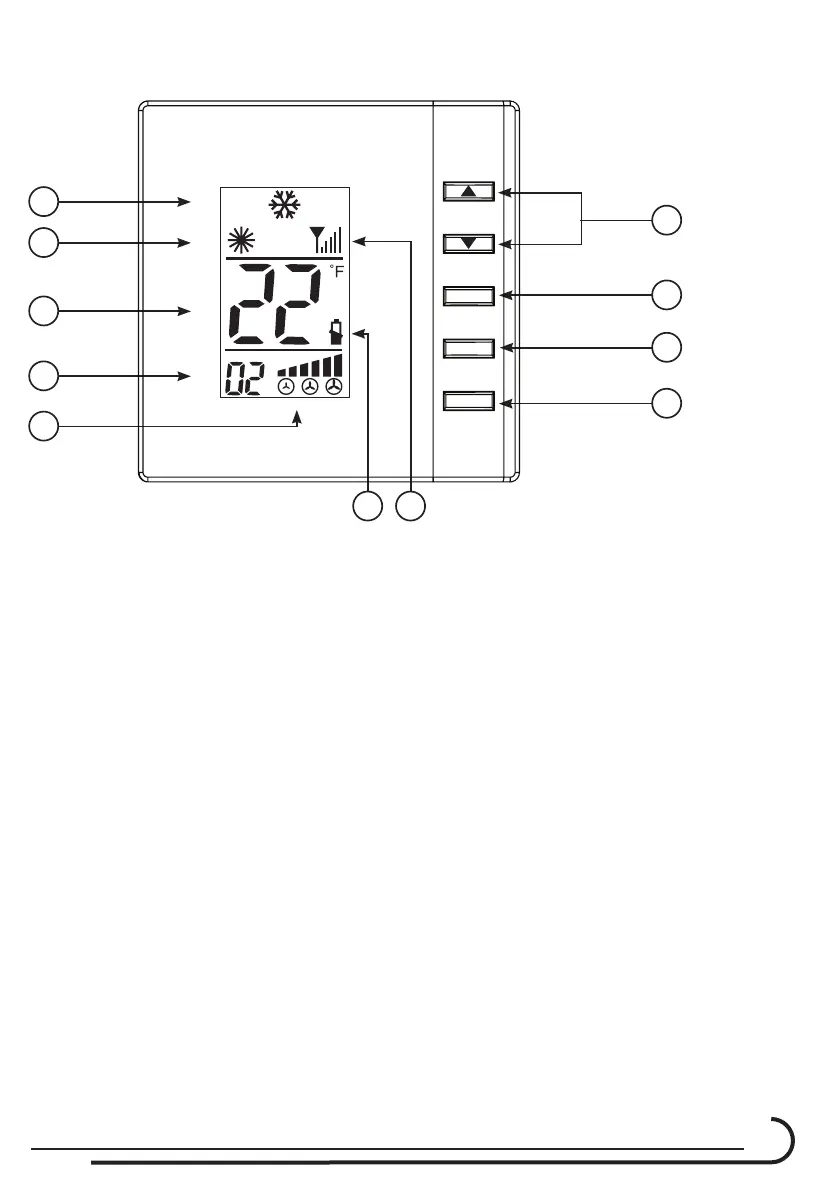
C210 Controller & C680RF thermostats
7
Operation Instruction for the C680RF Thermostat;
1
2
3
4
5
8
9
10 11
6
7
DAMPER
MODE
OFF/ON
AUTO
1. Power ON / Off button.
2. Up and Down Temp. and Address buttons.
3. Damper position and at Master mode close the damper at the Master room.
4. Mode of operation. Cool and Heat.
5. Temperatures and address. I.D Code No.
6. Heat mode of operation icon.
7. Cool mode of operation icons.
8. Room and Address numbers.
9. Damper position and mode Icons.
10. Low Batteries icon.
11. Antenna reception intensity.
Cool mode operation – Set the temperature set point below the room
temperature
Heat mode operation - Set the temperature set point above the room
temperature.



 To Next Page