20
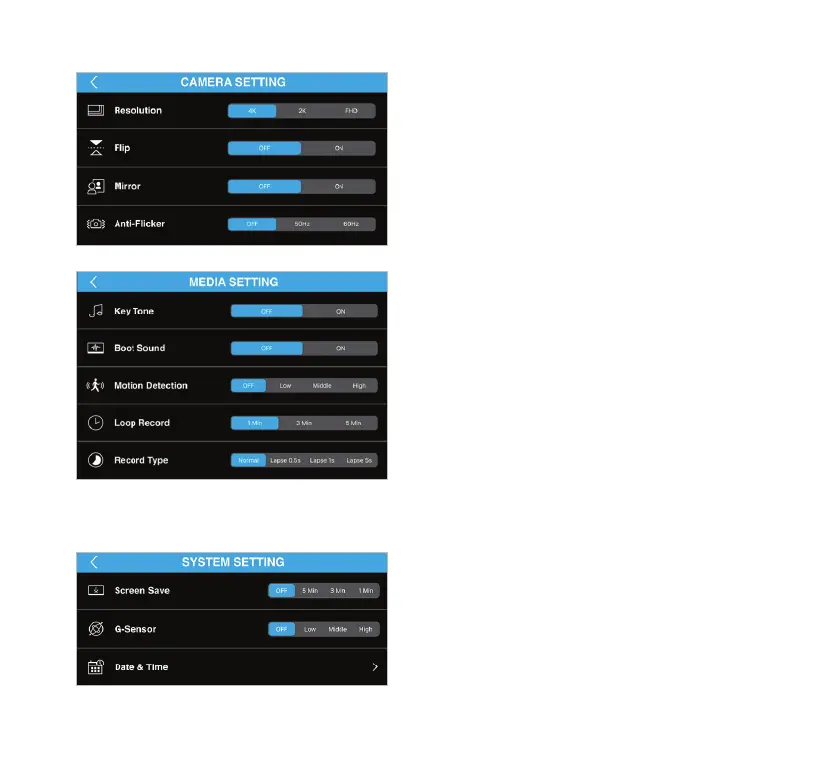
• Resolution - Select the resolution of captured images.
• Flip - Invert the camera image upside down.
• Mirror - Enable this feature when you rotate the
Dash Cam to rear facing.
• Anti-Flicker - Adjust this setting to prevent the
ickering of lights by selecting the frequency
according to your local regulations.
• Key Tone - Turn the Key Tone On/O.
• Boot Sound - The camera will play a sound when it is
turned on and o
. Choose this option to turn On/O the
sound.
• Motion Detection - Select the level of sensitivity of the
motion detection function.
• Loop Record - Select the duration of each
recorded footage
.
• Record Type - Select between normal video
or time-lapse video.
(Note: Refer to page 15 about time-lapse recording.)
• Screen Save - Select the period of inactivity before the
Dash Cam's LCD screen shut down automatically.
• G-Sensor - Select the level of sensitivity of G-Sensor.
• Date & Time - Set up the date and time of the Dash Cam.
Camera Setting (Camera Mode)
Media Setting
System Setting



 To Next Page