59
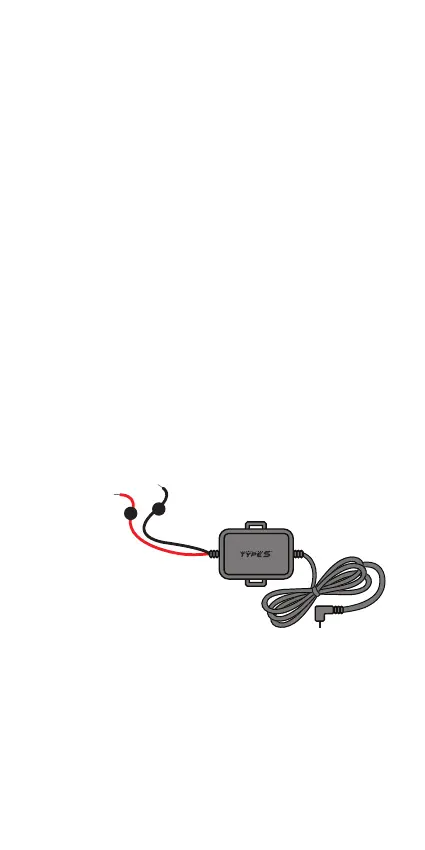
Connect the BLACK cable to negative (-) terminal, and then
Connect the RED cable to positive (+) terminal.
NOTE: Constant power supply means power is supplied
to the TravCa Dash 360 even when the vehicle’s engine is
turned o.
The TravCa Dash 360 has two recording modes: 1) Normal
Mode and 2) Park & Record Mode. The TravCa Dash 360
starts recording in Normal Mode, and switches to Park &
Record Mode when the engine is o. A low voltage power
cut-o function protects your vehicle battery from over-
drain.
In order to enable the Park & Record Mode user must
hardwire the TravCa Dash 360 to the vehicle’s fuse panel
using the hardwire cable provided.
Plug the Cigarette Charger Cable into a 12V DC outlet and
turn on the engine, the TravCa Dash 360 will start recording.
NOTES:
• 12V DC outlet does not provide constant power, the
TravCa Dash 360 will not be able to record in Park &
Record Mode when the vehicle’s engine is turned o.
• The TravCa Dash 360 can be connected to a 5V DC power
source with a Micro USB Cable (not included), e.g. a
power bank like the Type S Startya 8Qi, can be connected
and operated.
5. CONNECT TO POWER
Option 1 - Connect to 12V or 5V DC outlet
Option 2 - Hardwire to a constant power supply
DC 12V only
+
_
Refer to your vehicle owner’s
manual/handbook, identify a
place in your vehicle that has
constant power source and
connect the DC 12V hardwire
cable to it. Hardwiring by qualied
professionals only.



 To Next Page