EasyManua.ls Logo

U-Line H-8041 - User Manual

U-Line H-8041
33 pages
Print Icon
To Next Page IconTo Next Page
Loading...
PAGE 1 OF 31 0124 IH-8041
1-800-295-5510
uline.com
π
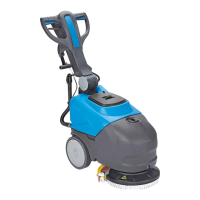
COMPACT AUTO
FLOOR SCRUBBER
H-8041
SAFETY
Para Español, vea páginas 11-21.
Pour le français, consulter les pages 22-31.
WARNING! To minimize the risk of electrocution
or injury:
Disconnect the machine from the main
power socket after use or before performing
maintenance.
Never allow the machine to be used as a toy.
Be extremely vigilant whenever the machine is
operated by or near children.
Only operate the machine as indicated in
these instructions. Only use the accessories
recommended by the manufacturer.
Do not use the machine if the power cable or plug
is damaged. If the machine does not function
as it should or has been dropped, damaged, left
outdoors or has fallen in water, have it checked
and repaired by an authorized service or repair
technician.
Do not move or transport the machine by pulling
on its power cable. Do not use the power cable
as a handle, close doors on it or pull it over sharp
objects or corners. Do not run over the power cable
with the machine. Keep the power cable clear of
hot surfaces.
Do not disconnect the machine by pulling on
the power cable. Grip the plug, not the cable, to
disconnect the machine.
Do not insert objects into the ventilation slots. Do
not operate the machine with blocked ventilation
slots. Remove all dust, dirt, hair and debris that
might be blocking the airflow.
Keep hair, loose garments, fingers and all other
parts of the body clear of slots and moving parts.
Do not use the machine to clean up flammable
or combustible liquids like gasoline, and do not
operate the machine in areas where such liquids
may be present.
The machine must not be used for purposes other
than those for which it was expressly designed.
Respect all safety standards and conditions
applicable to the type of building in which the
machine is to be operated (pharmaceutical
companies, hospitals, chemical companies, etc.).
Do not operate the machine in inadequate lighting,
explosive atmospheres, on public roads or to clean
dirt that is hazardous to health (dust, gas, etc.).
The machine must be kept indoors at all times.
The machine is designed to operate in
temperatures between 39°F and 95°F. It can be
stored in temperatures between 32°F and 122°F
when not in use.
The machine must be used at an altitude below
6,562'.
The machine is designed to operate at relative
humidity levels between 0% and 95%.
The machine must be used exclusively by people
trained in its use and/or who have demonstrated
their ability and have been expressly authorized to
use it.

Other manuals for U-Line H-8041

Questions and Answers

  • G
    Glenn MillerAug 3, 2025
    Why does my U-Line Scrubber leave stripes of wet floor?
    • T
      Theresa HendersonAug 3, 2025
      If your U-Line Scrubber leaves stripes of wet floor, it might be due to dust or debris on the floor catching on the squeegee blades. To resolve this, sweep the floor before using the machine. Another cause may be debris trapped between the squeegee blades; clean out any debris. Lastly, the squeegee blades may be worn and need replacement.
  • J
    John RiveraAug 7, 2025
    What to do if the U-Line Scrubber squeegee does not clean?
    • A
      Amy WalkerAug 7, 2025
      If the squeegee on your U-Line Scrubber isn't cleaning properly or has poor suction, consider these potential causes and solutions: * The edge of the squeegee blades in contact with the floor is worn: Replace the squeegee blades. * The squeegee or hose is blocked or damaged: Unblock and repair the damage. * The float switch has tripped (dirty water drum), is clogged by dirt or broken: Empty the recovery tank or reset the float switch. * The suction hose is blocked: Unblock the hose. * The suction hose is not connected to the squeegee or is damaged: Connect or repair the hose. * Debris is trapped between the squeegee blades: Clean out debris from the squeegee blades.
  • J
    Joseph RamseyAug 12, 2025
    What to do if no detergent is delivered by U-Line Scrubber?
    • K
      kentdanielleAug 12, 2025
      If your U-Line Scrubber isn't dispensing detergent, here's what you can check: * The detergent button LED is off: Press the detergent button. * The detergent tank is empty: Fill the detergent tank. * The brush motor is off: Turn the motor on by pressing the brush button. * The hose delivering the detergent to the brush is blocked: Unblock and open the detergent tank tap. * The detergent tap is dirty or faulty: Have the detergent tap cleaned or replaced. * The in-line filter is dirty (left side from operator's position near the wheel): Clean the filter.
  • D
    Daniel SmithAug 18, 2025
    Why the brush does not rotate on my U-Line Scrubber?
    • S
      Sharon LeeAug 18, 2025
      If the brush on your U-Line Scrubber isn't rotating, it could be due to several reasons: * The brush button LED is off: Press the brush button. * The brush motor thermal cutout has tripped; the motor has overheated: Turn the unit off and let it cool down for at least 45 minutes. * The batteries need to be charged: Charge the batteries. * The brush motor fuse has blown: Replace the brush motor fuse.
  • R
    Rachel ScottAug 22, 2025
    How to fix U-Line Scrubber that leaves stripes of wet floor?
    • S
      Samantha HarrisAug 22, 2025
      If your U-Line Scrubber is leaving stripes of wet floor, consider the following: * Dust or debris on the floor is catching on the squeegee blades: Sweep the floor prior to using the machine. * Debris is trapped between the squeegee blades: Clean out debris from the squeegee blades. * The squeegee blades are worn: Replace the squeegee blades.
  • C
    Carol WeeksAug 28, 2025
    What to do if the suction motor of U-Line Scrubber does not start?
    • R
      rhondaadamsAug 28, 2025
      If the suction motor on your U-Line Scrubber isn't starting, check these items: * The fan button LED is off: Press the fan button. * The vacuum motor fuse is blown: Replace the vacuum motor fuse.

Summary

Safety Warnings

General Safety Precautions

Key warnings to prevent electrocution, injury, and misuse of the auto floor scrubber.

Safety Continued

Additional Safety Guidelines

Further precautions regarding user limitations, detergents, personal items, and battery handling.

General Information

Parts Identification

Lists and illustrates the main components of the auto floor scrubber, including tanks and brushes.

Control Panel Functions

Explains the buttons and indicators on the machine's control panel for operation and status.

Assembly Instructions

Assemble Squeegee

Instructions and figures for attaching the squeegee assembly to the floor scrubber.

Install Fuse

Steps for locating, connecting, and securing the fuse for the machine's electrical system.

Assemble Brush

Guide on how to install the brush by rotating it onto the machine's center hub.

Operation Guide

Fill Tank

Procedure for adding water and detergent to the machine's tanks for operation.

Begin Work

Steps to prepare for and start cleaning operations, including lowering the squeegee.

When Finished Cleaning

Steps to properly shut down and prepare the machine after cleaning is complete.

Maintenance Procedures

Daily Maintenance

Routine cleaning and checks for the recovery tank, brush, squeegee, and filter.

Maintenance Continued

Replace Squeegee Blade

Detailed instructions for removing, reversing, and installing new squeegee blades.

Replace Brush

Steps for removing and installing a new brush on the machine.

Check Motor Fuses

Guide on how to inspect and replace the fuses for the brush and vacuum motors.

Maintenance and Battery Care

Periods of Inactivity

Procedures for storing the machine when not in use for extended periods (over 3 weeks).

Charging the Battery

Information on charging the battery, including initial charge and recharge times.

Optimal Battery Life

Tips and recommendations for maximizing battery lifespan and performance.

Troubleshooting

Machine Not Working

Diagnosing and resolving issues where the machine does not power on or operate.

Brush Rotation Issues

Troubleshooting problems related to the brush not spinning or rotating unevenly.

Uneven Cleaning

Addressing causes for the machine not cleaning the floor evenly.

Reduced Power or Speed

Solutions for the machine operating at lower than expected power or speed.

Detergent Delivery Problems

Resolving issues where no detergent is being delivered to the brush.

Suction Motor Not Starting

Troubleshooting why the suction motor fails to start.

Squeegee Performance Issues

Resolving problems with the squeegee not cleaning or having poor suction.

Troubleshooting Continued

Wet Floor Stripes

Fixing issues causing the machine to leave stripes of wet floor after use.

Battery Work Time

Addressing battery issues where it does not provide nominal work time.

Battery Discharge Rate

Understanding normal battery discharge rates for new batteries.

Error Code Display

Interpreting LED error codes for brush, fan, and battery indicator faults.

Battery Charger Visual Signals

Operating Signals

Understanding the meaning of LED indicators during battery charging.

Troubleshooting Charger Signals

Diagnosing battery charger issues based on LED flashing patterns.

U-Line H-8041 Specifications

General IconGeneral
BrandU-Line
ModelH-8041
CategoryScrubber
LanguageEnglish