◆Make sure that Blue LED is off.
When the LED LAMP is flashing or turned on, press AUTO/MANUAL
MODE and turn off the LED LAMP.
◆Press the START BUTTON once, the machine will feed-in a piece of tape
then cut it out based on your set length.
◆To cut another piece, press START BUTTON again.
◆
Make sure that the LED LAMP is flashing.
When the LED LAMP's lights are off, press AUTO/MANUAL BUTTON
and let the LED LAMP to flash.
◆Press the START BUTTON once, the machine will feed-in a piece of tape
then cut it out based on your set length.
When that piece of tape is removed, the machine will feed-in another
piece then cut it out.
The machine will feed-in and cut a new piece of tape once the piece of
tape is remomved.
AUTO MODE
MANUAL MODE
◆Make sure that DISPLAY indicating <cutting length>.
The cutting length is always indicates in some alphabets like A,b,C,d,E,F.
◆Set the cutting length.
Set your needed length by using +/- BUTTON.
The cutting length is adjustable in between 5 mm to 999 mm.
Can set six different length by using SELECT BUTTON.
If you press +/- BUTTON in a short while, the length in changed to 1 mm.
And if you press +/- BUTTON longer, if shows fast foraward.
Caution
The actual length is differ from the displayed length depends on the type
of the tape and its condition.
When cutting short length of tape, the length may not cut consistently
or tape is jammed.
Try several test cuts to insure proper operation.
If pressing -BUTTON for setting from b to F, you will be able to set ZERO.
However, machine will not start while alarming even though pressing
START BUTTON.
Mode Setting
Set the Tape Length
START
START
CUT and STAND BY
CUT and STAND BY
REMOVE THE TAPE
REMOVE THE TAPE
TAPE FEED
TAPE FEED
FLASHING
LIGHT ON
INDICATE CUTTING LENGTH
SET THE CUTTING LENGTH
INCREASE NUMBER
DECREASE NUMBER
SET AUTO / MANUAL
SELECT
+
-
A~F
AUTO
MANU
LIGHT OFF
BLUE LED LAMP
MANUAL MODE
MANUAL MODE
AUTO MODE
AUTO MODE
設定例:100枚
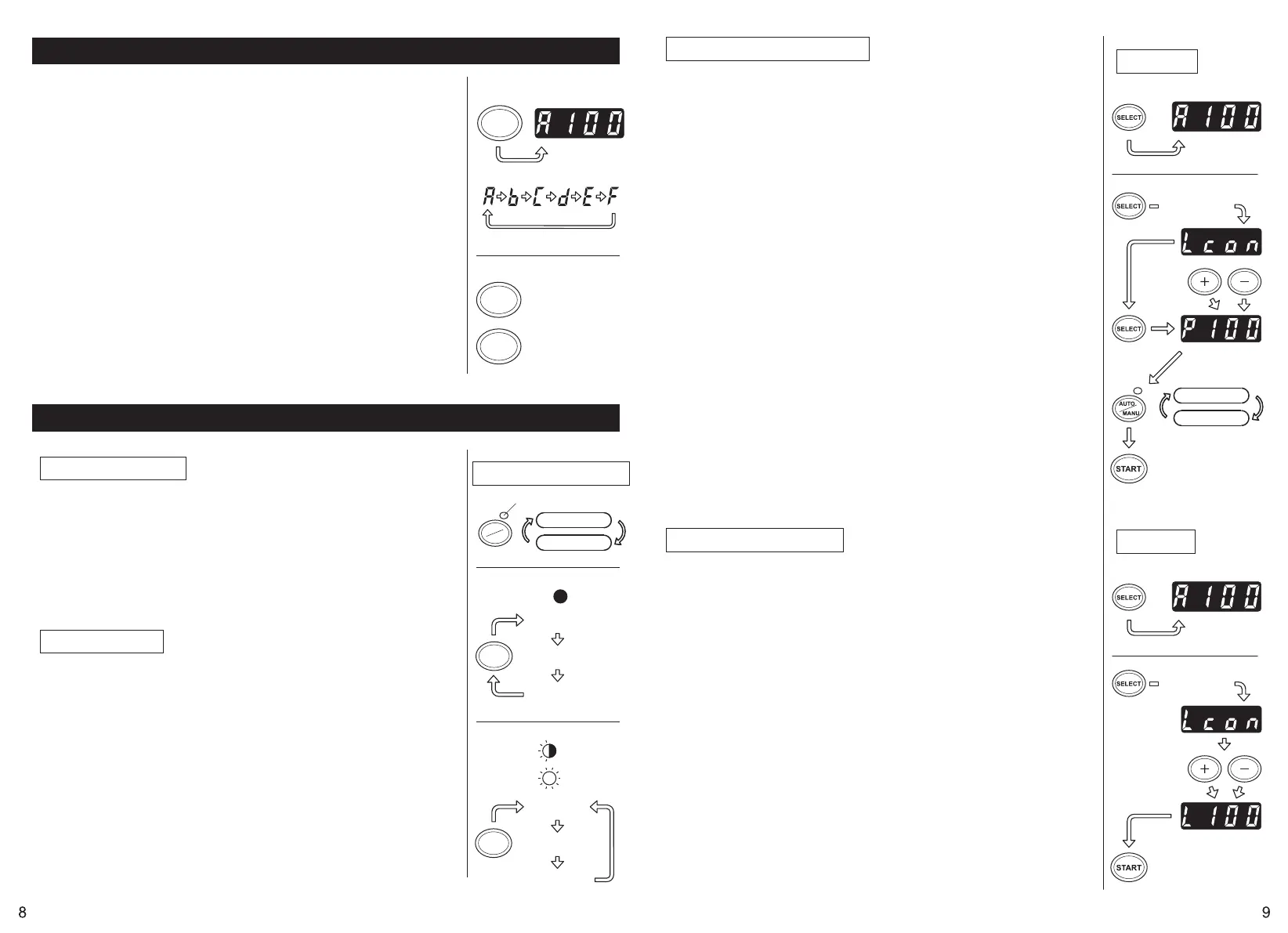
The machine is able to be programmed.
A signal will be shown based on your selected quantity of pieces and it will all
cut out. (Maximum 999 pieces.)
A buzzer will has sound when the program is finished.
You can use the mode either MANUAL or AUTO.
◆Press SELECT BUTTON to choose your needed length.
◆Press SELECT BUTTON for three seconds then it will indicates "Lcon".
◆Press SELECT BUTTON again then it will indicates "P".
◆Use +/- BUTTON and set your needed number of quantity.
◆Choose AUTO or MANUAL by USING AUTO/MANUAL BUTTON.
◆When you press the START BUTTON, the machine will feed-in and cut out
a piece of tape for testing purpose.
To operate the machine by using MANUAL MODE, press the START
BUTTON and feed-in a piece of tape after take it out.
To operate the machine by using AUTO MODE, the machine will feed-in a
piece of tape automatically.
◆The signal shows numbers backwards when feeding-in another piece of tape.
◆When the DISPLAY indicates "0", the buzzer will has a sound.
The DISPLAY indicates the number of pieces that is preset.
Please wait until the buzzer stops.
If you take the tape out before the buzzer stops, the LED LAMP will flash
so you need to press the START SWITCH again.
◆If you try to change the mode (AUTO/MANUAL) when machine is operating,
just press AUTO/MANUAL BUTTON.
◆If remaining P MODE and switching off, the number of cutting set will be
registered.
You can preset the quantity of piece which will be cut out. (Maximum 999 pieces)
The machine will cut out the pieces based on your selected quantities then it
will stop.
◆Press the SELECT BUTTON and decide the length of tape.
◆Press and hold SELECT BUTTON so that DISPLAY will indicates "Lcon".
◆Set the number of pieces to be cut out by using +/- BUTTON.
If you want to set the number of cutting in every 100pcs, please press
AUTO/MANUAL BUTTON while L con description and increase by 100pcs
every time you press. If you want to set the number of cutting in 1-figure or
2 figure, please press +BUTTON or -BUTTON.
◆When you press the START BUTTON, DISPLAY indicates a signal shows
numbers backwards and cutting continuously.
When the DISPLAY indicates "0", the buzzer will has sound then the
machine is stopped.
To stop the mahicne while running under L-MODE, press the START
BUTTON.
Caution
The number of cutting set will remain registered even if switching off while
L MODE. However, it will be eliminated if pressing SELECT BUTTON longer
for setting.
P-MODE (Preset Mode)
L-Mode (Loop Mode)
A~F
L-MODE
P-MODE
PRESS FOR 3SEC.
(exp.100pcs.)
INDICATE CUTTING LENGTH
MANUAL MODE
AUTO MODE
(exp. A-100mm)
A~F
PRESS FOR 3SEC.
(exp.100pcs.)
(exp. A-100mm)
INDICATE CUTTING LENGTH


 To Next Page
 Loading...