FWD
START
REV
SELECT
AUT
MANU
O
7
4
3
5
6
1
1
7
8
2
8
9
10
UPPER CASE
HOLD DOWN ROLLER
RELEASE BUTTON
HOLD DOWN ROLLER
UNIT
P.C.B.(A)
ROLLER UNIT
TAPE GUIDE PLATE
FRONT ROLLER
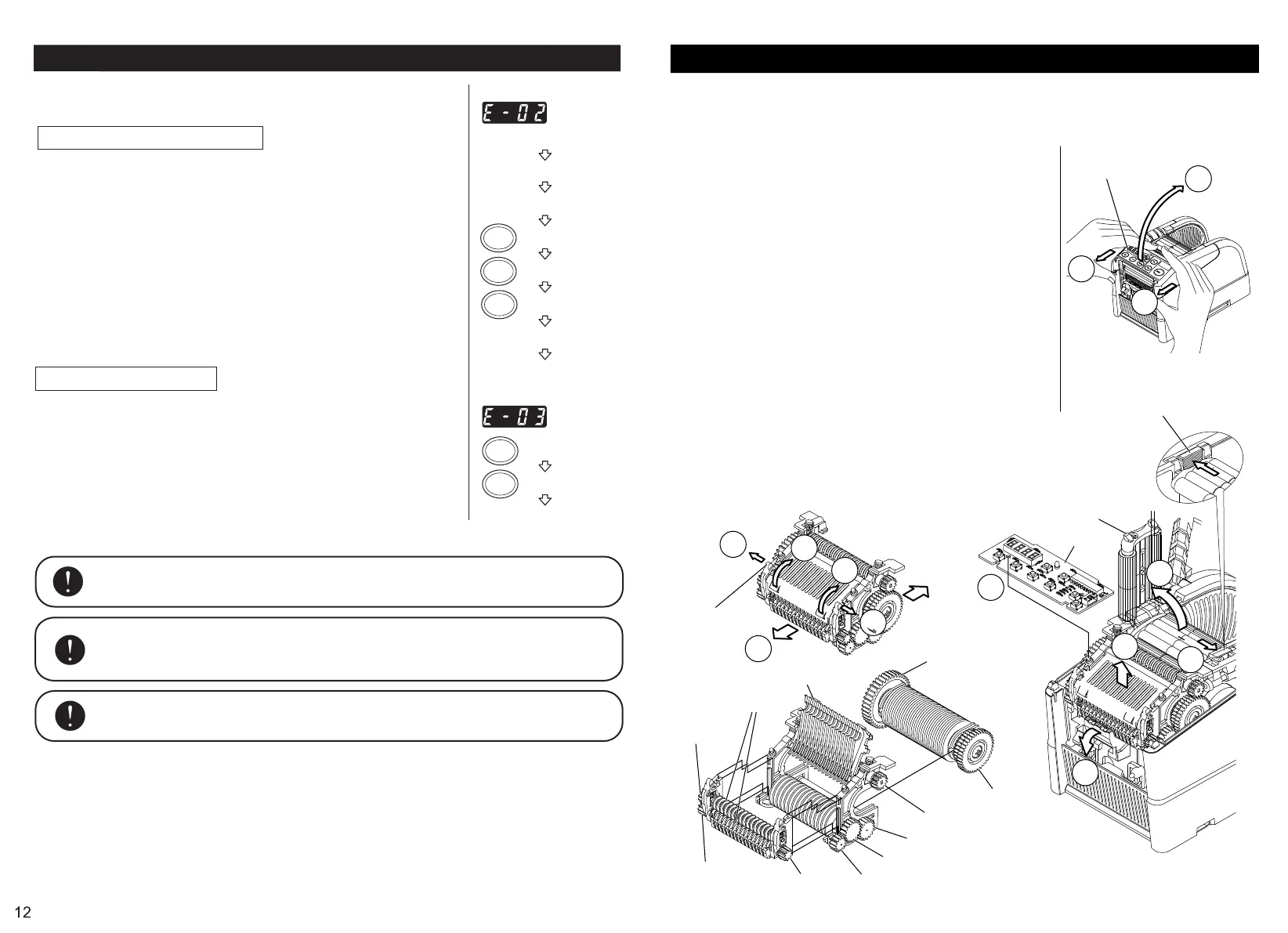
When tape jammed, you can remove ROLLER UNIT wihtout using any tools and make sure
about the status of Roller Unit.
Machine can be stable due to easy cleaning and removal of tape waste.
◆Please switch off and remove power cord from machine.
◆Remove BLADE UNIT.
◆Please take the following procedure.
① Pull UPPER CASE of Front Panel forward -2mm.
② Lift UPPER CASE up while pulling and open it.
③ Remove P.C.B (A) .
④-⑤ Push and release HOLD DOWN ROLLER UNIT.
⑥ Apparently lift ROLLER UNIT up.
◆When removing FRONT ROLLER, please take the following
procedure.
⑦ Pull the PROJECTION on ROLLER UNIT from side to side.
⑧ Lift up and open TAPE GUIDE PLATE.
⑨ Remove FRONT ROLLER.
◆⑩ If pulling SENSOR down forward and follow the instruction as
mentioned above, FRONT ROLLER can be removable without
removing ROLLER UNIT.
◆When assembling, please take the procedure conversely as you do.
Notice
★When removing Roller Unit, please be careful not to lose any of gears
due to dropping.
★When assembling, please assemble the right parts to the right position.
★Please do not put P.C.B. cord between any of parts.
PROJECTION
530 GEAR(40T)
531 GEAR(39T/31T)
514 GEAR(12T)
514 GEAR
(12T)
ROLLER UNIT
FWD
REV
START
START
REV
Error Messages
The buzzer will has a sound then a message will flash and show on the
DISPLAY.
E-02 Blade is Out of Position
A signal shows that the blade is not installed well or machine stops because
of the thickness or hardness of the tape.
◆Turn the POWER SWITCH off.
◆Remove the BLADE UNIT by releasing the BLADE UNIT RELEASING
LEVER then lift the assembly out of the body.
◆Turn the POWER SWITCH on.
◆Press the FWD BUTTON and feed -in the tape once, cut the tape in between
the TAPE OUTLET and the BLADE UNIT by scissor.
◆Press the REV BUTTON to remove the tape.
◆Clean the BLADE UNIT and lubricate the LOWER BLADE GUIDE.
◆Check the lower blade position and replace the BLADE UNIT.
E-03 Motor is Stopped
Indicates that the motor is stopped because of overload.
◆Press the START BUTTON to clear the error message.
◆Press the REV BUTTON to remove the tape.
◆Turn the POWER SWITCH off.
◆Check the BLADE UNIT and TAPE OUTLET carefully.
◆Clear and take away the spare tape waste or sticky residue by using
tweezers.(Clean ROLLER UNIT as depens on the condition.)
Do not touch the Blade when you are correcting an error under POWER SWITCH
is on.
Turn off the POWER SWITCH and stop using the machine.
If the machine cannot work normally after correcting the error.
It seems that nothing wrong without any error messages.
Do not use the tape if static electricity generates over 1000V.
It may cause failure to the machine.
POWER SWITCH IS OFF
REMOVE BLADE UNIT
POWER SWITCH IS ON
CLEAR THE ERROR
CLEAR THE ERROR
REMOVE THE TAPE
CLEAR THE BLADE
FEED THE TAPE
SET THE TAPE
REMOVE THE TAPE
SET THE TAPE
13
513 GEAR(9T)
512 GEAR(13T)
511GEAR(19T)
526 GEAR(17T)
522 GEAR(13T)


 To Next Page
 Loading...