1
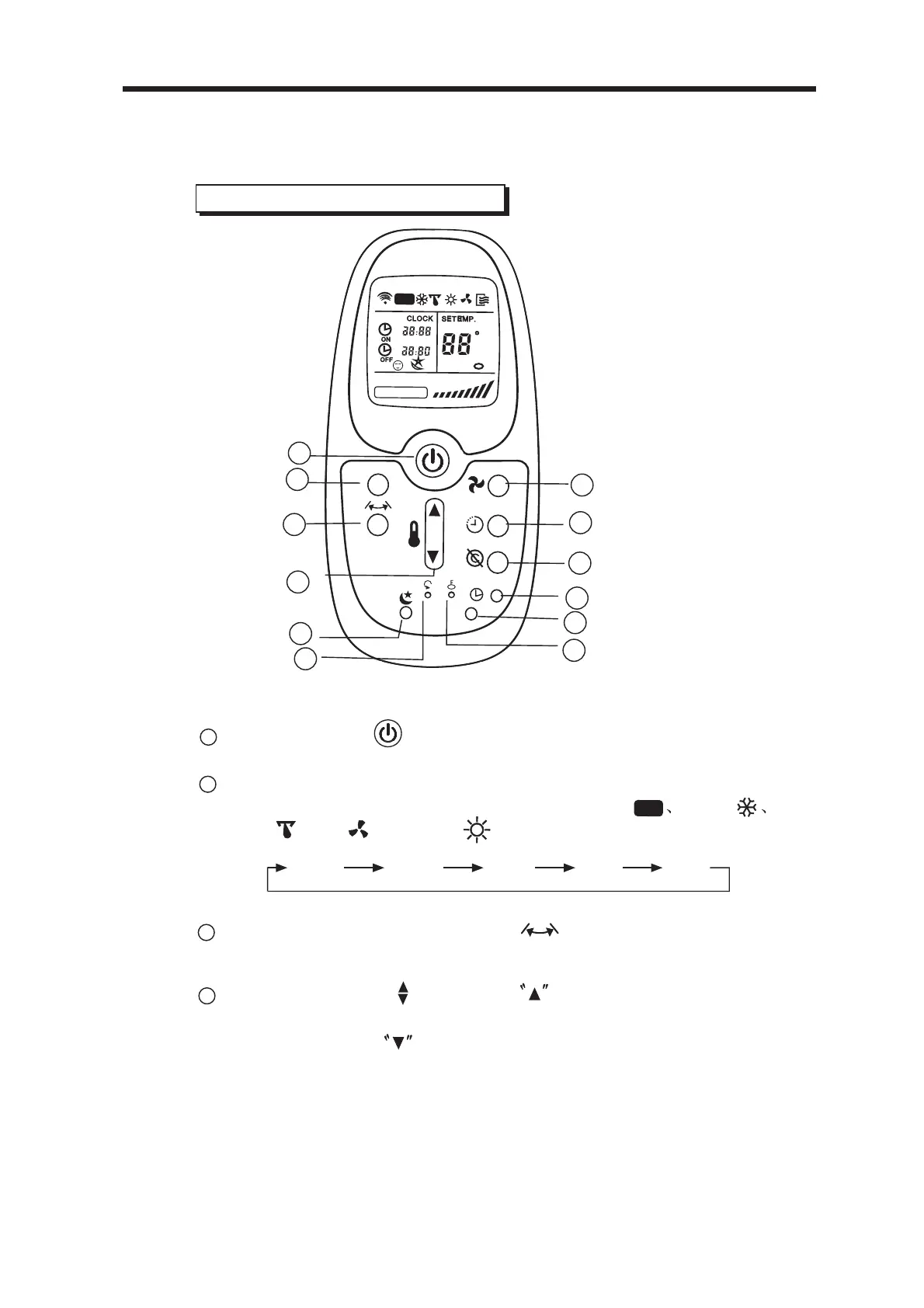
ON/OFF Button : Push this button to start operation, push
the button again to stop operation.
2
MODE Select Button: Each time you push the button, a mode
is selected in a sequence that goes from AUTO COOL
DRY , FAN and HEAT as the following figure indicates:
AUTO
COOL
DRY
FA
HEAT
N
1
2
4
5
3
6
7
8
9
10
11
12
MODE
LED
CLOCK
E
ON
OFF
SET T
EMP.
FAN
SPE
D
AUTO
AUTO
F
4
TEMP/TIME Button : Push the button to increase the
indoor temperature setting or to adjust the TIMER in a clockwise
direction. Push the button to decrease the indoor
3
SWING Button (on some models): Push this button,the
R emote C ontroller Features
louver will swing up and down automatically.Push it again to stop.
5HPRWH&RQWUROOHU)HDWXUHV
17
temperature setting or to adjust the TIMER in a counter
-clockwise direction.



 To Next Page