EasyManua.ls Logo

Ubiquiti USW-Pro-48-POE - User Manual

Ubiquiti USW-Pro-48-POE
15 pages
Print Icon
To Next Page IconTo Next Page
Loading...
System Requirements
Package content
Power cord
Screw Clamps (Qty: 8)
Set Screws (Qty: 4) Cage Nuts (Qty: 4)
Rubber base (qty: 4)
UniFi Switch
Rack mount brackets
(qty: 2)
USW-Pro-48-POE Quick Start Guide
Linux, Mac OS X or Microsoft Windows
7/8/10 Java Runtime Environment 1.6 (1.8 or later is recommended)
Web browser: Google Chrome (other browsers may have limited functionality).
Question and Answer IconNeed help?

Do you have a question about the Ubiquiti USW-Pro-48-POE and is the answer not in the manual?

Summary

Package Content

System Requirements

Hardware Description

Touch Screen

Details the touch screen interface, including startup, fixed white light, steady blue light, and location animation.

RJ45 PoE LEDs

Explains the RJ45 PoE LEDs for ports 1-48, detailing the 'disabled' state for PoE indication.

Speed;Link;Activity LEDs

Describes Speed/Link/Activity LEDs for ports 1-48, covering disabled, amber, and green states.

SFP+ Speed;Link;Activity LEDs

Details SFP+ Speed/Link/Activity LEDs for ports 49-52, covering disabled, green, and white states.

RJ45 Ports (1-40)

Covers RJ45 ports 1-40, specifying 10/100/1000 Ethernet and 802.3af/at PoE output capabilities.

RJ45 Ports (41-48)

Details RJ45 ports 41-48, specifying 10/100/1000 Ethernet and 802.3af/at/bt PoE output.

SFP+ Ports

Explains SFP+ ports 49-52, highlighting hot-swappable nature and 1/10 Gbps connection support.

Reset Button

Describes the dual functions of the reset button: quick press for reset and hold for factory default restore.

DC Input to USP

Details the DC input for redundant power connection with the UniFi SmartPower Redundant Power System.

Power Port

Instructions for connecting the included power cord to the device's power port.

Installation Requirements

Hardware Installation

Power Connection

Ethernet Connection

SFP Connection

Software Installation

UniFi Switch Implementation

Specifications

Sound Level

Measures sound levels at different PoE load percentages and ambient temperatures.

PoE Details

Details PoE standards, wattage per port, and voltage range modes for different PoE types.

Safety Instructions

Electrical Safety Information

Limited Warranty

Compliance

FCC Compliance

Details FCC rules, conditions for operation, and limits for Class A digital devices.

ISED from Canada

Provides Canadian compliance information, specifically CAN ICES-3(A)/NMB-3(A).

Australia and New Zealand

Specifies compliance with Class A of CISPR 32 for Australia and New Zealand.

CE Marking

Indicates that the product complies with all applicable European directives.

Online Resources

Overview

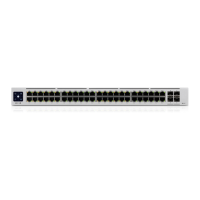
The USW-Pro-48-POE is a UniFi Switch designed for network management and power over Ethernet (PoE) applications. This quick start guide provides comprehensive information on its package contents, hardware description, installation requirements, and software setup, ensuring a smooth deployment and optimal performance.

Function Description

The UniFi Switch serves as a central component in a network, facilitating Ethernet connections and providing Power over Ethernet (PoE) to compatible devices. It supports various Ethernet speeds, including 10/100/1000 Mbps on its RJ45 ports and 1/10 Gbps on its SFP+ ports. The switch is designed to integrate seamlessly with the UniFi Controller software, allowing for centralized management and monitoring of the network. It offers redundant power capabilities when connected to a UniFi SmartPower Redundant Power System (USP-RPS), ensuring continuous operation even in the event of AC power loss or internal power supply failure.

Usage Features

The USW-Pro-48-POE offers a range of features that enhance its usability and network performance:

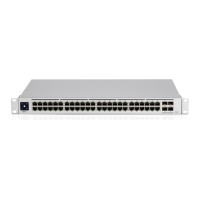
  • Extensive Connectivity: The switch is equipped with 48 RJ45 PoE LEDs (ports 1-48) and 4 SFP+ Speed/Link/Activity LEDs (ports 49-52). The RJ45 ports support 10/100/1000 Ethernet connections and 802.3af/at PoE output, with ports 41-48 also supporting 802.3bt PoE output. The SFP+ ports are hot-swappable and support 1/10 Gbps connections, providing high-speed uplink capabilities.
  • Intuitive Touch Screen: A touch screen on the device provides immediate feedback on the switch's status. It displays startup animations, indicates factory defaults or pending approval, shows a fixed white light for network approval and successful operation, and a steady blue light for normal operation. A location animation is displayed when the "Locate" function is activated in the UniFi controller software, helping users quickly identify the device.
  • LED Indicators: The RJ45 PoE LEDs (ports 1-48) indicate the presence of PoE (when disabled, it means no PoE). The Speed/Link/Activity LEDs for ports 1-48 show the connection status: disabled means not connected, amber indicates a 10/100 Mbps link with blinking for activity, and green signifies a 1000 Mbps link with blinking for activity. Similarly, the SFP+ Speed/Link/Activity LEDs (ports 49-52) indicate connection status: disabled means not connected, green indicates a 1 Gbps link with blinking for activity, and white signifies a 10 Gbps link with blinking for activity.
  • Redundant Power Input: The switch includes a DC input designed to connect to a UniFi SmartPower Redundant Power System (USP-RPS). This feature provides redundant power, ensuring that the switch remains operational even if the primary AC power source fails or an internal power supply issue occurs. The LED lights blue when there is an active power connection on the USP DC input.
  • Easy Management with UniFi Controller: The switch is managed through the UniFi Controller software, which provides a centralized interface for configuring and monitoring the network. Users can adopt the switch into their network from the Devices screen in the UniFi controller panel. The System LED on the UniFi Switch turns blue to confirm successful deployment, indicating that it is ready for use.
  • Reset Functionality: A dedicated reset button offers two functions: a quick press and release performs a standard reset, while pressing and holding the button for more than five seconds restores the device to its factory default settings.

Maintenance Features

Maintaining the USW-Pro-48-POE involves several considerations to ensure its longevity and reliable operation:

  • Ventilation: Adequate ventilation is crucial to prevent overheating and potential fire hazards. It is recommended to maintain at least 20mm clearance next to the ventilation holes for proper airflow.
  • Environmental Protection: The switch is designed for indoor applications. For outdoor use, Category 5 (or higher) shielded cabling is required for all Ethernet connections, and it must be connected to the AC ground of the power supply. Ubiquiti's Industrial Grade Shielded Ethernet Cable is recommended to protect networks from harmful outdoor environments and electrostatic discharge. Although wiring can be run outside, the UniFi Switch itself must be stored inside a protective case.
  • Power Regulation: It is strongly recommended to use power regulation and an uninterruptible power supply (UPS) to prevent equipment damage due to local AC power stability issues. This helps protect the switch from power surges and fluctuations.
  • Electrical Safety: Adherence to electrical safety information is mandatory. This includes complying with current, frequency, and voltage requirements indicated on the manufacturer's label. The equipment is supplied with a detachable power cord with an integral safety ground wire, which must not be substituted. Only qualified service technicians should perform maintenance or repairs, as the equipment contains no operator-serviceable parts.
  • Firmware Updates: Regular updates to the UniFi Controller software are important for maintaining optimal performance and security. Users should download and install the latest version of the UniFi driver software from the official website and follow the on-screen instructions. If an older version of the UniFi Controller (5.10.x or higher) is already installed, users can proceed directly to the "UniFi Switch Implementation" section for setup.

Ubiquiti USW-Pro-48-POE Specifications

General IconGeneral
Total Ports48
PoE Ports48
PoE Budget600W
Uplink Ports4 x 10G SFP+
Switching Capacity176 Gbps
Forwarding Rate130.94 Mpps
RackmountYes, 1U
Total Non-Blocking Throughput88 Gbps
Supported Voltage Range100-240VAC
PoEYes
PoE+ IEEE 802.3atYes
CertificationsCE, FCC, IC
ManagementUniFi Controller
Weight4.7 kg
Power MethodAC
Power SupplyInternal
Interfaces48 x 1G RJ45, 4 x 10G SFP+
Operating Humidity5 to 95% Noncondensing
Layer3
Dimensions442.4 x 285.4 x 43.7 mm

Related product manuals