OPERATING PHONE MODE
The Uconnect Phone is a voice-activated, hands-free,
in-vehicle communications system with Voice Command
Capability (see Voice Command section).
The Uconnect Phone allows you to dial a phone number
with your mobile phone using simple voice commands.
NOTE: The Uconnect Phone requires a mobile phone
equipped with the Bluetooth Hands-Free Profile.
To check mobile phone compatibility please visit
UconnectPhone.com
.
For Uconnect customer support:
• U.S. residents - visit
UconnectPhone.com
or call
1-877-855-8400
• Canadian residents - visit
UconnectPhone.com
or call
1-800-465-2001 (English) or 1-800-387-9983 (French)
Phone Mode Activation
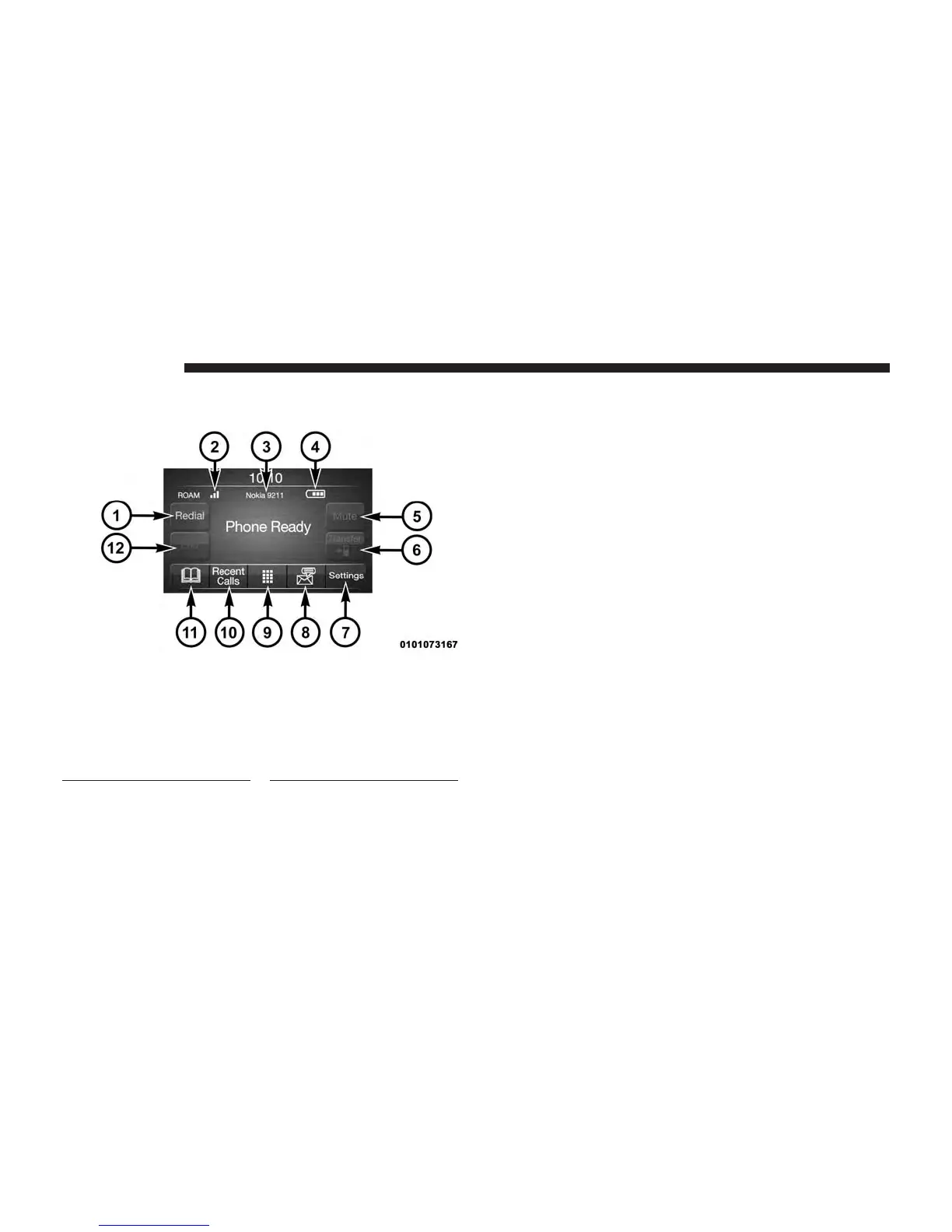
Press the PHONE button on the front panel to activate the
Phone mode.
1 — Call/Redial/Hold
2 — Phone Signal Strength
3 — Paired Phone
4 — Phone Battery Life
5 — Mute Microphone
6 — Transfer To/From
Uconnect System
7 — Uconnect Phone Settings
8 — Text Messaging
9 — Direct Dial Pad
10 — Recent Call Log
11 — Browse Phone Book
(Contains 911)
12 — End Call
24 PHONE MODE



 To Next Page