DSD 700 OPERATING INSTRUCTIONS 11
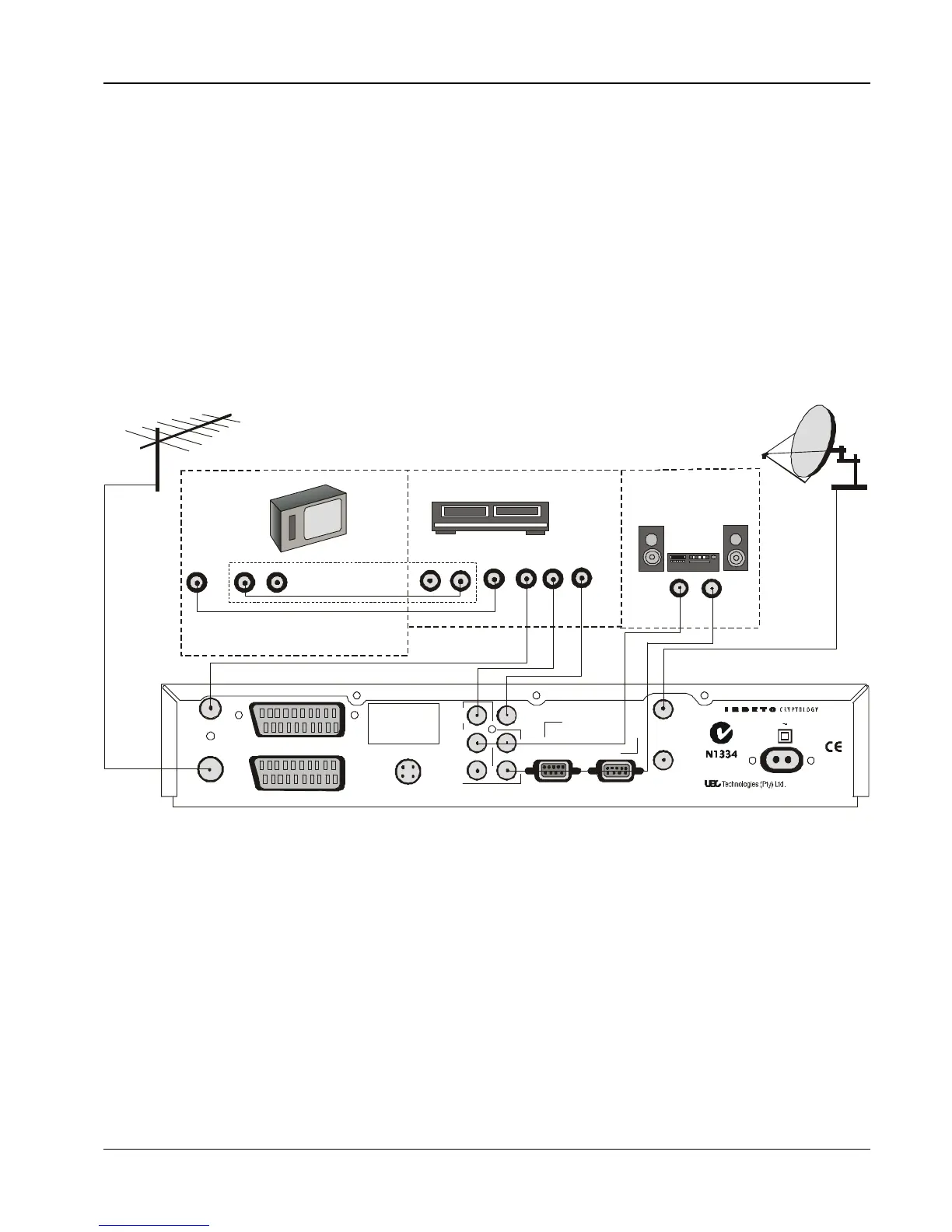
Decoder, VCR, TV, Hi-Fi (using RCA Connectors)
NOTE: It is recommended that you switch off the mains
supply to the decoder before connecting or
disconnecting the LNB connector.
1 Connect the terrestrial antenna to the RF IN socket on the
decoder.
2 Using the supplied flylead , connect the RF OUT on the
decoder to the RF IN on the VCR.
3 Using the flylead supplied with the VCR, connect the RF OUT
on the VCR to the RF IN on the TV.
4 Connect the coaxial cable connector from the LNB on the
satellite dish into the socket marked LNB IN on the decoder.
Tighten the connector finger tight.
5 If the TV and VCR have AV connectors, connect as shown in
the diagram.
6 Connect the VIDEO OUT connector on the decoder to the
VIDEO IN connector on the VCR.
7 Connect the MONO AUDIO socket on the decoder to the
AUDIO IN socket on the VCR.
NOTE: If your VCR has a stereo audio input, connect the
FIXED stereo audio outputs from the decoder to
the VCR stereo audio connector.
8 Switch the power on to the decoder.
RF OUT
RF IN
MONO
AUDIO
VIDEO
OUT
STEREO AUDIO
OUTPUTS
R
L


 To Next Page