12 OPERATING INSTRUCTIONS DSD 700
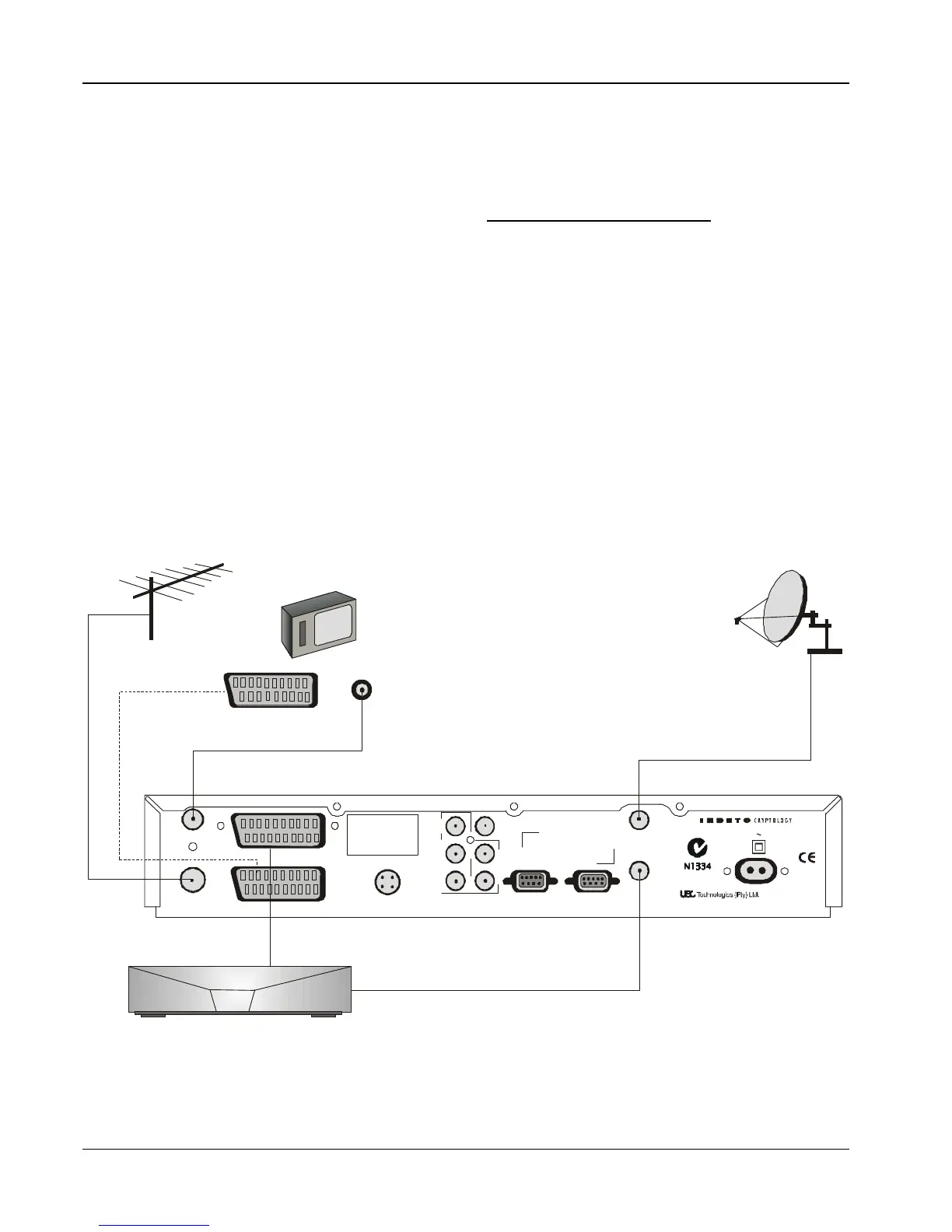
Two Satellite Decoders, TV (using RF Connector)
The TV SCART connector on a second analogue or digital receiver
has audio, video (RGB) and composite video input connections that
can be used to view programmes. If a second receiver is
connected, signals from selected sources are automatically routed
internally in the decoder to the TV SCART connector.
1 Connect the terrestrial antenna connector to the RF IN socket
on the decoder.
NOTE: It is recommended that you switch off the mains
supply to the decoder before connecting or
disconnecting the LNB
2 Using a SCART-to-SCART cable (not supplied), connect the
TV SCART socket on the decoder to the SCART socket on the
TV.
3 If the TV does not have a SCART connector, use the supplied
flylead to connect the RF OUT socket of the decoder to the
RF IN socket on the TV.
4 Connect the coaxial cable connector from the LNB on the
satellite dish into the socket marked LNB IN on the decoder.
The connector on the coaxial cable should be turned until it
is finger tight
5 On the first decoder, connect a second cable with F-type
connectors (not supplied), from the LNB OUT connector to
LNB IN connector on the second decoder.
6 Connect a second SCART to SCART connector between the
VCR SCART connector on the decoder and the TV
SCART on the second decoder.
RCU UHF Button Selection Functions
Pressing UHF on the RCU with the second decoder connected and
operating, selects the TV viewing source in the sequence VCR, TV
and IRD. If VCR is selected, the satellite picture is routed to the TV
and VCR from the second decoder.
If a second satellite decoder is being used, consult the installer as to
the menu setup requirements.
RF OUT
RF IN
MONO
AUDIO
VIDEO
OUT
STEREO AUDIO
OUTPUTS
R
L


 To Next Page