(3)
Pen nib
(4)
Pen stand (Top)
(5)
Replacement pen nibs
(6)
Pen clip
(7)
Pen stand (Bottom)
NOTE:
a.
Barrel button functions can be customized in the pen tablet's driver settings.
b.
Stylus does not use a battery or require charging.
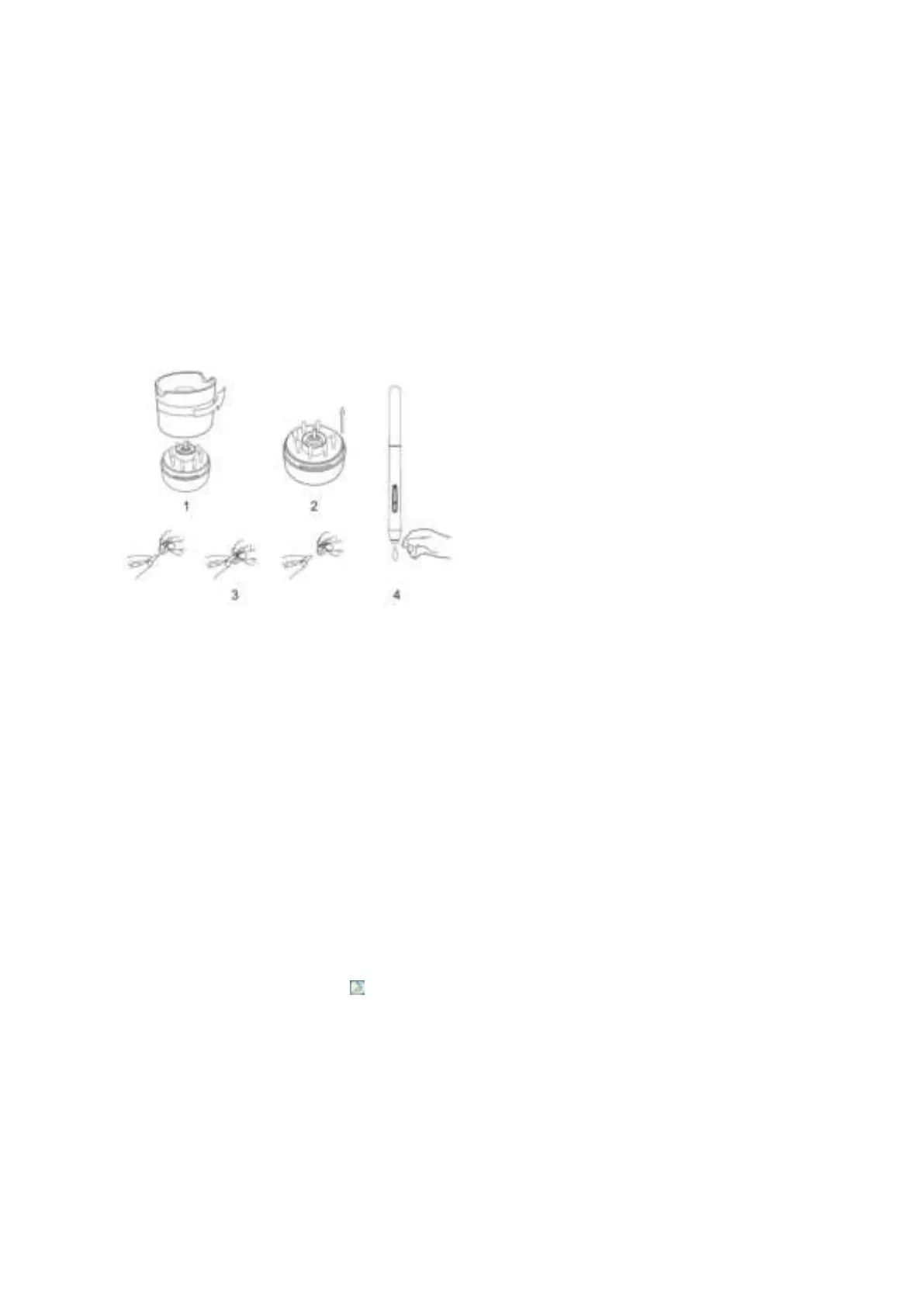
Pen nib replacement
(1). Hold the upper half of the pen stand and twist counterclockwise to remove it.
(2). Remove the pen clip located in the center of the lower pen stand.
(3). Use the pen clip to grip the pen nib and pull it out of the stylus.
(4). Push the new pen nib into the stylus.
Image 2-2: Replacing the pen nib
{Ill. Driver Installation}
Supported operating systems:
Windows 10, 8, or 7
Mac OS X 10.10 or above
Chrome OS 88 or above
NOTE:
(1). Disable any antivirus or firewall software and close any non-essential background software before beginning the installation. Some software,
such as OneDrive and Dropbox, may monopolize important files and prevent a successful installation. On a Windows operated computer,
check the system tray on the bottom-right of the screen and close any software unrelated to your computer hardware.
(2).
Uninstall any existing pen tablet software before attempting to install the
M708 driver. Other pen tablet drivers will conflict with the
M708 driver or
prevent installation entirely.
(3).Please download the latest driver version from the UGEE website(www.ugee.net) and be sure to extract the"zip"file contents
before running
".exe" or ".pkg" or ".dmg".
Windows
(1). Connect the M708 to your computer with the included USB cable.
(2). Download the M708's latest driver from the support section of our website,
www.ugee.net
(3). Extract the ".zip" file contents before running ".exe".
(4). After a successful installation, the driver's icon ( ) will appear in your system tray and on your desktop
. If the icon is not present, uninstall the
driver, reboot, and repeat step 2
.
Mac
(1).
Connect the M708 to your computer with the included USB cable.
(2).
Download the M708's latest driver from the support section of our website,
www.ugee.net
(3).
Extract the ".zip" file contents before running
"
.dmg
"
or
"
.pkg
"
.


 To Next Page