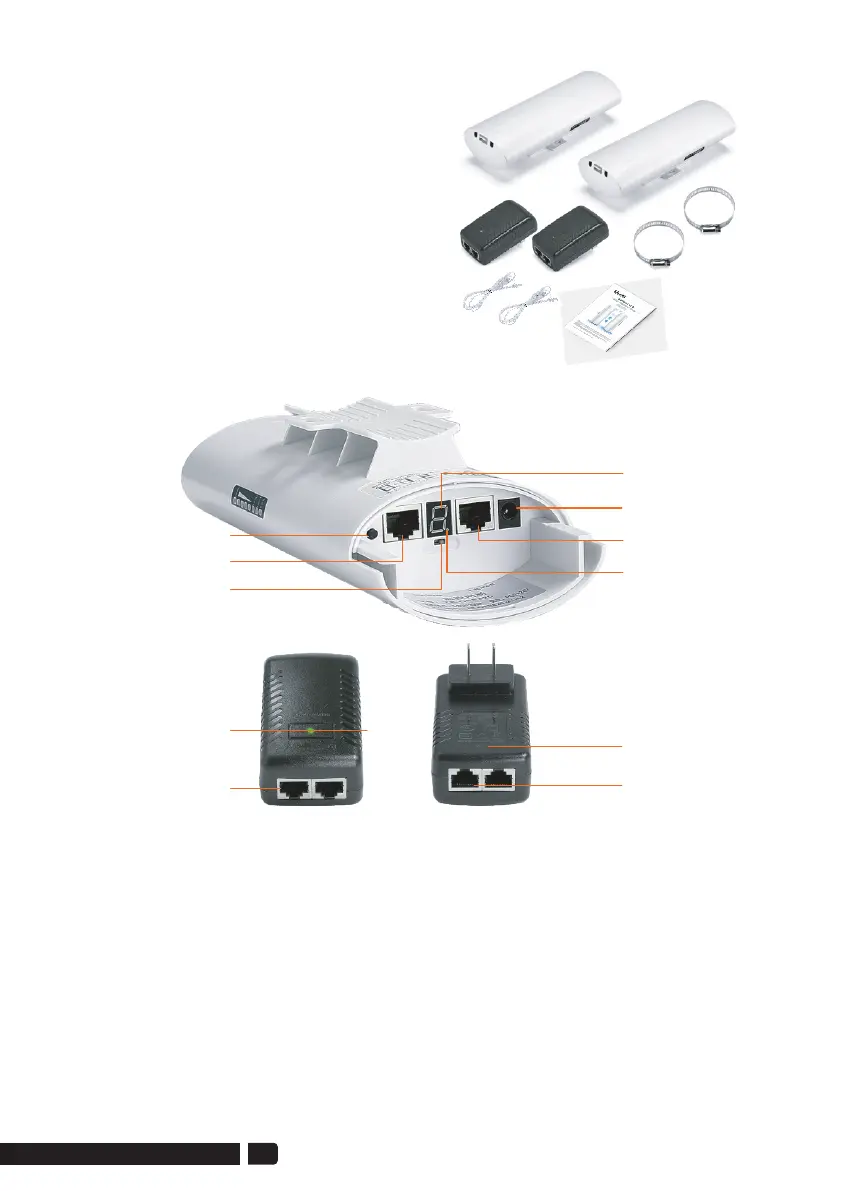
2 * CPE966 Gigabit Bridge
2 * Gigabit POE Adapter (24V)
2 * Cat 5e Network Cable
2 * Metal Hoop
1 * User Manual
4.Package Included
Reset Button:
Press and hold for 10S to reset the wireless bridge; in setup mode, short press
once to toggle a different character to pairing.
5.1. Button Operation
A-B Button:
Pushing the button to "A" indicates that the bridge acts as the master bridge
(transmitter), and pushing the button to "B" indicates that the bridge acts as
the slave bridge (receiver).
5.Interface Details
Reset Button
100Mbps LAN
A-B Button
Digital Tube
DC(Unavailable)
1000Mbps
B-LED
Gigabit PoE Adapter
LED
PoE Port
1000Mbps LAN Port
03
support01@ulnastore.com


 To Next Page