Page 44 Ulthera, Inc
7.2.1. The DeepSEE Screen
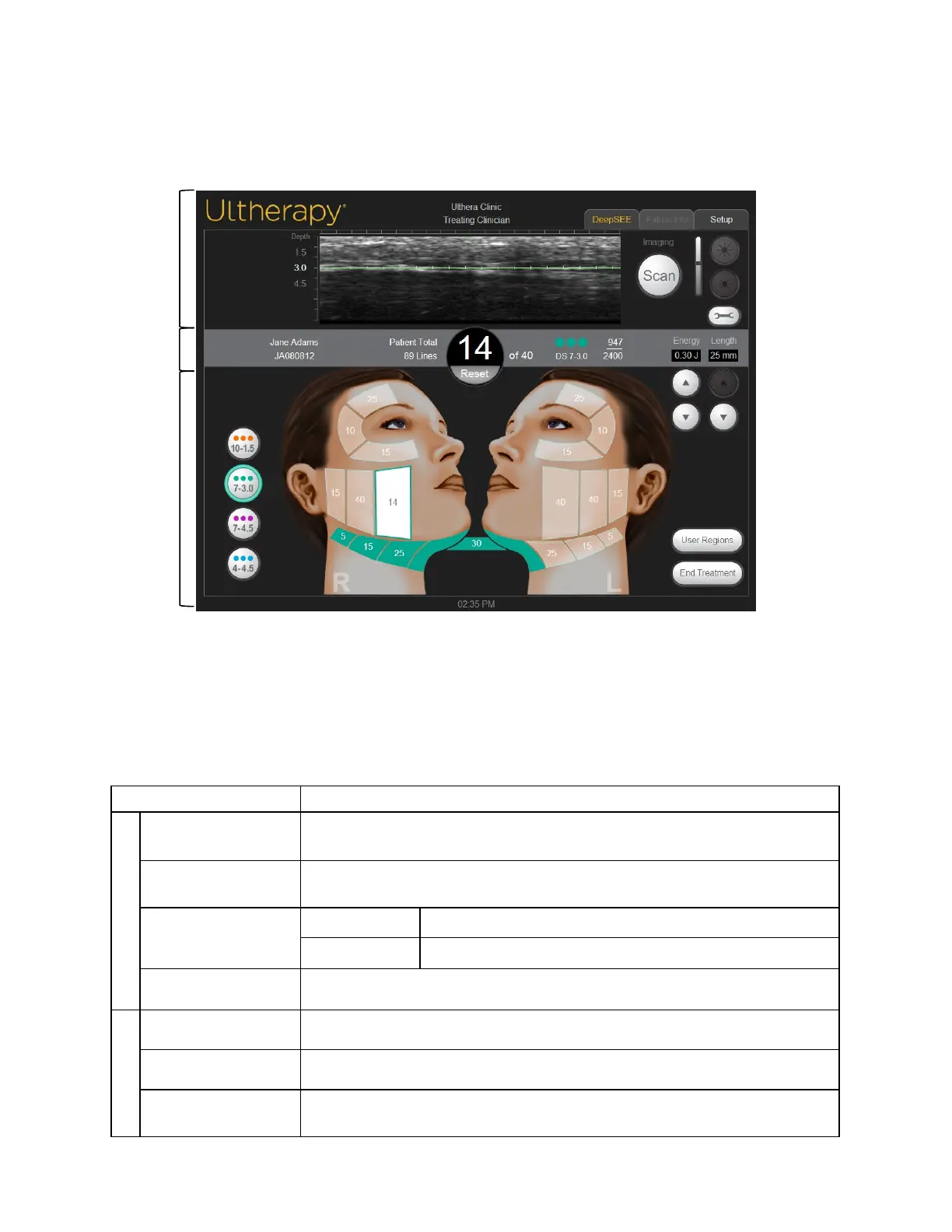
Figure 7.2 shows an example of the user interface when the DeepSEE tab is
active. Each element is described in Table 7.1.
Figure 7.2 DeepSEE Screen
① Imaging Controls
② Home Bar
③ Treatment Controls
Table 7.1 Elements on DeepSEE Screen
Ultrasound Image
Shows an ultrasound image of the tissues being imaged. The horizontal green line
indicates the depth at which treatment will be delivered.
Scan Button
The circular icon to the right of the depth indicator starts or stops scanning
(imaging).
Brightness Controls
Large Sun icon Increases ultrasound image brightness during scanning.
Small Sun icon Decreases ultrasound image brightness during scanning.
Tools
Displays the Tools menu (see Figure 7.3).
Patient Name and ID Displays the name and ID information.
Total Line Count Number of lines that have been delivered during this treatment session.
Current Line Count
The number of lines deliv ered. This line count value may be reset by tapping the
Reset button immediately below the line count value.
①
②
③



 To Next Page