Need help?
Do you have a question about the Ultimate Ears MEGABOOM 3 and is the answer not in the manual?
A concise guide to initial setup and operation of the speaker.
Lists the items included with the MEGABOOM 3 speaker.
Steps to begin using the MEGABOOM 3 for the first time.
Options for sound equalization and tuning to suit preferences.
Details on the speaker's power source and battery life.
Technical specifications regarding sound output and drivers.
Information on Bluetooth connectivity and mobile range.
Supported devices and audio profiles for playback.
Physical measurements of the MEGABOOM 3 speaker.
Instructions for charging the speaker via USB or charging dock.
How to check the current battery status of the speaker.
How to increase or decrease the speaker's volume.
Guidance on downloading and using the Ultimate Ears app.
Proper cleaning procedures after using the speaker in or around water.
Information on whether the speaker supports making phone calls.
Details on the availability of voice assistant integration.
Clarification on using the auxiliary port for music streaming.
Steps to resolve app recognition issues on iOS 13.
Tips for resolving intermittent audio interruptions.
Troubleshooting steps for Bluetooth connection failures.
Guidance to resolve problems with the speaker not charging.
Steps to troubleshoot problems when pairing devices.
Details on features like One App, Name Customization, and Remote On/Off.
Using the app for playlist selection and EQ adjustments.
Information on PartyUp feature and setting music alarms.
How to update speaker software for new features.
Step-by-step guide to connect and set up the app for speakers.
Information regarding the 2-year limited hardware warranty.
How to contact Ultimate Ears support for assistance.
The ULTIMATE EARS MEGABOOM 3 is a portable wireless speaker designed to deliver a powerful audio experience with a range of convenient features for music lovers on the go. This device is built for durability and ease of use, making it suitable for various environments, including those in or around water.
The MEGABOOM 3 serves as a wireless audio playback device, allowing users to stream music from their smartphones, tablets, and other Bluetooth-enabled devices. It is designed to provide robust sound quality with customizable equalization settings, enabling users to tailor the audio output to their preferences and the specific occasion. The speaker features a "Magic Button" for intuitive control over music playback, including play, pause, and track skipping, without needing to interact directly with the source device.
A key function of the MEGABOOM 3 is its ability to connect with multiple speakers for an enhanced sound experience. Through the PartyUp feature, users can pair up to 150 BOOM and MEGABOOM speakers together, creating a large-scale audio system for parties or expansive listening areas. This multi-speaker connectivity is managed through a dedicated app, which also offers additional functionalities like remote power control and alarms.
The speaker is equipped with a rechargeable lithium-ion battery, providing extended hours of music playback on a single charge. It supports charging via a micro-USB cable and can also be charged using an optional POWER UP charging dock, offering flexibility in how the device is powered. Battery level can be easily checked directly on the speaker.
Getting started with the MEGABOOM 3 is straightforward. To power on the speaker, a short press of the power button is all that's needed. Pairing a phone or other device is equally simple: users press and hold the Bluetooth button to enter pairing mode, then select "MEGABOOM 3" from their device's Bluetooth settings. The speaker is designed to be ready to pair right out of the box for its initial connection.
The "Magic Button" is a central usage feature, offering quick control over music. A short press plays or pauses music, while a double press skips to the next track. This eliminates the need to constantly reach for the connected device, enhancing convenience during use.
Volume adjustment is intuitive, with dedicated "+/-" buttons on the speaker itself. These buttons allow users to easily increase or decrease the audio output, providing direct control over the listening experience.
The ULTIMATE EARS BOOM and MEGABOOM app significantly expands the speaker's usage features. This app allows users to customize the speaker's name, making it easier to identify in device lists. It also provides remote power ON/OFF functionality, enabling users to control their speaker from a distance. The app offers customizable EQ settings, including presets for different occasions and a personalized tuner, giving users fine-grained control over the sound profile. For those who enjoy waking up to music, the app includes an alarm feature. Furthermore, the app facilitates speaker updates, ensuring the device always has the latest features and performance enhancements.
The PartyUp feature, accessible via the app, is a standout usage feature for social gatherings. It allows for the seamless connection of numerous BOOM and MEGABOOM speakers, creating a synchronized audio experience across a wide area. This feature requires all connected speakers to have the latest firmware, which can be updated through the app.
The MEGABOOM 3 supports connecting up to two Bluetooth-enabled source devices simultaneously, allowing for easy switching between different music sources without the need to re-pair. It can also pair with up to eight Bluetooth source devices in total.
The MEGABOOM 3 is designed with durability in mind, particularly for use in various environments, including those involving water. A key maintenance feature related to its water resistance is the recommendation for cleaning after exposure to water. After using the speaker in a swimming pool or the ocean, it is crucial to thoroughly rinse and dry the speaker, its micro-USB port, and the charging ring with fresh water. This is important because while the speaker is waterproof, the chemicals in pool water and salt in ocean water can, over time, damage the waterproof seals if not rinsed off. This simple cleaning step helps preserve the speaker's waterproof integrity and extends its lifespan.
For charging, the speaker utilizes a weather door that protects the micro-USB port. Lifting this door allows access for charging with the USB cable. This design helps keep the port free from debris and moisture when not in use.
The app plays a role in maintaining optimal speaker performance through its update feature. Regular speaker updates, delivered via the app, ensure that the MEGABOOM 3 benefits from the latest software improvements and bug fixes. This proactive maintenance helps address potential issues, such as charging problems or connectivity glitches, and keeps the speaker functioning at its best.
Troubleshooting tips provided in the manual also act as maintenance guidelines. For instance, if music drops out, suggestions include moving the audio source closer, moving away from other wireless signal sources to avoid interference, ensuring sufficient battery power, adjusting volume on both the source and speaker, restarting both devices, and re-pairing. These steps help users diagnose and resolve common performance issues, effectively maintaining the speaker's audio quality and connectivity.
In cases of charging issues, a specific maintenance procedure is outlined: connecting and disconnecting the charger repeatedly until the charge LED pulses continuously, indicating a normal charge cycle. This process, combined with ensuring the speaker's firmware is updated, helps restore the MEGABOOM 3 to a normal charging state.
Overall, the ULTIMATE EARS MEGABOOM 3 is a feature-rich wireless speaker that combines robust audio performance with user-friendly controls and practical maintenance considerations for a versatile and enjoyable listening experience.
 General
| Driver diameter | 50 mm |
|---|---|
| Number of drivers | 2 |
| Number of speakers | 1 |
| Audio output channels | - channels |
| Frequency range | 60 - 20000 Hz |
| RMS rated power | - W |
| Signal-to-Noise Ratio (SNR) | 90 dB |
| Battery type | Built-in battery |
| Battery capacity | 3130 mAh |
| Power source type | Battery |
| Wi-Fi | No |
| Bluetooth | Yes |
| Bluetooth range | 45 m |
| Connectivity technology | Wireless |
| Product type | - |
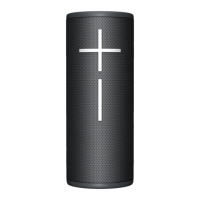
| Product color | Black |
| Product design | Cylinder |
| International Protection (IP) code | IP67 |
| Languages support | English |
| Recommended usage | Tablet / Smartphone |
| Package depth | 141 mm |
| Package width | 138 mm |
| Package height | 242 mm |
| Package weight | 1667.2 g |
| Master (outer) case width | 148 mm |
| Master (outer) case height | 258 mm |
| Master (outer) case length | 280 mm |
| Master (outer) case weight | 3425 g |
 Weight and Dimensions
| Width | 87 mm |
|---|---|
| Height | 255 mm |
| Weight | 912 g |


 To Next Page