TASK SETTINGS
Power on the charger and connect a battery, the charger will enter into the
standby page, then short press the roller wheel to activate the program
setting menu. The items in the menu are as follows:
8
Battery
Cells
Mode
Current
TVC
Battery Type Selection
Select number of battery pack cells
Working mode: Charge / Storage
Select desired charge current : 0.1A-5.0A
Terminal voltage control
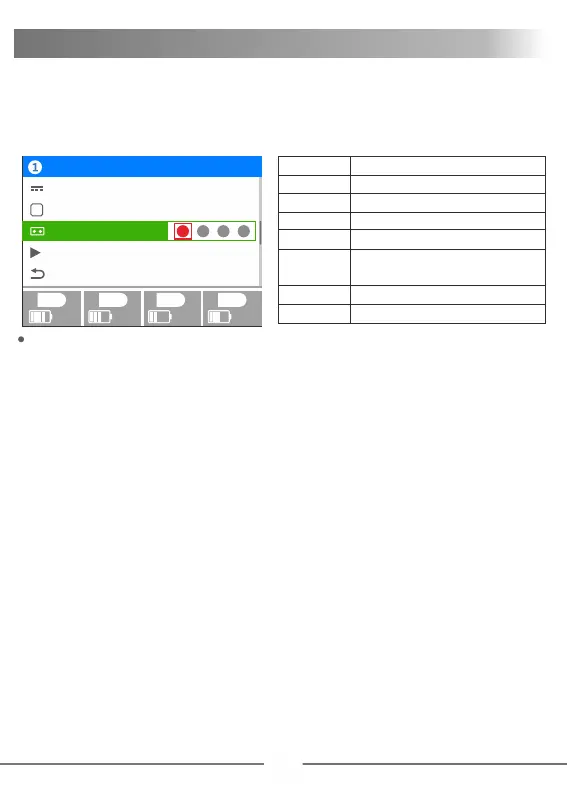
Charging channel: This setting provides convenience for charging
multiple identical batteries. You can select the channel to be started.
Red indicates selected, and gray indicates not selected
For example: When all four channels are the same battery, you can
select 1.2.3.4 are all set to red, the charger will charge all four
channels simultaneously .
Note: If the batteries are not consistent, you need to select the
corresponding channel to set and start it separately, unable to start
simultaneously. Otherwise, charging is abnormal
The default mode of the UP9 is series charging, therefore you must
connect the output wires to the battery pack that you wish to charge.
For lithium packs, it is highly recommended to ALWAYS connect the
balance leads and utilize balance charging. To ensure that the
charger can accurately monitor the voltage of each cell
Program
96% 60% 35% 65%
1
2
3
4
Current
VT
TVC
Start
Back
2.0A
4.20V
Charge channel:
1
2
3
4
Charge
Channels
Start
Back
Start charging/ stored program.
Return to previous screen or function
The same battery, this setting can start
four channels at a time


 To Next Page