Helpline No UK. 0871 2000 463 ROI. 01443 3940
Web Support: www.umc-uk.co.uk
14
TV Menu Operation
Tip: If you do not press any buttons for 30 seconds, the menu will automatically exit. You can change
the length of time before the menu exits automatically - see ‘Menu Duration’ in the Setup Menu
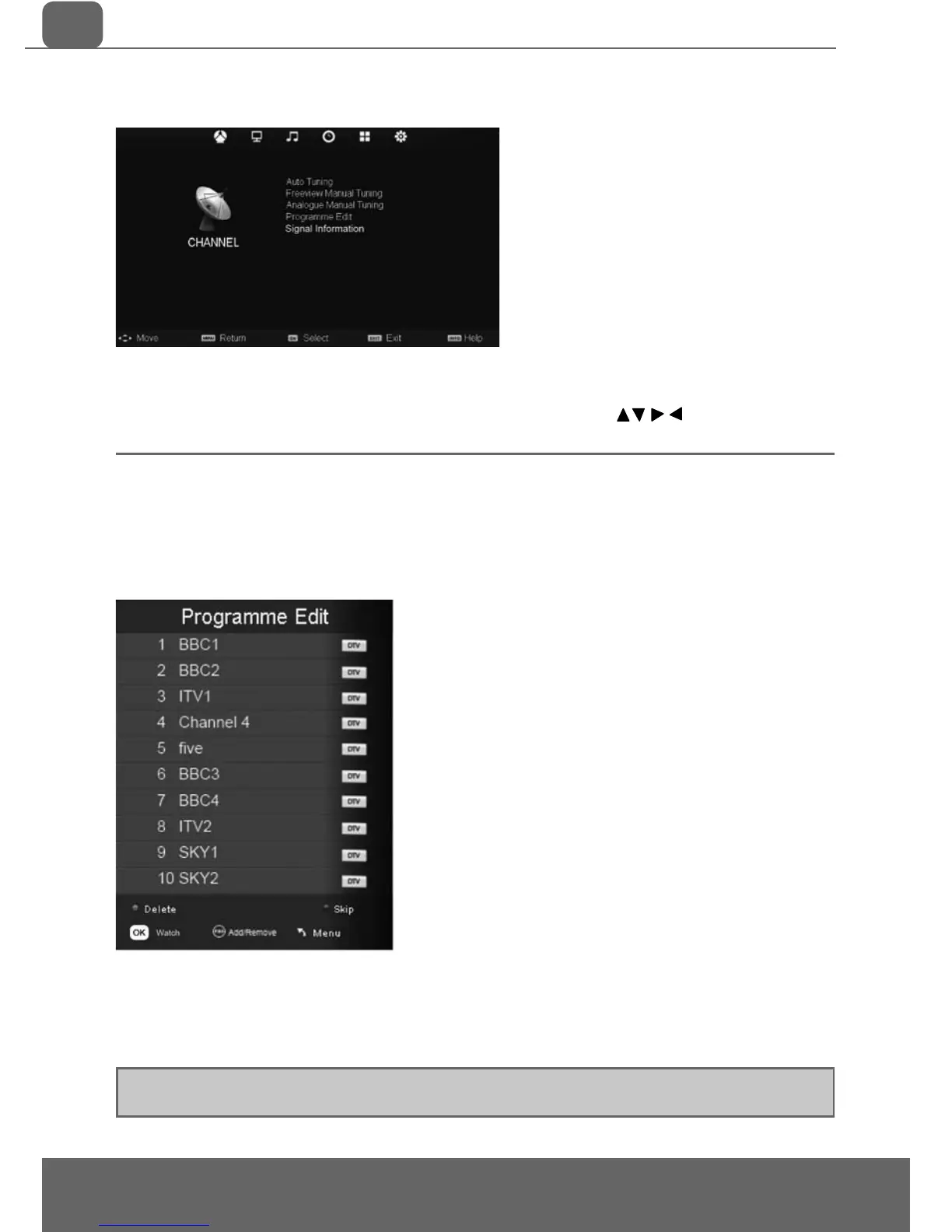
CHANNEL MENU
Auto Tuning - Allows you to retune the television for all digital channels, digital radio stations and
analogue channels
Freeview Manual Tuning- Allows you to manually tune your digital signal
Analogue Manual Tuning - Allows you to manually tune your analogue signal
Programme Edit - Allows you to delete, skip and add favourite channels
Signal Information - Allows you to view signal frequency, signal quality and signal strength
To access this menu, press [MENU] button on the remote control.
To enter a menu press [OK]
If you wish to make changes to any of the default settings, use the scroll
buttons.
To confi rm any settings press [OK] button. To exit this menu at anytime, press [EXIT] button.


 To Next Page