Getting Set-Up
EYE MINI USER MANUAL 17
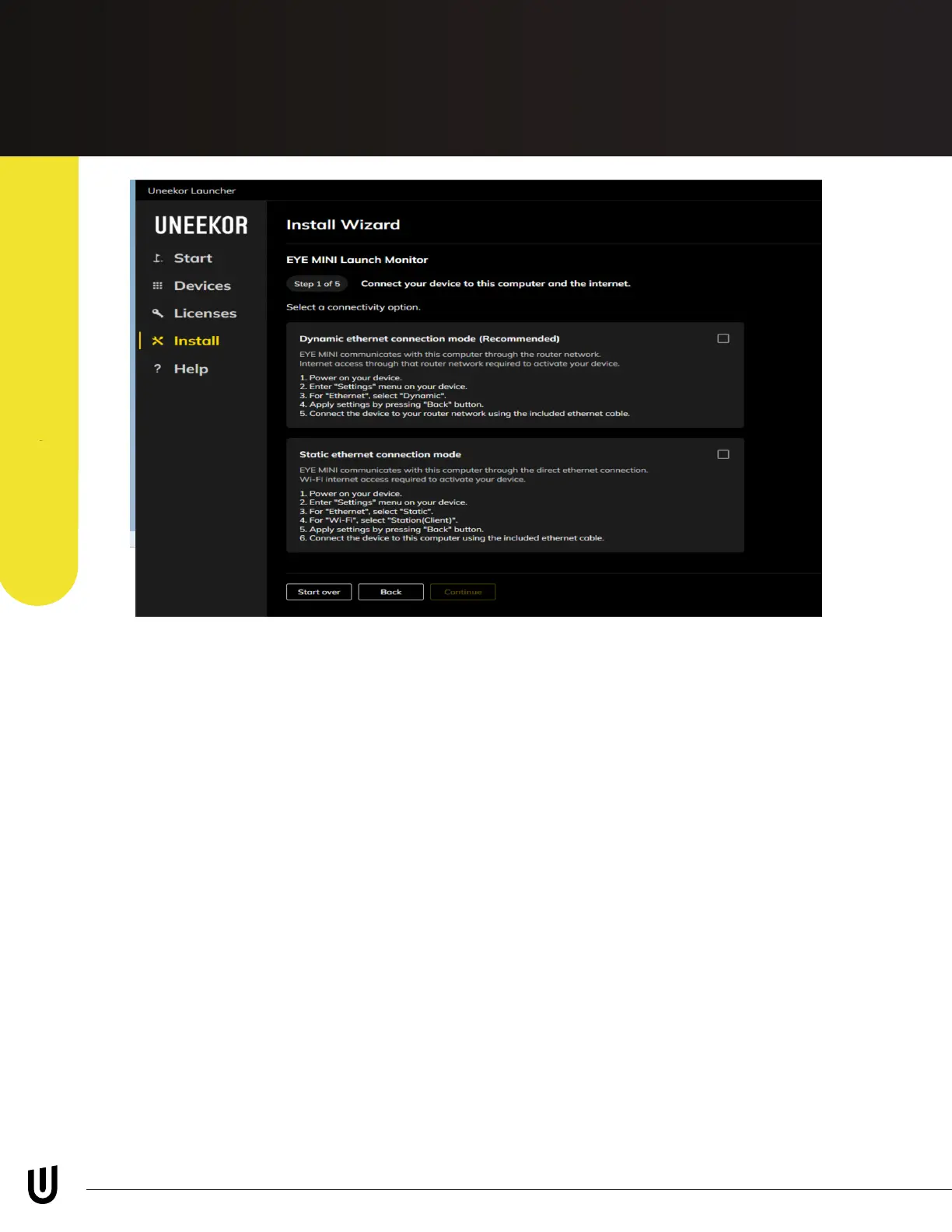
Per the above photo. Step 1 will have you select the connection method you have set up.
Option 1: Dynamic Etherenet Connection Mode (Recommended method for setup)
This option is to be selected when connecting you EYE MINI into your router or network
switch. When connected to the router or network switch, make sure our EYE MINI ethernet
setting is set to “Dynamic.” If not set to “Dynamic,” the Launcher will not be able to nd
and connect to your EYE MINI.
Option 2: Static Ethernet Connection Mode
This option is to be selected when connecting your EYE MINI directly to the PC. Ensure
you have the ethernet setting on the EYE MINI set to “Static” and the WiFi setting set to
“Station (Client).” If not set to the proper Ethernet and WiFi setting, then the launcher will
not be able to nd your EYE MINI.
After selecting your connection mode, please click “Continue” on the bottom.
Step 1
PC Software InstallationPC Software Installation


 To Next Page