QED USER MANUAL 19
Calibrating
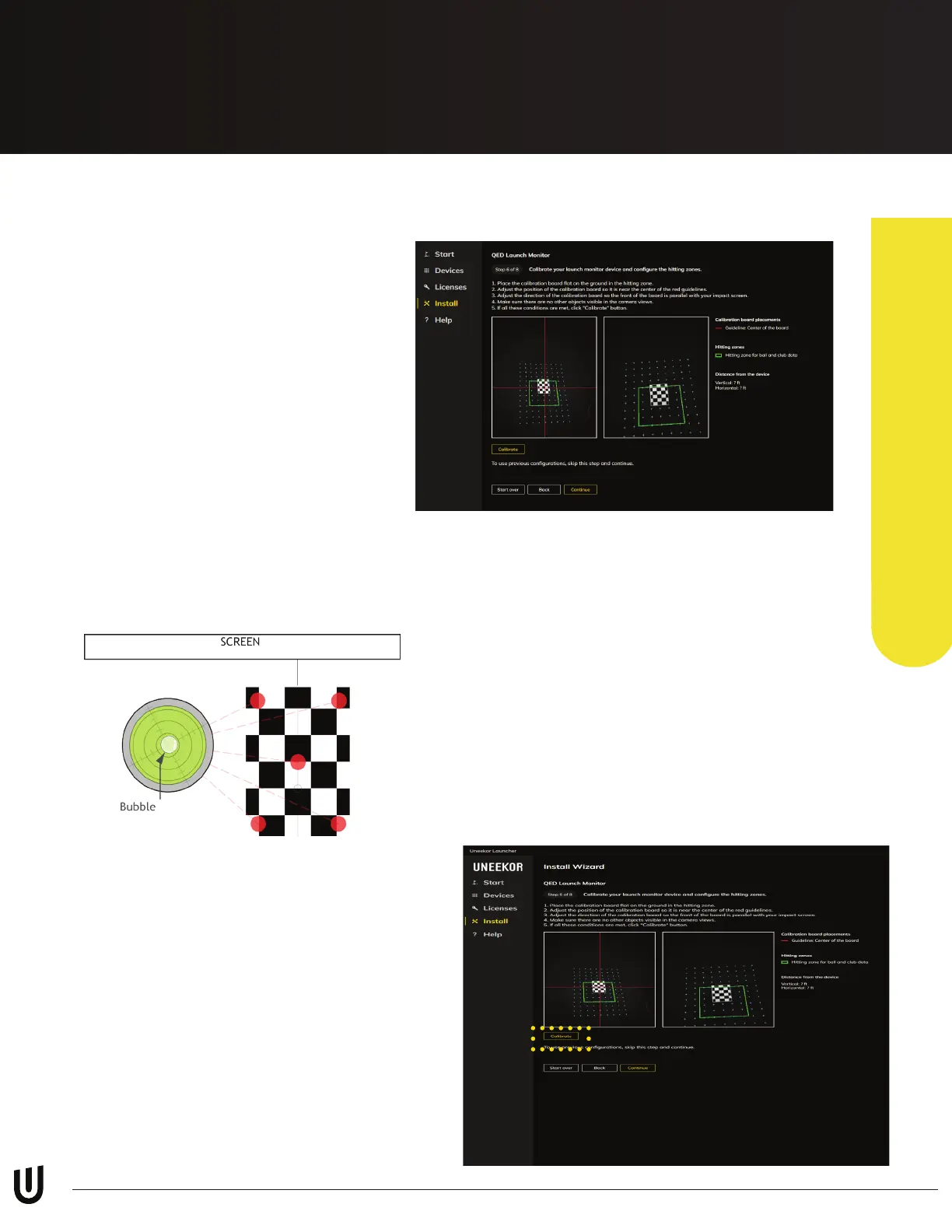
During Step 6 of the installation
process, the calibration tool on the
right will open. Please follow the
prompts on the screen. If you have any
issues than see the remaining steps
below.
Lay the calibration board at and
ensure the calibration board is within
the red squares on all 3 windows.
*Ensure there are no other objects
visible in each camera view when
calibrating your launch monitor.
Step 1
Next, place the bubble leveling tool on the
calibration board to conrm that the hitting
mat is level front to back and side to side.
Step 2
Before pressing “Calibrate” below the rst
camera window, make sure the top of
the calibration board is parallel with the
impact screen and nothing other than the
calibration board is visible in the calibration
tool.
If all the above conditions are met, click
“Calibrate” on the bottom left.
Step 3
Uneekor Launcher


 To Next Page