UT3200 Series User Manual
15
▪ After fix the temperature connection line layout, turn on to start test. Do not move
Instrument as testing, it will affect the value precision
▪ After the test is completed, disconnect the test cable and unplug USB
▪ Arrange the lines then turn off Instrument
4. TEST
▪ Numerical reading
▪ Curve figure
▪ Histogram figure
▪ USB recording function
▪ Print screen
4.1 Numerical reading
Press Test button to enter. If you need to record data, insert the USB into Instrument
interface before data collection. There are three way to display measurement result:
numerical reading, histogram figure and curve figure.
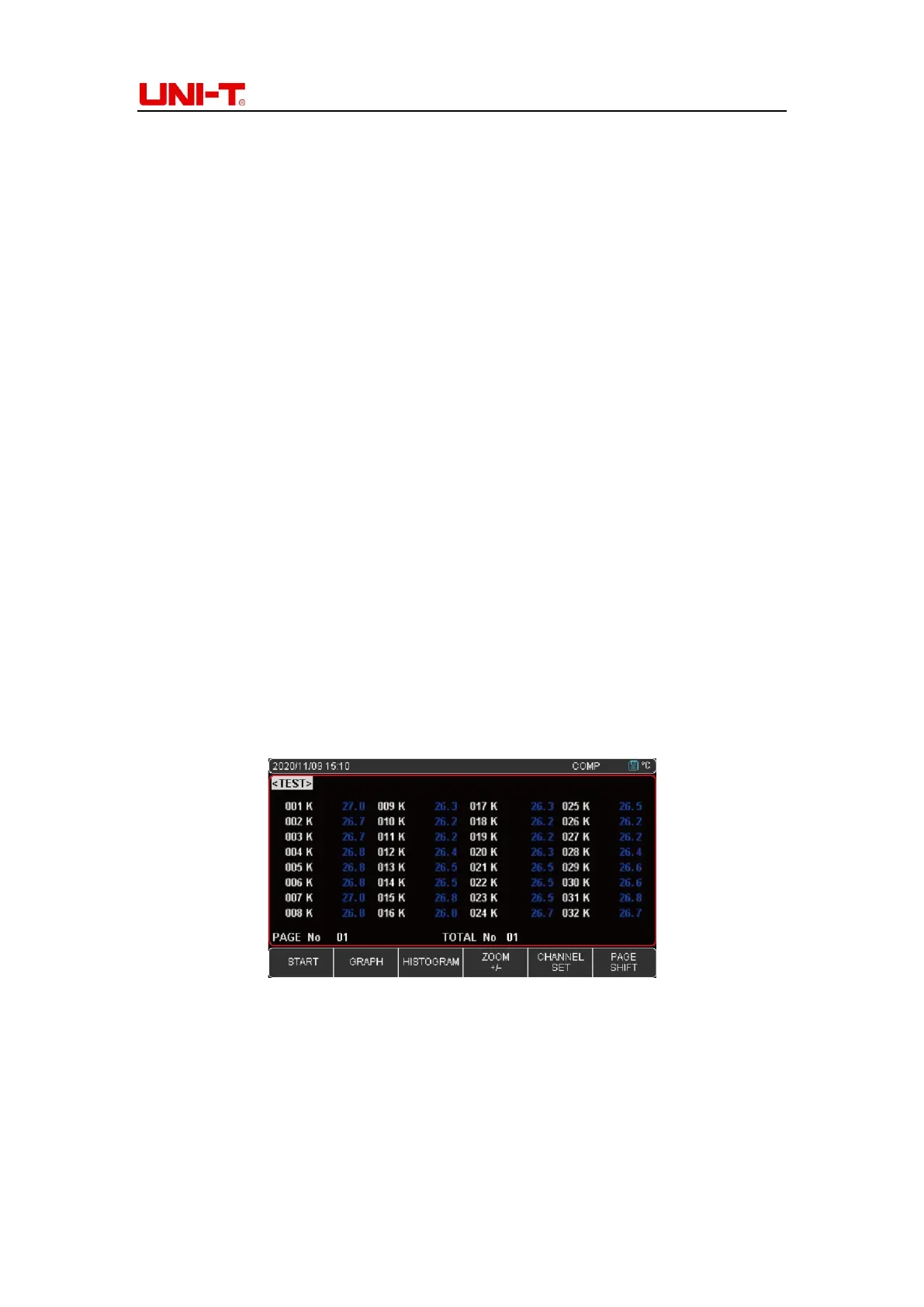
Numerical reading is the best way to read one or more channel values at some point in time.
Press Start button, Instrument will start to collect data. A green flashing cursor at the top of
the screen indicates that the data is being collected, test values will show in blue. Press Stop
button to terminate data collect. Refer to Figure 4-1-1.
Figure 4-1-1
Turn on/off channel
Turn off specific channel, press direction button▼, choose 002 K then press Stop, 002 K
channel value will be close. 002 K display grey color, test value disappear. See Figure 4-1-2
Press Start button, test values will return. After setting, press Test button to return to the
measurement page.



 To Next Page
 Loading...