UT3200 Series User Manual
32
Make sure the controller is connected to the UT3200 series Benchotop Thermometer
and use these settings. RS-232 interface for data transmission
▪ Data bits: 8 bits
▪ Stop bit: 1 bit
▪ Parity check: no
▪ Baud rate: recommend 115200 (refer to 7.1.4 section)
9.2 USB
RS232 interface has been canceled on some newer computers and laptops. You need
to use USB interface to communicate. The Instrument is equipped with USB-232
interface, this function is the same as RS232.
Turn on USB function
There are two options USB/RS232. If you need use USB interface, enter SYSTEM
CONFIG, move the cursor key to COM MODE and then use Function button to choose
USB
Install drive on the computer
The USB interface needs to install a driver to work.
Install drive steps:
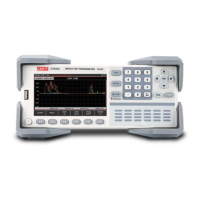
1. Insert USB interface to computer and Instrument
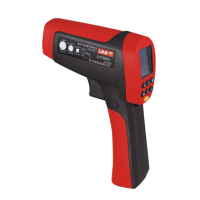
2. It will prompt “other device” in the device manager on the computer



 To Next Page