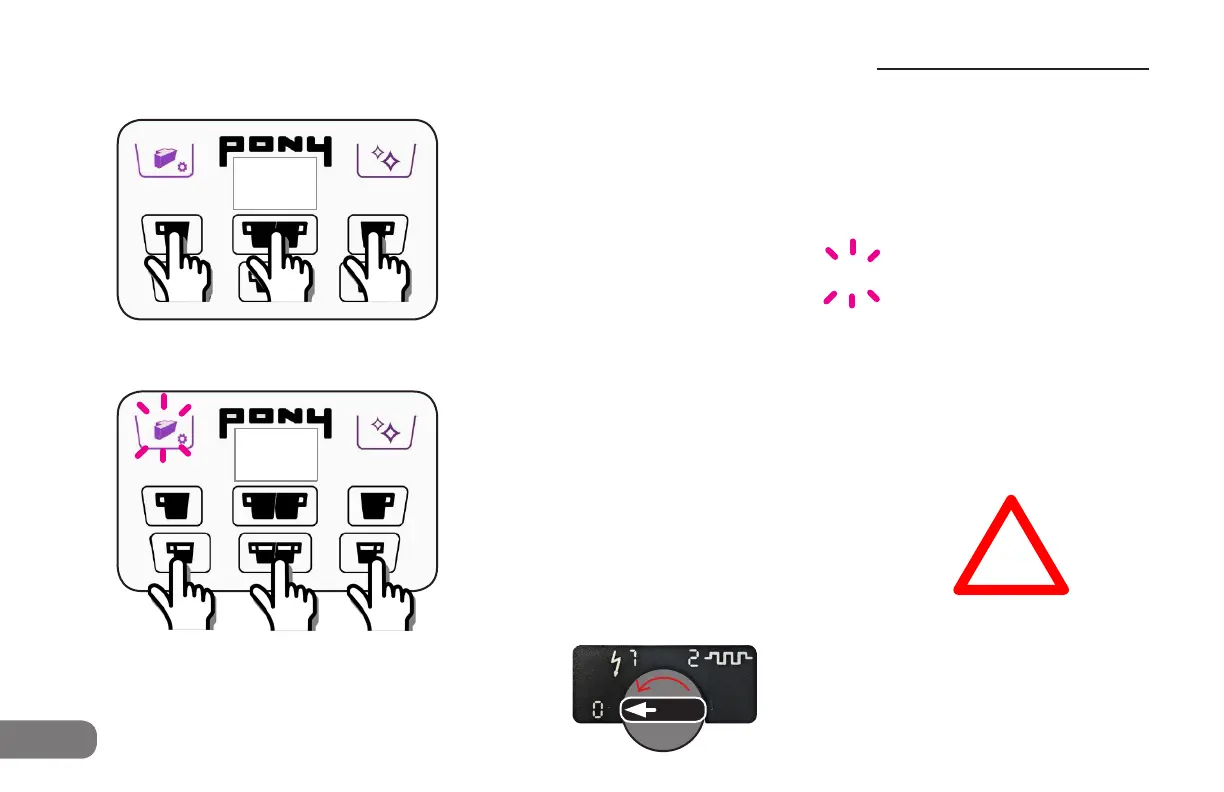
Override dA “drawer absent” error message:
Manual drawer mode:
Press all 3 bottom row buttons at the same time for 10 seconds.
Buttons ash 3 times to conrm.
Drawer icon ashes red.
EMPTY DRAWER WARNING IS DISABLED
Drawer MUST be emptied manually.
86
pe
Override PE “pod error” message:
Manual drink mode:
Press all 3 top row buttons at the same time for 10 seconds.
Buttons ash 3 times to conrm.
Screen shows 2 lines blinking.
All drink buttons are lighted.
All drink buttons will work with or withpout a pod inserted.
8a
!
Emergency settings to allow operation if pod or drawer sensors are not working
--
Switch OFF to reset
the machine to normal
opation
Call for Service as soon as
possible after making these
changes!
Troubleshooting
Troubleshooting


 To Next Page