DRIVING INSTRUCTIONS10
35
Crawler mode
It is possible to manually activate crawl speed during
operations. Button alternates between the two speed
selections. (Button to go directly to normal speed.) Various
safety systems in the truck may automatically reduce the speed
in certain situations. For example, driving with forks lifted high
and/or folded out side stabilizers results in reduced speed. The
symbols for normal speed or crawler mode are not changed by
reducing the speed.
Standby position
Standby mode is only used for shorter stops during the work
shift. At the end of the work shift or when the truck is going to
be left unattended, it should always be turned off.
1)
To enter standby mode: Keep the button pressed until
the text “standing by” is shown on the display.
2)
To return to operating mode: Briefly press the button
again.
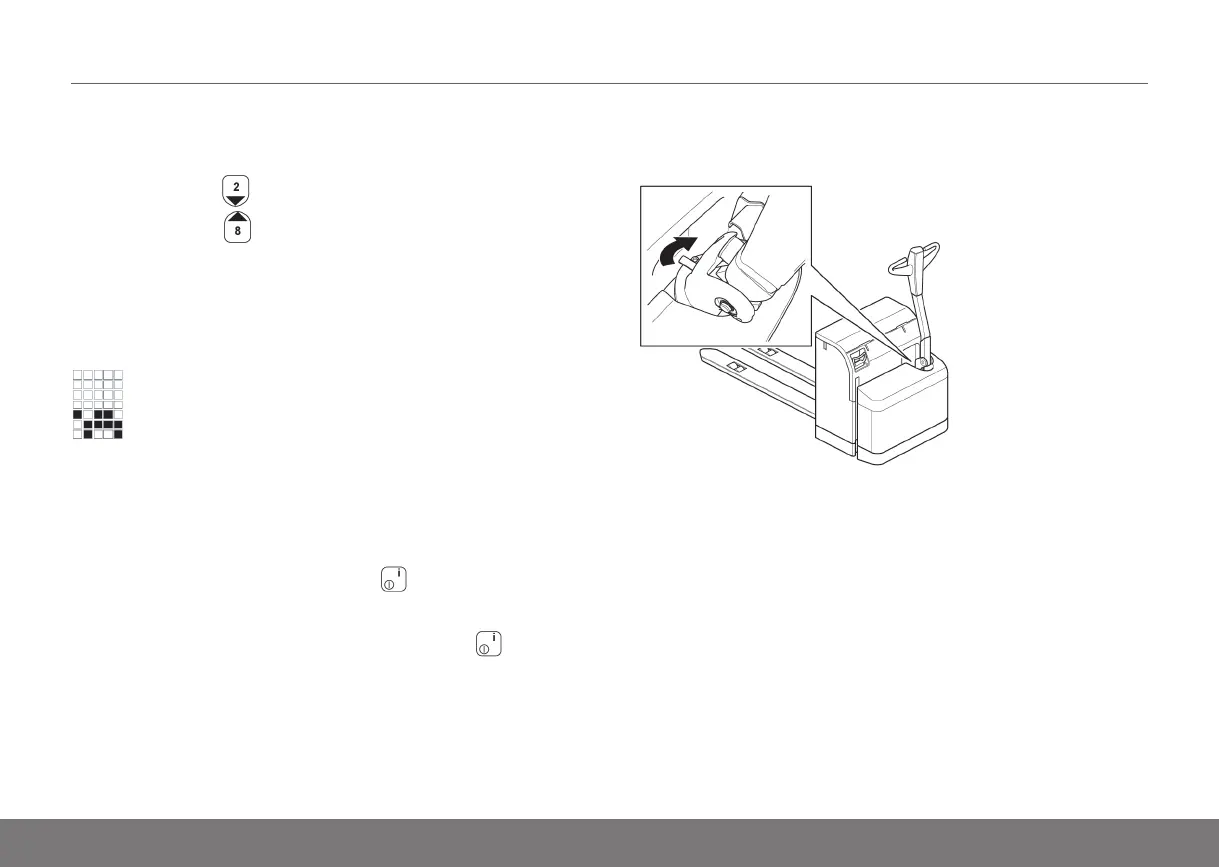
Manual release of the brake PLL, PSD, PLE, PSL, PS
The brake can be released in order to move a truck without
power by turning the handle at the top of the brake clockwise
(A). The truck cannot be driven in this position. To return to
normal operation, turn the handle anticlockwise back to normal
position (B).
Instruction Handbook PLL, PLE, PSL, PSD, PS, PSH, PLP, TS — D002652, B, GBR, ForTranslation



 To Next Page