EasyManua.ls Logo

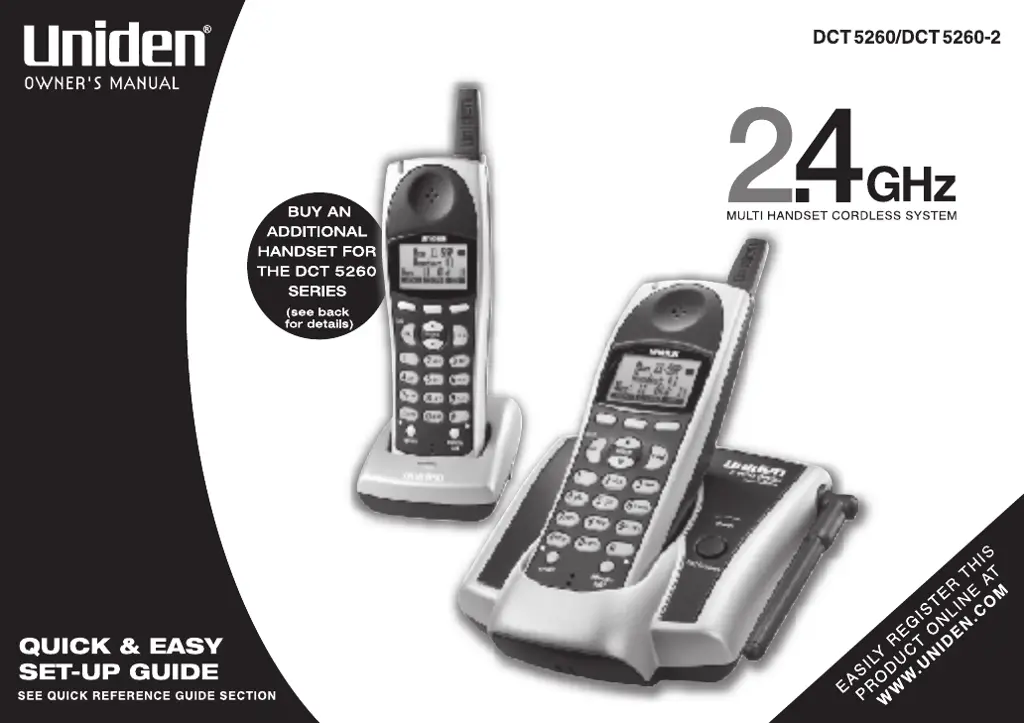
Uniden DCT5260 - User Manual

Uniden DCT5260
64 pages
Print Icon
To Next Page IconTo Next Page
Loading...

Table of Contents

Questions and Answers

  • G
    Glenda HartAug 15, 2025
    Why doesn’t my Uniden DCT5260 handset ring or receive a page?
    • B
      Brandy PadillaAug 15, 2025
      If your Uniden Cordless Telephone handset isn't ringing or receiving pages, try charging the battery in the base unit for 15-20 hours. The battery pack may be weak and require a full charge. Also, ensure the handset is not too far from the base unit and that the base unit is away from appliances or metal objects. If there is more than one user on the line, you may not be able to page.
  • J
    Jessica BaldwinAug 18, 2025
    What to do if the charge LED won’t illuminate when the handset is placed in the base of my Uniden Cordless Telephone?
    • C
      Colton PotterAug 18, 2025
      If the charge LED doesn't light up when you place the handset in the base, first ensure the AC adapter is properly plugged into both the base and the wall outlet. Next, make sure the handset is correctly seated in the base. Finally, check and clean the charging contacts on both the handset and the base.
  • A
    Angelica WilsonAug 21, 2025
    Why can't I make or receive calls on my Uniden Cordless Telephone?
    • C
      charlesteresaAug 21, 2025
      There could be several reasons why you're unable to make or receive calls. First, check the telephone line cord at both ends and ensure they are properly connected. Next, verify that the AC adapter is correctly plugged into both the base and the wall outlet. Try disconnecting the AC adapter for a few minutes before reconnecting it. Also, ensure you are within a reasonable distance from the base unit. If multiple users are on the line, it might prevent you from making a call.
  • J
    Joseph ClarkAug 25, 2025
    Why is there severe noise interference on my Uniden Cordless Telephone?
    • D
      David WilsonAug 25, 2025
      Noise interference can be caused by nearby electronic devices. Try to keep your Uniden Cordless Telephone away from microwave ovens, computers, remote control toys, wireless microphones, alarm systems, intercoms, room monitors, fluorescent lights, and other electrical appliances. If the problem persists, try moving to a different location or turning off potential sources of interference.
  • J
    James ArmstrongAug 27, 2025
    What to do if moisture or liquid has entered the plastic-housing of my Uniden DCT5260?
    • J
      John DavidsonAug 27, 2025
      If liquid has entered the plastic housing of your Uniden Cordless Telephone, follow these steps: 1) Remove the battery cover of the handset and leave it off for ventilation. 2) Disconnect and remove the battery pack. 3) Leave the battery cover off and the battery pack disconnected for three days to allow for thorough drying. 4) After it's completely dry, reconnect the battery pack and the battery cover. 5) Recharge the handset's battery pack for 20 hours in the base unit before using the phone. Remember to unplug the telephone line while recharging to prevent charge interruption.
  • M
    Michelle RodriguezAug 30, 2025
    What to do if the base unit or the handset of my Uniden DCT5260 Cordless Telephone is submerged or covered in a sticky substance?
    • B
      Brian AustinAug 30, 2025
      If your Uniden Cordless Telephone handset is submerged or covered in a sticky substance, follow these steps: Handset: 1) Remove the battery cover and disconnect the battery pack. 2) Rinse the handset in warm distilled water. 3) Let it dry for at least 3 days. 4) Once completely dry, reconnect the battery pack and the battery cover. 5) Recharge the handset’s battery pack for 20 hours in the base unit before using the phone. Base: 1) Disconnect the AC adapter from the base unit to cut off the power supply. 2) Disconnect the telephone cord from the base unit. 3) Rinse the base in warm distilled water. 4) Let it dry for at least 3 days. Do not use a microwave oven to speed up the drying time, as this will cause permanent damage.
  • B
    Barbara GriffithSep 2, 2025
    How to fix weak or scratchy audio on my Uniden DCT5260 Cordless Telephone?
    • A
      Andrea AtkinsSep 2, 2025
      If the audio on your Uniden Cordless Telephone sounds weak or scratchy, try moving the handset and/or base to a different location, away from metal objects or appliances. Also, make sure you are not too far from the base unit.
  • M
    Melissa BartonSep 5, 2025
    Why doesn't the Caller ID display on my Uniden DCT5260?
    • K
      Kelly CarrollSep 5, 2025
      The Caller ID on your Uniden Cordless Telephone may not display if the handset was picked up before the second ring, or if the call was placed through a switchboard. You may also need to call your local telephone company to verify that your Caller ID service is current.
  • K
    kingjohnSep 8, 2025
    Can an extra handset join the conversation on my Uniden DCT5260 Cordless Telephone?
    • R
      rojasderrickSep 8, 2025
      Only one handset at a time can talk with an outside caller on your Uniden Cordless Telephone. However, up to 2 handsets can participate during a 3-way conference call.
  • J
    Justin DavisSep 12, 2025
    What to do if the handset or base of my Uniden DCT5260 Cordless Telephone is exposed to moisture or liquid?
    • M
      Mr. James FreemanSep 12, 2025
      If the handset or base of your Uniden Cordless Telephone is exposed to moisture or liquid, but it only affects the exterior plastic housing, simply wipe off the liquid and use the device as normal.

Summary

WELCOME;FEATURES

Features

List of key phone capabilities and technologies.

QUICK REFERENCE GUIDE

Step 1 Charging the Batteries

Instructions for initial battery charging.

Step 2 Connecting

Steps to connect the phone to a telephone line.

CONTROLS AND FUNCTIONS

GETTING STARTED

Read This First

Essential initial setup steps before using the phone.

Setting up the Phone

Detailed steps for phone installation and configuration.

BASICS

Making and Receiving Calls

Core call handling procedures for making and answering calls.

PHONEBOOK

Storing Contact Information

Adding numbers, names, distinctive rings, and speed dial entries.

Making Calls Using the Phonebook

Dialing saved contacts from the phonebook.

Editing or Erasing Stored Data

Managing phonebook entries by editing or deleting them.

CALLER ID

Viewing Caller ID Information

Accessing and reviewing incoming call logs.

EXPANDING YOUR PHONE

Setting Up an Extra Handset

Adding more handsets to the cordless phone system.

Registering the Handset

Pairing new handsets with the base unit.

TROUBLESHOOTING

Common Issues and Solutions

Resolving typical phone problems and symptoms.

PRECAUTIONS AND WARRANTY

General Safety Instructions

Warnings for safe operation and handling of the equipment.

Battery and Electrical Safety

Specific warnings for batteries and electrical safety.

Uniden DCT5260 Specifications

General IconGeneral
BrandUniden
ModelDCT5260
CategoryCordless Telephone
LanguageEnglish

Related product manuals