4545
Setting Up the
Answering System
Setting the Record Time (or Announce only)
You can choose how many minutes (1 or 4) callers have to record a message. If you select Announce Only, the
answering system answers the call but prevents callers from leaving a message.
Press MENU/SELECT.
Select the Ans. Setup menu, and then the Record Time submenu.
Move the cursor to select a record time (1 Minute, 4 Minutes, or Announce Only).
Press MENU/SELECT. You will hear a conrmation tone.
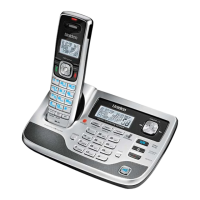
While your answering system is set to Announce Only, the message counter on the base LCD displays “A.” If you
are using the prerecorded greeting, the system automatically switches to the following message: “Hello, no one is
available to take your call. Please call again.” If you are using a personal greeting, the system continues to use that
greeting.
Activating the Message Alert
The message alert feature sounds a short alert tone every fteen seconds whenever you have a new message.
To turn on the message alert:
Press MENU/SELECT.
Select the Ans. Setup menu, and then the Message Alert submenu.
Move the cursor to select On or Off.
Press MENU/SELECT. You will hear a conrmation tone.
Activating the Base Call Screen
With the call screen feature, you can listen to callers as they leave a message without answering the call.
Press MENU/SELECT.
Select the Ans. Setup menu and then the Call Screen submenu.
Move the cursor to select On or Off.
Press MENU/SELECT. You will hear a conrmation tone.
1)
2)
3)
4)
1)
2)
3)
4)
1)
2)
3)
4)


 To Next Page