EasyManua.ls Logo

Uniden UH076 - User Manual

Uniden UH076
32 pages
Print Icon
To Next Page IconTo Next Page
Loading...
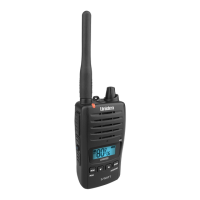
UH076
Handheld UHF-CB Transceiver
For more exciting new products please visit our website:
Australia: www.uniden.com.au
Question and Answer IconNeed help?

Do you have a question about the Uniden UH076 and is the answer not in the manual?

Summary

Warning and Safety Information

Waterproofing Standard (JIS7)

Explains the JIS7 waterproof standard for the UH076 radio.

Lithium Ion Battery Pack Safety

Warns about handling, charging, and disposal of the Lithium Ion battery pack.

User License Information

Provides licensing information for citizen band radio service in Australia and NZ.

Introduction to the Uniden UH076

Key Features Overview

Lists the main features of the UH076 Handheld UHF-CB Transceiver.

Package Contents and Accessories

Included Items in the Package

Lists all accessories and components included in the UH076 package.

Optional Accessories for Purchase

Lists accessories available for purchase to enhance UH076 functionality.

Controls and Indicators Explained

Getting Started: Initial Setup

Charger Connection Guide

Instructions for connecting the AC adapter and optional cigarette lead charger.

Antenna Attachment Instructions

Steps to correctly attach the antenna to the UH076 radio.

Getting Started: Component Attachment

Battery Pack Attachment

Instructions on how to securely attach the battery pack to the radio.

Beltclip Attachment and Removal

Steps for attaching and removing the beltclip for portability.

Getting Started: Battery Management

Charging the Lithium Ion Battery

Details on charging the battery pack using the drop-in charger.

Getting Started: Battery Status Display

Battery Level Indicators

Explains the icons and levels indicating the battery charge status.

Getting Started: Connections and Mounting

SPKR;MIC Jack, External Mic, and Hang-Up Bracket

Instructions for SPKR/MIC jack cap, connecting mics, and mounting the bracket.

Operation: Basic Functions

Power On;Off and Volume Adjustment

How to turn the radio on/off and adjust speaker volume.

Key Beep Configuration

Instructions to enable or disable the audible key press beep.

Operation: Channel and Audio Settings

Roger Beep Configuration

How to enable or disable the Roger Beep notification tone.

Channel Selection Process

Method for changing between available UHF-CB channels.

Operation: Squelch Control

Squelch Adjustment for Noise Filtering

Adjusting squelch to filter out background noise and improve reception.

Operation: Communication Procedures

Transmit and Receive Guide

Steps for transmitting on a channel and listening for responses.

Operation: Advanced Communication Modes

Using Repeater Channels

Explanation of how repeaters extend range via simplex and duplex operations.

Operation: Scanning Features

Duplex Mode Operation Guide

How to activate and deactivate Duplex mode for repeater communication.

Open Scan (OS) Mode Explained

How to initiate and use Open Scan to find active channels.

Operation: Advanced Scanning Techniques

Group Scan (GS) Mode Guide

How to use Group Scan to monitor priority channels alongside active scans.

Operation: Scan Memory and Priority

Programming Scan Channels

Steps to add or remove channels from the scan memory.

Priority Channel Selection

How to select a priority channel for monitoring during scans.

Drop-out Delay Setting

Explains the delay before resuming scan after a signal ends.

Operation: CTCSS System

CTCSS Private Communication

Explanation of CTCSS for private group communication on channels.

CTCSS Scan Operation

How to use CTCSS scanning to find matching codes for communication.

Operation: VOX and Power Management

VOX (Voice Activated Transmission)

How to activate and configure the VOX feature for hands-free transmission.

Power Save and Backlighting Features

Features for extending battery life and improving display visibility.

Operation: Interface and Lock Features

Keypad Lock Functionality

How to lock and unlock the keypad to prevent accidental key presses.

Busy Channel Lock-out (BCL)

Prevents accidental transmission on an already occupied channel.

Monitor Functionality

How to listen for weak signals on the current channel.

CTCSS Codes and Frequencies Reference

UHF-CB Channel Guidelines

Channel Usage Rules and Emergency Channels

Guidelines for channel use in Australia, emergency channels, and calling channels.

80-Channel Expansion and Interference Issues

Information on 80-channel narrowband and potential audio interference issues.

UHF-CB Channels and Frequencies (1-40)

UHF-CB Channels and Frequencies (41-80)

Product Warranty Information

Warranty Service and Support Procedures

Statement of Remedy and Consumer Rights

Outlines remedies under warranty and consumer protection laws.

Procedure for Obtaining Warranty Service

Steps to follow when submitting a warranty claim and contact information.

Summary

Warning and Safety Information

Waterproofing Standard (JIS7)

Explains the JIS7 waterproof standard for the UH076 radio.

Lithium Ion Battery Pack Safety

Warns about handling, charging, and disposal of the Lithium Ion battery pack.

User License Information

Provides licensing information for citizen band radio service in Australia and NZ.

Introduction to the Uniden UH076

Key Features Overview

Lists the main features of the UH076 Handheld UHF-CB Transceiver.

Package Contents and Accessories

Included Items in the Package

Lists all accessories and components included in the UH076 package.

Optional Accessories for Purchase

Lists accessories available for purchase to enhance UH076 functionality.

Controls and Indicators Explained

Getting Started: Initial Setup

Charger Connection Guide

Instructions for connecting the AC adapter and optional cigarette lead charger.

Antenna Attachment Instructions

Steps to correctly attach the antenna to the UH076 radio.

Getting Started: Component Attachment

Battery Pack Attachment

Instructions on how to securely attach the battery pack to the radio.

Beltclip Attachment and Removal

Steps for attaching and removing the beltclip for portability.

Getting Started: Battery Management

Charging the Lithium Ion Battery

Details on charging the battery pack using the drop-in charger.

Getting Started: Battery Status Display

Battery Level Indicators

Explains the icons and levels indicating the battery charge status.

Getting Started: Connections and Mounting

SPKR;MIC Jack, External Mic, and Hang-Up Bracket

Instructions for SPKR/MIC jack cap, connecting mics, and mounting the bracket.

Operation: Basic Functions

Power On;Off and Volume Adjustment

How to turn the radio on/off and adjust speaker volume.

Key Beep Configuration

Instructions to enable or disable the audible key press beep.

Operation: Channel and Audio Settings

Roger Beep Configuration

How to enable or disable the Roger Beep notification tone.

Channel Selection Process

Method for changing between available UHF-CB channels.

Operation: Squelch Control

Squelch Adjustment for Noise Filtering

Adjusting squelch to filter out background noise and improve reception.

Operation: Communication Procedures

Transmit and Receive Guide

Steps for transmitting on a channel and listening for responses.

Operation: Advanced Communication Modes

Using Repeater Channels

Explanation of how repeaters extend range via simplex and duplex operations.

Operation: Scanning Features

Duplex Mode Operation Guide

How to activate and deactivate Duplex mode for repeater communication.

Open Scan (OS) Mode Explained

How to initiate and use Open Scan to find active channels.

Operation: Advanced Scanning Techniques

Group Scan (GS) Mode Guide

How to use Group Scan to monitor priority channels alongside active scans.

Operation: Scan Memory and Priority

Programming Scan Channels

Steps to add or remove channels from the scan memory.

Priority Channel Selection

How to select a priority channel for monitoring during scans.

Drop-out Delay Setting

Explains the delay before resuming scan after a signal ends.

Operation: CTCSS System

CTCSS Private Communication

Explanation of CTCSS for private group communication on channels.

CTCSS Scan Operation

How to use CTCSS scanning to find matching codes for communication.

Operation: VOX and Power Management

VOX (Voice Activated Transmission)

How to activate and configure the VOX feature for hands-free transmission.

Power Save and Backlighting Features

Features for extending battery life and improving display visibility.

Operation: Interface and Lock Features

Keypad Lock Functionality

How to lock and unlock the keypad to prevent accidental key presses.

Busy Channel Lock-out (BCL)

Prevents accidental transmission on an already occupied channel.

Monitor Functionality

How to listen for weak signals on the current channel.

CTCSS Codes and Frequencies Reference

UHF-CB Channel Guidelines

Channel Usage Rules and Emergency Channels

Guidelines for channel use in Australia, emergency channels, and calling channels.

80-Channel Expansion and Interference Issues

Information on 80-channel narrowband and potential audio interference issues.

UHF-CB Channels and Frequencies (1-40)

UHF-CB Channels and Frequencies (41-80)

Product Warranty Information

Warranty Service and Support Procedures

Statement of Remedy and Consumer Rights

Outlines remedies under warranty and consumer protection laws.

Procedure for Obtaining Warranty Service

Steps to follow when submitting a warranty claim and contact information.

Uniden UH076 Specifications

General IconGeneral
BrandUniden
ModelUH076
CategoryTransceiver
LanguageEnglish

Related product manuals