Need help?
Do you have a question about the UniFi US-24-250W and is the answer not in the manual?
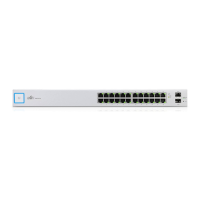
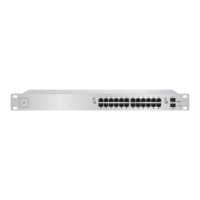
Provides status indication for the system.
Indicates Power over Ethernet status for ports 1-24.
Shows link status and activity for RJ45 ports 1-24.
RJ45 serial console port for Command Line Interface (CLI) management.
Port for connecting the power supply.
This document outlines the setup and operation of the UniFi Switch, a network device designed for robust and flexible Ethernet connectivity, including Power over Ethernet (PoE) capabilities. It is suitable for both indoor and outdoor network deployments, offering a range of features for efficient network management.
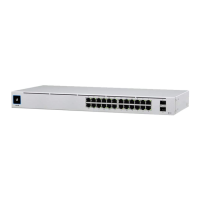
The UniFi Switch serves as a central hub for network connections, providing 24 RJ45 Ethernet ports and two SFP ports. Its primary function is to facilitate data transfer across a network, supporting 10/100/1000 Mbps Ethernet connections. A key feature of this switch is its Power over Ethernet (PoE) capability, which allows it to deliver electrical power along with data to compatible devices such as IP cameras, VoIP phones, and wireless access points, eliminating the need for separate power cables for these devices. The switch supports both IEEE 802.3af/802.3at (PoE+) and 24V Passive PoE, offering versatility for various powered devices. The SFP ports enable high-speed fiber optic connections, extending network reach and providing uplink capabilities.
The device is managed through the UniFi Controller software, a centralized platform that allows users to configure, monitor, and troubleshoot their UniFi network devices. This software provides a comprehensive overview of network performance, connected devices, and traffic statistics, simplifying network administration. The switch also includes a console port for Command Line Interface (CLI) management, offering an alternative method for advanced configuration and troubleshooting.
The UniFi Switch is designed for ease of use and flexible deployment. For physical installation, it is rack-mountable in a standard 19-inch rack, requiring a minimum of 1U height. The package includes mounting screws and cage nuts for secure installation. The device is powered via a standard AC power cord, and it is recommended to use a UPS backup and power regulation to ensure stable operation and protect against power fluctuations.
For network connectivity, the 24 RJ45 ports automatically detect and adapt to the connected device's speed (10/100/1000 Mbps). The PoE functionality can be configured per port, allowing administrators to select between Off, 24V Passive PoE, or PoE+ (IEEE 802.3af/802.3at) as needed. This granular control helps optimize power consumption and ensures compatibility with various powered devices. The SFP ports support 1 Gbps connections and are hot-swappable, allowing for easy installation or replacement of SFP modules without interrupting network operations.
The UniFi Controller software is central to managing the switch. After physical installation, the switch can be "adopted" into the UniFi Controller, which then allows for comprehensive configuration. The controller provides real-time monitoring of port status, including link speed, activity, and PoE status, indicated by dedicated LEDs on the front panel of the switch. The System LED provides an overall status of the device, while individual RJ45 PoE LEDs and Speed/Link/Act LEDs offer detailed feedback for each port.
For outdoor deployments, it is crucial to use shielded Category 5 (or above) cabling for all wired Ethernet connections. This cabling should be grounded through the AC ground of the power supply to protect against harmful outdoor environments and destructive ESD events. While the cabling can be outdoors, the UniFi Switch itself should be housed inside a protective enclosure to ensure its longevity and reliable performance.
The device supports various operating systems for the UniFi Controller, including Linux, Mac OS X, and Microsoft Windows. A Java Runtime Environment (version 1.6 or newer, with 1.8 or newer recommended) and a modern web browser (Mozilla Firefox, Google Chrome, Microsoft Edge, or Microsoft Internet Explorer 11) are required to access the controller interface. The UniFi Controller software version 5.4.x or higher is necessary for managing this specific switch model.
The UniFi Switch is designed for reliable operation with minimal maintenance. However, certain features are included to facilitate troubleshooting and system recovery. The device includes a Reset button on the front panel, which serves two functions: a quick press and release will restart the switch, while pressing and holding it for more than five seconds will restore the device to its factory default settings. This is a crucial feature for recovering from misconfigurations or preparing the device for redeployment.
The console port on the back panel provides an alternative management interface, particularly useful for initial setup or troubleshooting when network access to the UniFi Controller is unavailable. By connecting an RJ45-to-DB9 serial console cable to a computer, administrators can access the Command Line Interface (CLI) to configure network settings, diagnose issues, and perform firmware updates. The required serial port settings (Baud rate 115200, Data bits 8, Parity NONE, Stop bits 1, Flow control NONE) are standard for network devices, making it accessible with common terminal emulation software.
Regular software updates for the UniFi Controller and the switch firmware are important for maintaining optimal performance, security, and access to new features. Ubiquiti provides these updates, and users are encouraged to download the latest versions from the official website. The UniFi Controller simplifies firmware management, allowing for centralized updates across all adopted UniFi devices.
Proper ventilation is critical for the long-term reliability of the UniFi Switch. The device requires at least 20 mm of clearance next to its ventilation holes to ensure adequate airflow and prevent overheating, which could lead to equipment damage or fire hazards. Adhering to environmental guidelines, such as operating within the specified temperature and humidity ranges, also contributes to the device's longevity.
In summary, the UniFi Switch is a versatile and robust networking solution, offering extensive connectivity and power delivery options, all managed through an intuitive software platform. Its design emphasizes ease of installation, flexible configuration, and straightforward maintenance, making it suitable for a wide range of network environments.
 General
| Total Non-Blocking Throughput | 26 Gbps |
|---|---|
| Switching Capacity | 52 Gbps |
| Forwarding Rate | 38.69 Mpps |
| Max. Power Consumption | 250W |
| Rackmount | Yes, 1U |
| Operating Temperature | -5 to 40° C (23 to 104° F) |
| PoE Budget | 250W |
| Certifications | CE, FCC, IC |
| Layer | 2 |
| Power Method | 100-240VAC, 50/60 Hz, Universal Input |
| Operating Humidity | 5 to 95% Noncondensing |
| Supported Voltage Range | 100-240VAC |
| PoE | 802.3af/at |
| LEDs Per Port | PoE, Link/Activity |
| Management Interface | UniFi Controller |
| Ports | 24 |
| PoE Interfaces | 24 |

 To Next Page