76
Turning the uDirect 2 ON and OFF
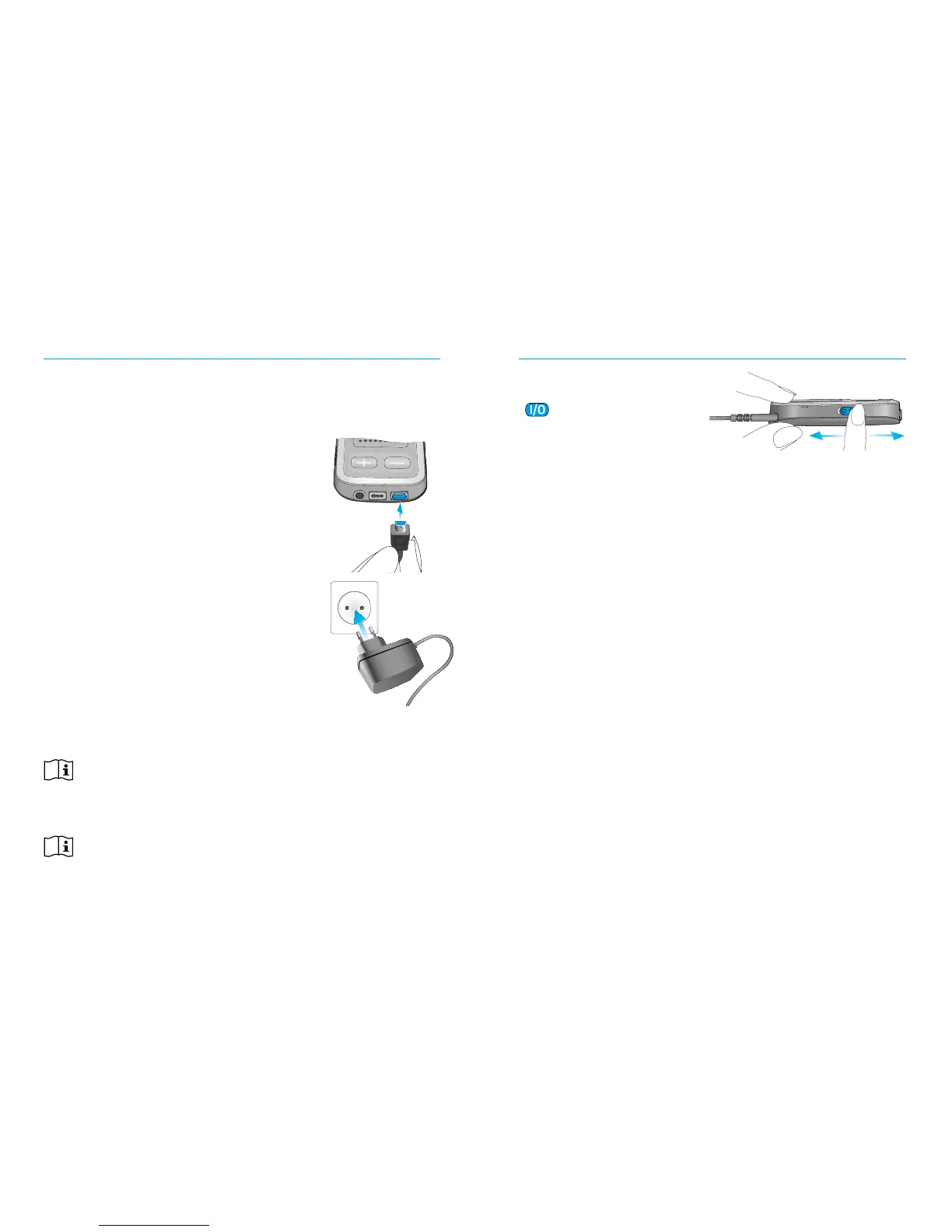
Slide the power switch
(
) as shown to turn
the uDirect 2 ON or OFF.
Switch the uDirect 2
OFF when not in use or if in storage or during
transportation.
For operational use switch the uDirect 2 ON.
OFF ON
Charging the uDirect 2
Your uDirect 2 has a non-removable rechargeable
battery.
To charge it:
1. Plug the mini-USB plug into the
mini-USB port on the uDirect 2.
2. Plug the power supply into a
power outlet.
Power indicator
Solid red: Charging,
typically 90 minutes.
Solid green: Battery fully charged.
It is safe to leave the uDirect 2
connected to the charger overnight.
When charging your uDirect 2 for the first time,
let it charge for at least three hours, even if the
battery indicator is not lit or turns green earlier.
A new battery’s full performance is achieved only
after two to three complete charge and discharge
cycles.



 To Next Page