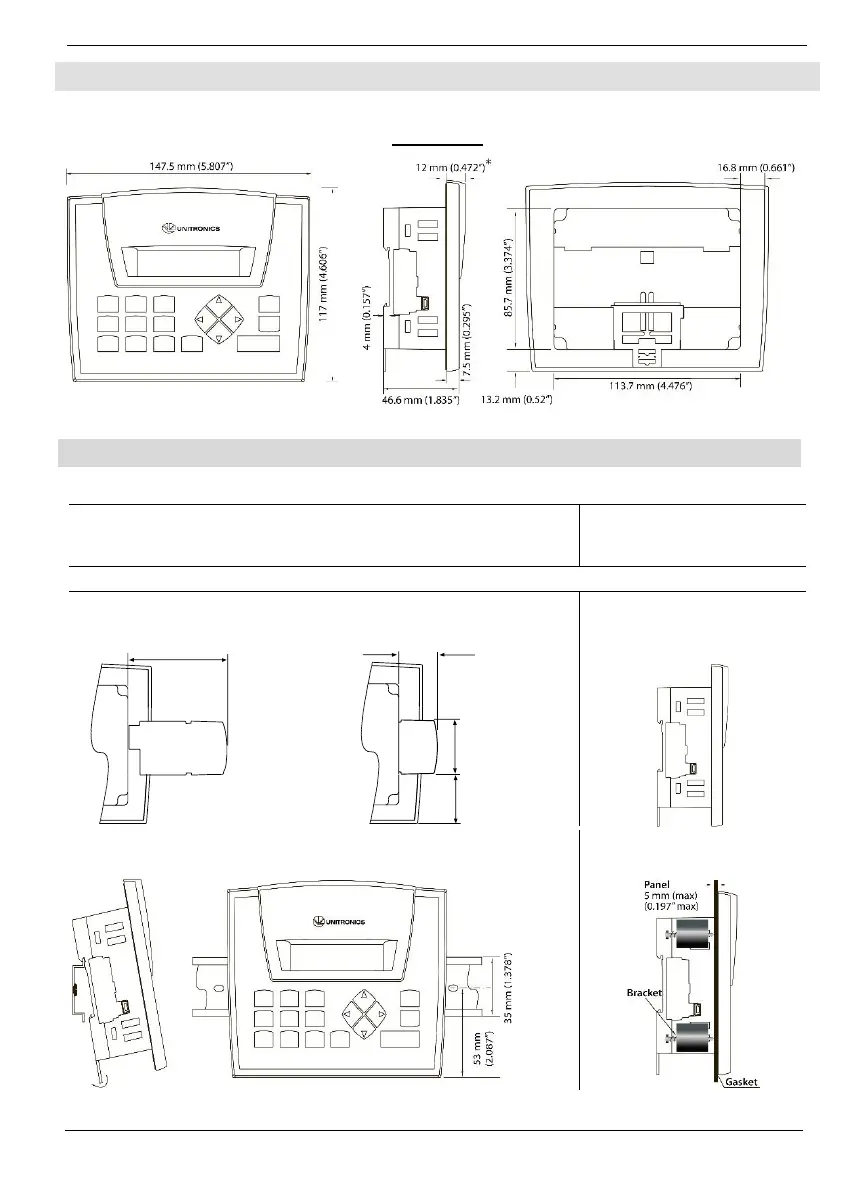
Note that figures are for illustrative purposes only.
* * Note that for JZ20-J modules those dimensions are 7.5 mm (0.295”).
117 x 89mm (4.606”x 3.504”)
66 x 19.2mm (2.598”x 0.755”)
Add-on modules-
Available by separate order for
communication and cloning.
Integral USB Port
This may be used for
programming purposes.
Note: the USB port and an Add-on module cannot be physically connected at the same time.
Add-on: during installation
Add-on: after installation
Installing an Add-on module requires sufficient clearance space
27.5 mm
(1.083")
38 mm
(1.496")
35.8 mm
(1.409")
DIN-rail mounting
Snap PLC onto the DIN rail
Note: Removing the unit requires clearance space. Recommendation: approximately 40mm (1.58”)



 To Next Page