30
MX-980 Programming Manual
U
S
I
N
G
O
P
E
N
A
R
C
H
I
T
E
C
T
U
R
E
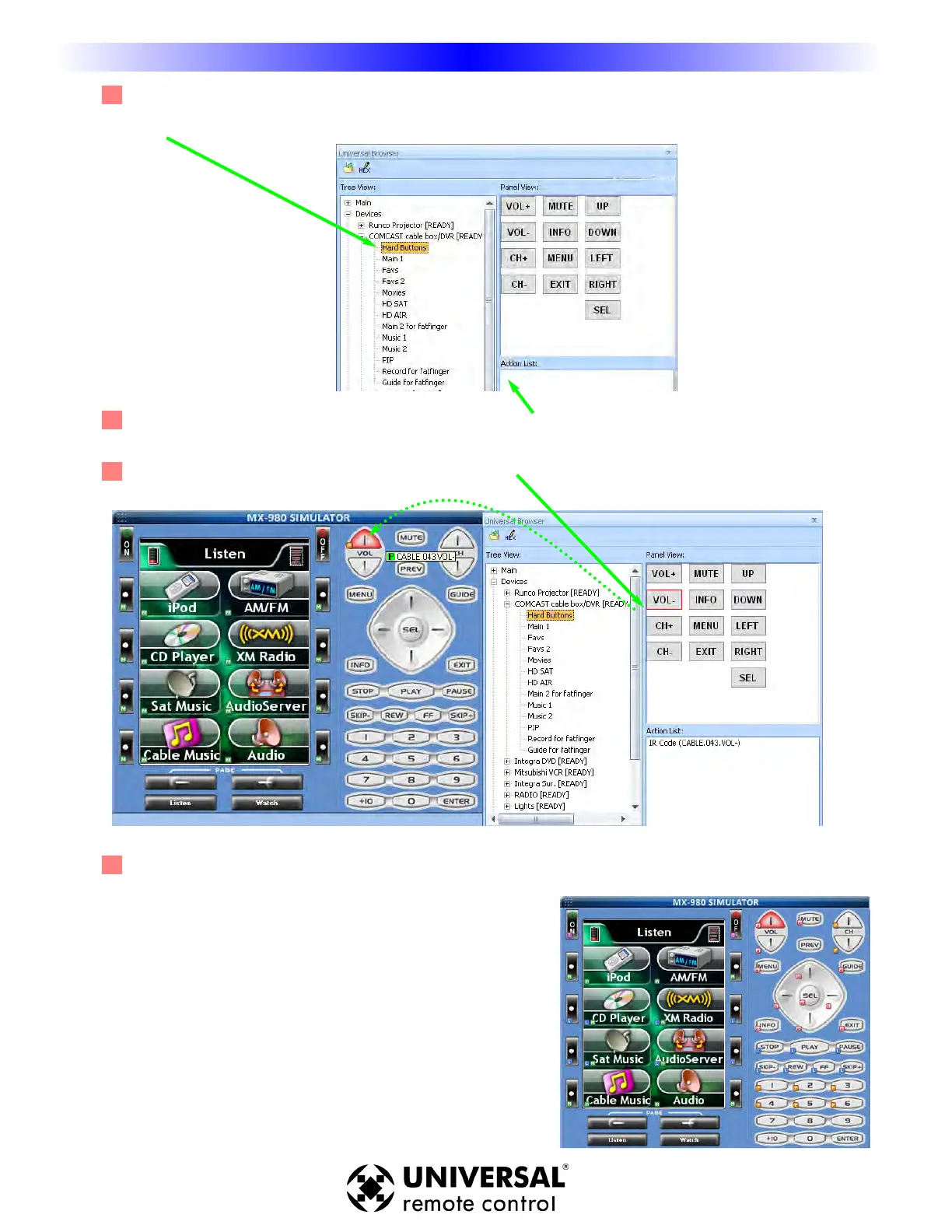
3 Use Tree View to Navigate to the Panel containing commands you want. Click on the panel name in
Tree View to make the panel appear in Panel View.
4 Click on a button in Panel View and the Action List view will reveal whether it has a Trigger code
(MSC-400), Learned code or Pre-Programmed Data.
5 Click and drag the button to the MX-980 simulator.
6 After y
ou’
v
e dragged a command from the browser, the button will change
it’s name if it is a screen button. Both screen and hard buttons show the
appropriate flag (Trigger, Learned or Pre-Programmed)
after y
ou’
v
e dragged to a button.
Finding Discrete Commands for Reliable Macros
T - Trigger - Indicates an MSC Trigger Command
L - Learned - Indicates a Learned IR Command
P- Pre-Programmed - Indicates an IR command from
the URC
database.
M - Macro - Indicates a macro is programmed.
PT - Punch Through - Indicates that the button is
“punched through” to another device.





 To Next Page