16
Console Features
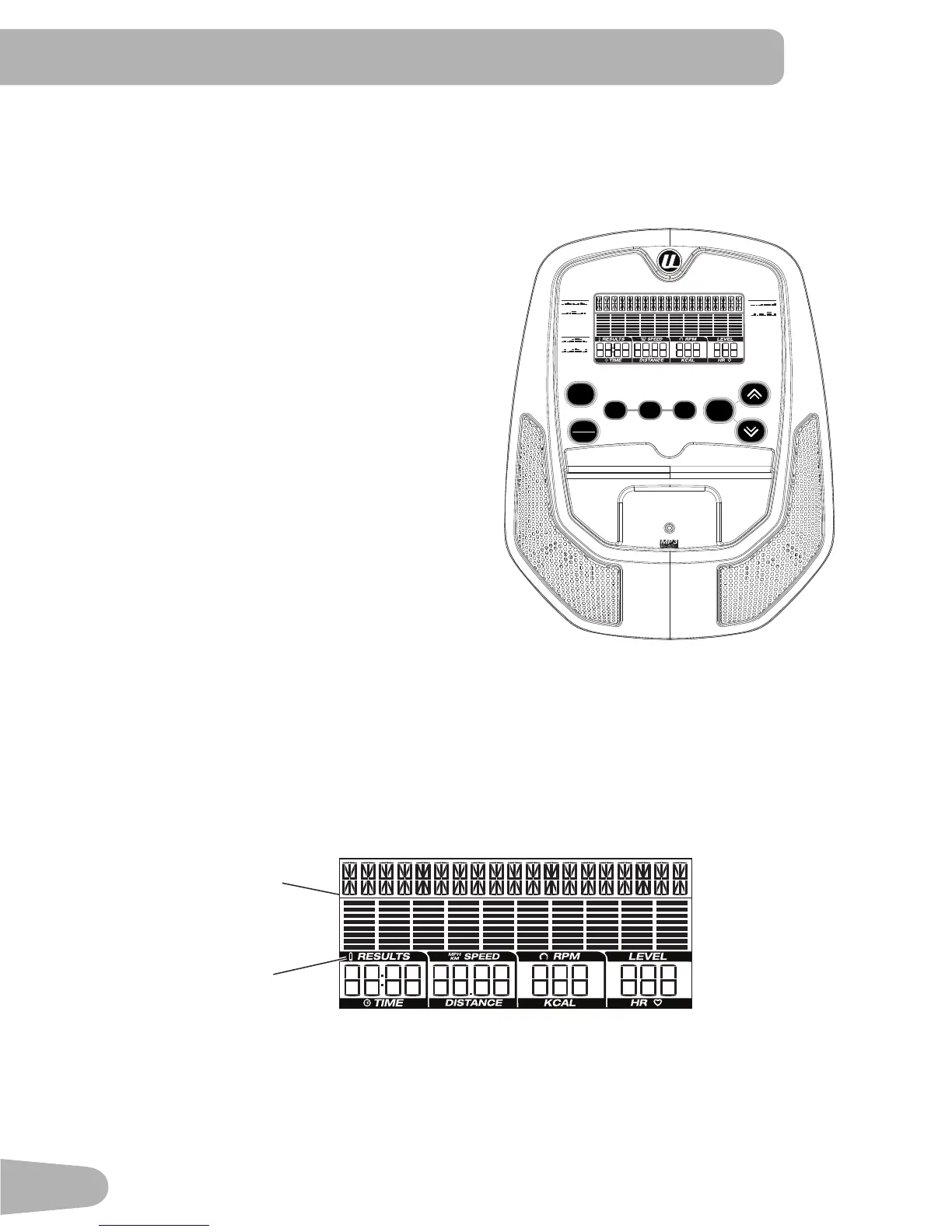
The Console provides important information about your workout and lets you control the resistance levels while you
exercise.TheConsolehasagriddisplaywithtouchcontrolbuttonstonavigateyouthroughtheexerciseprograms.
Keypad Functions
QUICK START Begins a Quick Start workout
START/STOP Starts a Program workout, pauses
an active workout. And if pushed
and held down for 3 seconds during
a paused workout, ends and erases
the workout.
FUN RIDES Begins selection of a FUN RIDES
workout
MOUNTAINS Begins selection of a MOUNTAINS
workout
CHALLENGES BeginsselectionofaCHALLENGES
workout
ENTER Conrmsinformationoraselection
Increase () Push to increase a value, or push
and hold to quickly increase a value
Decrease () Push to decrease a value, or push
and hold to quickly decrease a value
Note: The Console keypad will not adjust the
sound output for a connected media device. Use the volume control on the media device.
LCD Display Data
Program Display
TheProgramDisplayshowsthenameoftheprogramselectionandthegridareashowsthecourseproleforthe
program.Eachcolumnintheproleshowsoneinterval(workoutsegment).Thehigherthecolumn,thehigherthe
resistancelevelforthatinterval.Theashingcolumnshowsyourcurrentinterval.
Time
TheTIMEdisplayeldshowsthetimecountintheworkout.Ifnopresettimeissetupforthecurrentworkoutpro-
gram,thedisplayvaluestartsatzeroandcountsforwarduntiltheendoftheworkout.Maximumtimeis99:59.
If the workout has a preset time, the display starts at the preset value and counts down to zero. The display shows the
total time count for the workout.
ROLLING HILLS
RIDE IN THE PARK
PIKES PEAK
PYRAMIDS
FUN RIDES
MOUNTAINS
UPHILL FINISH
CROSS-TRAINING
CHALLENGES
FUN RIDES MOUNTAINS CHALLENGES
QUICK
START
START
STOP
ENTER
Battery
indicator
Program
display


 To Next Page