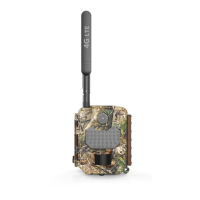
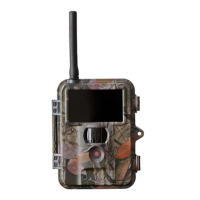
The UoVision GLORY LTE Scouting Camera (Model No. L4-E) is a trail camera designed for remote monitoring and scouting, featuring LTE connectivity for cloud-based image and video transmission.
Function Description:
The GLORY LTE Scouting Camera captures still images and videos, triggered by a Passive Infrared (PIR) sensor that detects motion. It utilizes LTE cellular technology to transmit captured media to a cloud server, accessible via a dedicated mobile application ("Linckeazi") or a web portal (https://www.linckeazi.com). This allows users to remotely monitor their camera's activity and settings. The camera supports various cellular bands, including FDD LTE (B1/B3/B5/B7/B8/B20), TDD LTE (B38/B40/B41), WCDMA (B1/B5/B8), and GSM (900/1800), ensuring broad network compatibility.
The camera operates in three modes: OFF, SETUP, and ON. In OFF mode, the camera is powered down, and batteries should be removed if not in use. SETUP mode allows users to configure camera settings via the integrated 2.0" LCD screen and keypad. ON mode is the working mode where the camera automatically captures and transmits photos or videos based on the configured settings, with the screen powering off to conserve battery.
Key functions include:
- Image and Video Capture: Records photos and videos based on PIR triggers or time-lapse settings.
- Cellular Transmission: Sends captured media to a cloud server via LTE.
- Remote Control: Allows users to control camera settings and retrieve media remotely through the "Linckeazi" mobile app or web portal.
- Time-Lapse: Captures photos or videos at set intervals, independent of PIR triggers, useful for continuous monitoring.
- Work Time Scheduling: Configures specific time periods and days for the camera to be active, conserving battery and data.
- Password Protection: Secures camera access with a password.
- Over Write Function: Automatically overwrites old photos when the memory card is full.
- GPS Functionality: Supports GPS for location tracking.
Important Technical Specifications:
- Picture Resolution: Selectable resolutions of 3, 5, 8, 12, 16, or 20 Megapixels.
- Lens: F/NO=2.2, Field of View (FOV)=58° (FOV10m=7.72 meters).
- Frequency Bands:
- FDD-LTE: B1/B3/B5/B7/B8/B20
- TDD-LTE: B38/B40/B41
- WCDMA: B1/B5/B8
- GSM: 900/1800
- Flash Power: Full, Low (Black vision IR flash).
- Display Screen: 2.0" LCD.
- Memory Card: Supports SD cards up to 32GB.
- Video Resolution: 1080P, 720P, WVGA.
- PIR Sensor: Multi-zone, with adjustable sensitivity (High/Normal/Low).
- Trigger Time: 0.6 seconds.
- Weight: 474g (without batteries).
- Operation/Storage Temperature: -20°C to +60°C / -30°C to +70°C.
- Trigger Interval: 0 seconds to 60 minutes.
- Time Lapse: 3 minutes to 24 hours.
- Photo Burst: 1 to 10 photos per trigger.
- Video Length: 1 to 60 seconds.
- Power Supply: 4AA, 8AA, or 12AA batteries.
- Stand-by Current: < 0.25 mA (<6mAh/Day).
- Power Consumption: 12AA batteries can transmit 3000+ photos.
- Low Battery Alert: LED Indicator, Cloud Platform.
- Mounting: Rope/Belt/Python lock.
- Dimensions: 140mm x 95mm x 57mm.
- Operation Humidity: 5% - 90%.
- Security Authentication: CE, ROHS.
Usage Features:
- Quick Start Guide: Provides instructions for installing batteries (12 AA recommended, high-density/high-performance Alkaline or Lithium), inserting an SD card (up to 64GB), and inserting a SIM card.
- Mobile App and Web Portal: The "Linckeazi" app (available on Google Play Store and Apple Store) and web portal (https://www.linckeazi.com) allow users to register an account, add their camera by entering its SN and IMEI (found inside the camera and on the front panel), and manage settings remotely.
- Test Photo Function: In SETUP mode, users can manually take a photo and then send it to verify cellular connectivity and transmission to their email or phone. A "Diagnose" function generates a log file for troubleshooting if sending fails.
- Remote Settings: Camera settings can be conveniently adjusted via the cloud server or mobile app, providing flexibility and ease of use.
- Auxiliary Power: The camera includes a standard 4mm jack for connecting an external 6V battery.
- Multi-language Support: The camera supports 10 languages.
- Date and Time Format: Supports MM/DD/YYYY and YYYY/MM/DD formats.
Maintenance Features:
- Battery Management:
- Use 12 AA batteries, paying attention to polarity.
- Do not mix different types of batteries (e.g., Alkaline with Lithium).
- Do not mix old and new batteries.
- Remove batteries when the camera is not in use to prevent leakage.
- SD Card Management: Ensure an SD card is installed for the camera to function. The "Over Write" function helps manage storage by overwriting old photos when the card is full.
- SIM Card Requirements:
- Ensure the PIN code of the SIM card is disabled.
- Ensure there is sufficient credit or data on the SIM card.
- Mounting Tips:
- Mount the camera approximately 1-1.5 meters off the ground and 3-15 meters from the target.
- Position the camera in an area with a backdrop to reflect maximum light for enhanced flash performance.
- Avoid direct sunlight on the camera's face.
- Utilize reflective surfaces like trees to add more light to the target.
- Avoid placing the camera where air flow is surging or near excessive vegetation, as this can cause false triggers due to wind movement.
- Password Security: Users are advised to write down or save their password to their mobile phone to ensure access to the camera.
- Warranty: The camera comes with a 12-month warranty against manufacturing defects or malfunctions. Repair or replacement is provided free of charge within 2 years under normal use, with a purchase receipt required for validation. Improper use resulting in damage is not covered. Repair services are available after warranty expiration, with the customer responsible for parts, labor, and shipping costs.

 Need help?
 General

 To Next Page