Need help?
Do you have a question about the Uovision UM565-SMS 12MP and is the answer not in the manual?
Lists important notes and reminders for initial setup and camera operation.
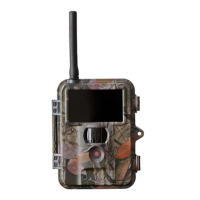
Provides an overview of the camera's features, capabilities, and purpose.
Details the physical ports, buttons, and connectors on the camera body.
Instructions for powering the camera using batteries or external power supply.
Guidance on inserting SD and SIM cards for data storage and wireless functions.
Steps to switch on the camera and put it into its primary operating mode.
Instructions for accessing and navigating the camera's setup menu for configuration.
Procedure for safely shutting down the camera and battery removal recommendations.
Details on accessing and configuring various camera settings via the menu interface.
Guidance on reviewing captured photos and videos on the camera's display.
Specific steps for navigating and viewing captured media files.
Instructions on how to remove unwanted photos or video files from the camera.
Explanation of how images and videos are named and organized on the storage media.
Specific setup instructions and considerations for wireless camera functionality.
Configuration options for how and when the camera sends captured data.
Defines the method for sending data (MMS or GPRS) to recipients.
Specifies the destinations for sending photos/videos (phone, email, or both).
Settings for configuring network operator parameters for wireless communication.
Defines the phone numbers and email addresses that will receive captured media.
Options for renaming camera files and setting the maximum file size for transmissions.
Process for creating configuration files for the camera's wireless setup.
Instructions for updating the camera's firmware or settings via configuration files.
 General
| Image Resolution | 12MP |
|---|---|
| Operation / Storage Temp. | -20°C to 60°C |
| Low Battery Alert | Yes |
| Water Proof | IP54 |
| Night Vision | Yes |
| Video Resolution | 1920x1080 |
| Trigger Speed | 1.2s |
| Detection Range | 15 meters |
| Battery Type | 8 x AA batteries |
| Storage | Micro SD card (up to 32GB) |
| Connectivity | SMS control |
| Lens | FOV 52° |
| LCD Screen | 2.0 inch |
| PIR Sensitivity | Adjustable (High/Normal/Low) |
| Weight | 0.30kg |
| Interface | USB, SD card slot |
| Mounting | Strap |
| Battery Life | Up to 6 months |
| Delay | 5s - 60min |

 To Next Page