Urive HIT ... 12 ... User's Guide
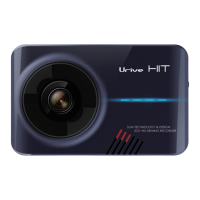
Name Functional Desciption
① Camera lens To record the front video
② Security LED Blue LED for indicating the operation state and security
③ Embedded speaker For voice guidance
④ External GPS terminal (GPS) Port to connect an external GPS module
⑤ Power terminal (DC) Port to connect the power cable
⑥ Rear camera terminal (CAM) Micro USB port to connect the rear camera
⑦ LED indicator Green LED to indicate always-on mode
⑧ LCD 3.5″ LCD to check a video and control the device
⑨ Embedded mic (MIC) Voice recording is supported by the embedded microphone.
⑩ Connection part for the holder Connection part fixed to the attached face of the holder
⑪ Power & Manual record switch Power On/Off switch
⑫ SD card slot To insert a micro SD card for storage


 To Next Page