Urive Zest ... 41 ... User's Guide
11. PC Viewer -Format & Recover SD
◆ Format SD
1.
#
Insert a micro SD card into the PC.
2.
#
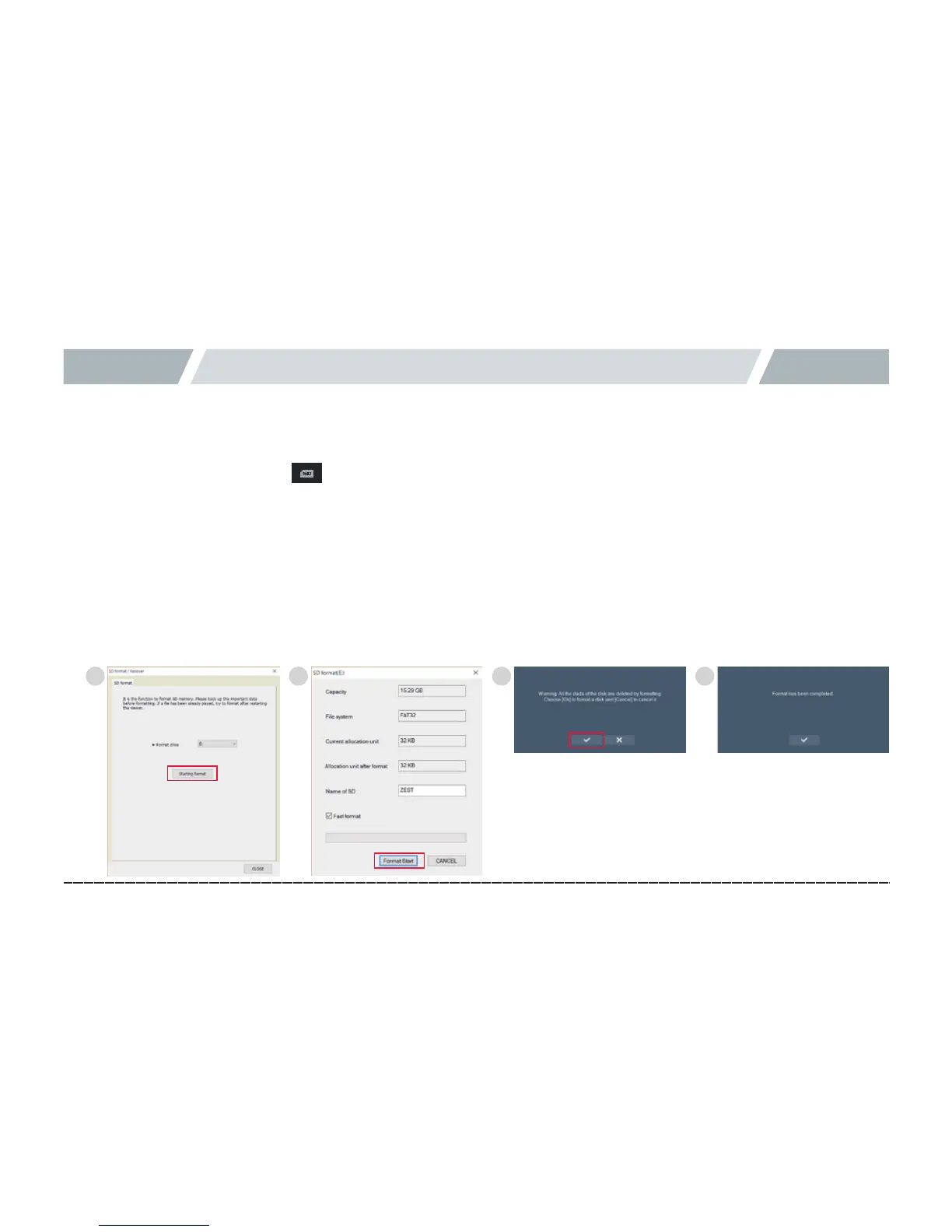
In the main screen, press the button to format the micro SD card from the Format SD tab.
3.
#
Press the Start button to check the information of micro SD card, and, then, select to use quick format or not.
※Withoutselectingthequickformat,itmaytakealongtimedependingonyourPCspecifications.
4.
#
Press the Start button to show the data deletion pop-up, and press V to format it.
5.
#
If the formatting finished, an information prompt pops up.
Caution) Allocation unit after formatting:WhenformattingitwithoutusingthePCViewer,select32KBfortheallocationunit.
Caution)MicroSD64GBshouldbeformattedusingthebodyorPCviewer.WhenformattinginaPC,
theblackboxmaynotworkproperly.(WhenformattingusingaPC,closeall“Explorer”programsbeforeformatting).
1 2 3 4



 To Next Page