8
−−−−
sec.5
ONE-FAMILY AND TWO-FAMILY KITS
DOOR PHONE AND VIDEO DOOR PHONE SYSTEM: Product Technical Manual
PANEL
The camera unit is supplied complete with:
• Semi pin-hole camera.
• Led for lighting.
• Front plate with 1 button.
• Electronic circuit.
• Lamp for lighting the name tags.
Adjust volume (to be adjusted only when needed) and camera
position.
INSTALLATION
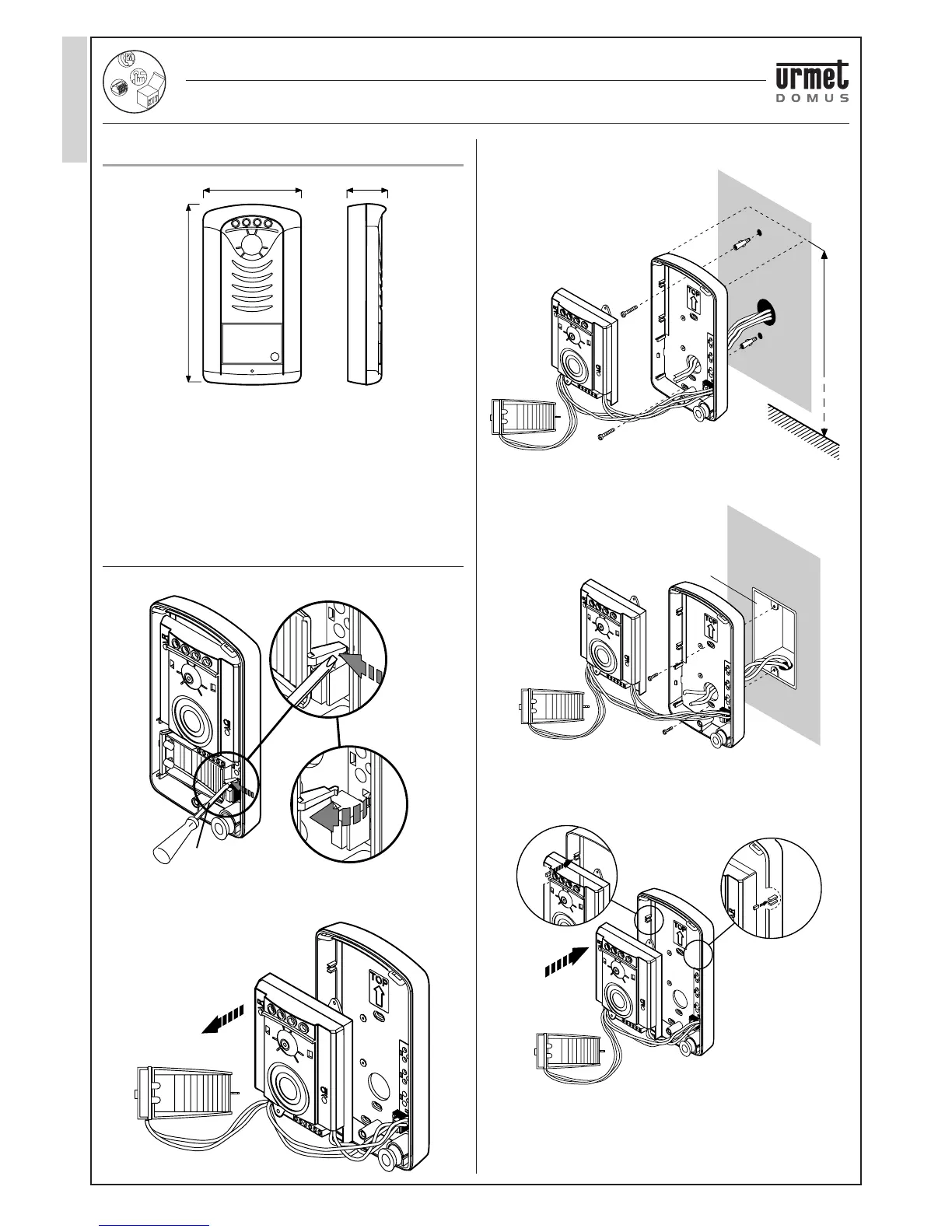
• Remove the name tag light circuit.
• Extract the door unit from the base.
• Fasten the base onto a fl at wall at the height shown in the fi gure
using the bolts provided.
NOTE: the panels with plastic casing may also be fi xed in a fl ush-
mounting box Mod. 503 as shown below.
• Insert the door unit into the compartment in the based and connect
the wires (it is advisable to have approximately 40-45 mm of wire
protruding from the wall).
99 mm 35 mm
185 mm
ø 4 mm
1,55 m ÷ 1,65 mm
Mod. 503
2-WIRE ONE FAMILY VIDEO KIT
PANEL
‘AUDIO TWO’ DOOR PHONE KIT WITH SMYLE PANEL
Ref. 1129/10




 To Next Page