sec.5
−−−−
9
ONE-FAMILY AND TWO-FAMILY KITS
DOOR PHONE AND VIDEO DOOR PHONE SYSTEM: Product Technical Manual
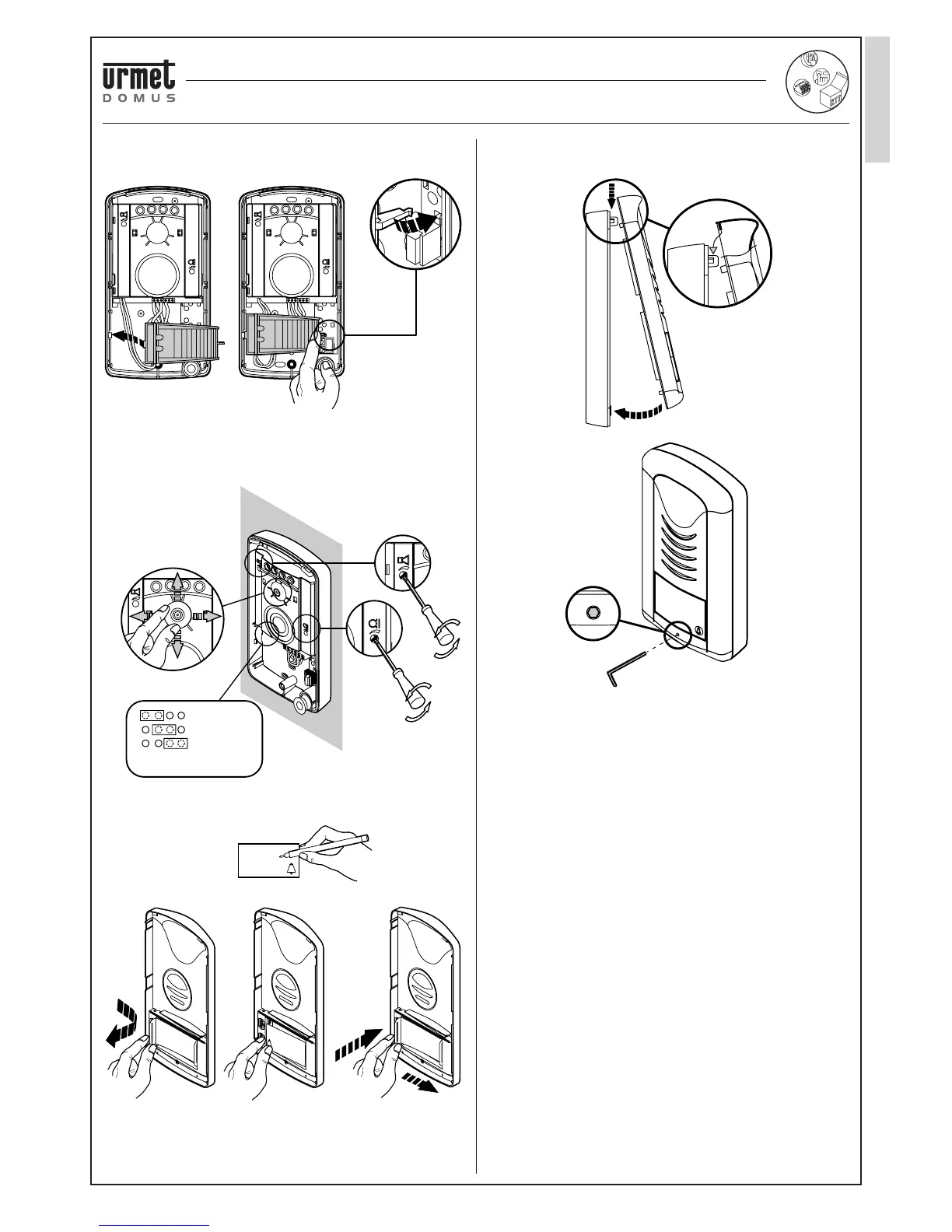
• Fasten the name tag light circuit making the wires pass underneath
the support.
• Adjust volume and camera position. Volume is calibrated to optimal
values during production. Change the settings when needed only.
• Set the electrical lock operating time by shifting the jumper to the
required position.
• Write the name on the name tag and insert in the housing.
• Insert the front part of the panel on the base and fasten it with the
socket head screw using the wrench (2mm) provided.
CLICK
5°
10°
5°
5°
DOOR OPENER TIME
PROGRAMMING
= 1" default
= 3"
= 5"
Rossi
Rossi
CLICK
2-WIRE ONE FAMILY VIDEO KIT
PANEL
‘AUDIO TWO’ DOOR PHONE KIT WITH SMYLE PANEL Ref. 1129/10





 To Next Page