366 MT124-032M
7.1.10.6 Maintenance Settings
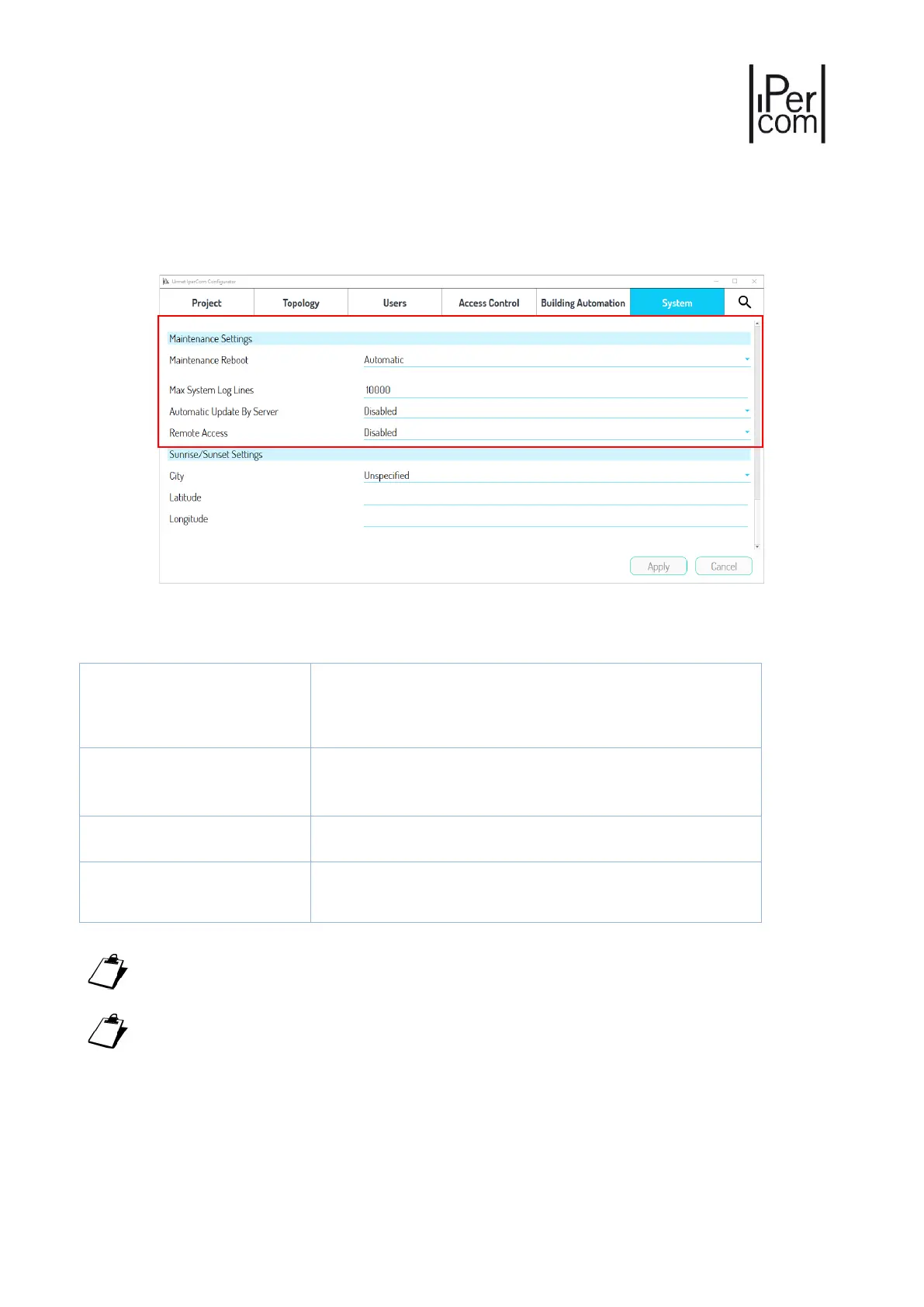
The parameters are shown in the following figure:
Figure 480: “System" tab – Maintenance settings
The parameter meaning is as follows:
"Automatic" means that all devices in the system restart at
4:00 am. "Manual" allows you to change the time (at half-
hourly intervals) and set weekly reboot days for the displayed
devices.
System Logs maximum depth
Number of events that can be displayed in the System Logs of
IPerCom Installer Tools. Default value: 10000. Maximum
value: 100,000
If enabled, it allows the firmware upgrade of the devices
through the Server 1060/1. Default value: disabled.
If enabled, it is possible through IPerCom Installer Tools to
connect to a remote system. Default value: disabled.
Table 22: Maintenance parameters and their meaning
For manually scheduled restarts, it is necessary to respect the constraint of at least 2 restarts every 4
days.
Devices such as Relay Actuator, Key Reader and Lift Interface cannot be restarted either
automatically or manually.





 To Next Page