Control Panel
Changing SC Cutter Speed
and Force
To set speed and force of the SC cutter, make sure you
are back in the “Home” screen with “Local” highlighted.
Press “Enter”. Use the up and down arrows to adjust the
speed and the le and right arrows to adjust the cutting
force. A typical cutting speed is 500mm/s, and a typical
cutting force is 100g.
Home Screen
Setting the Origin for SC Cutter
To set the Origin of where the SC cutter will begin
cutting from press the “Enter” button on “Local” while on
the Home Screen using the “Select” button to highlight
it if needed. is will enter the cutter into “Jog Mode”
where the le and right arrows of the control pad adjust
the position of the carriage and the up and down arrows
advance and retreate the media via the feed rollers. Once
you have your media and carriage in position press the
“Select” button, while in the Local Screen, to move the
cursor to “Current” then press “Enter” and the origin is
set in the correct spot.
Local Screen
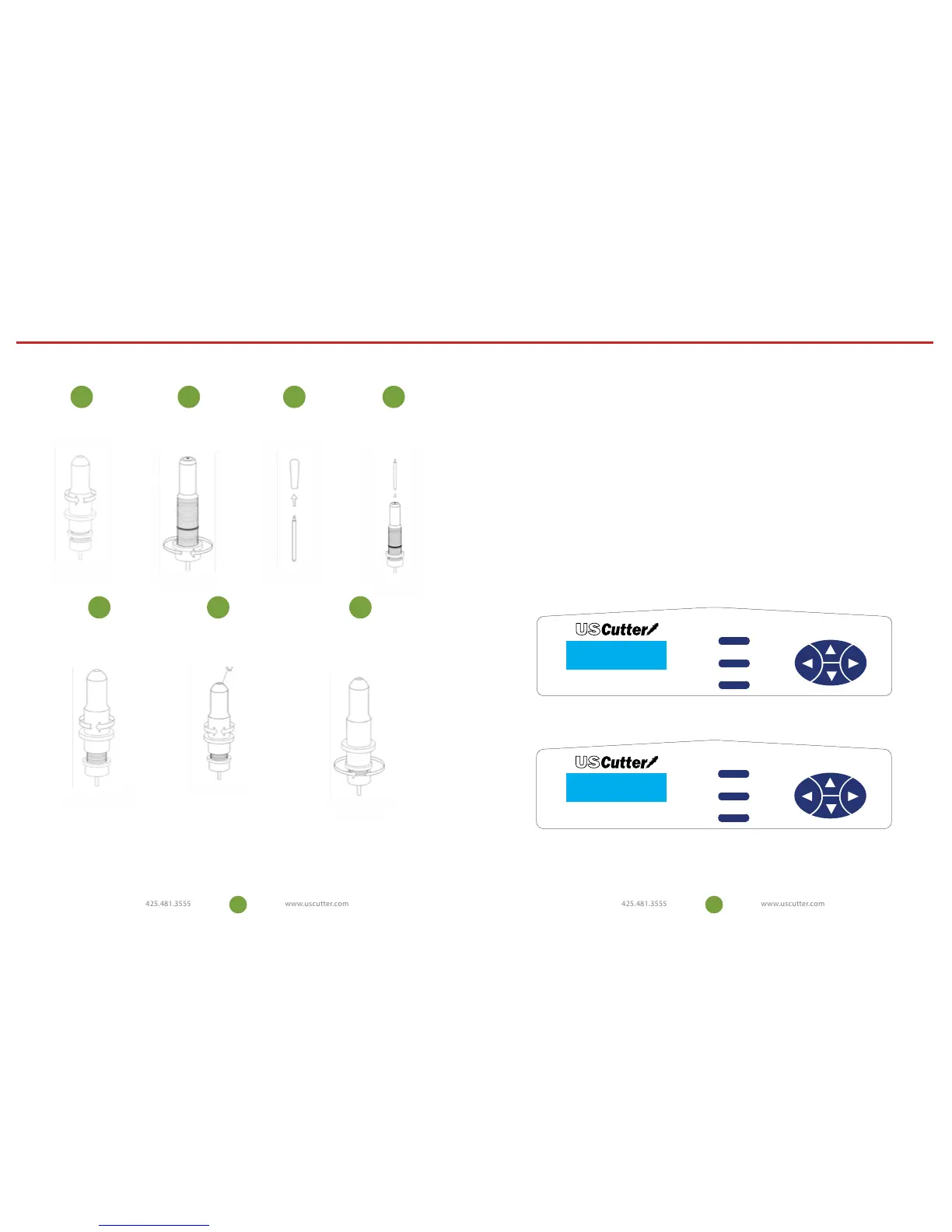
Blade Set Up
Unscrew the cap from the
Blade Carriage.
Screw the cap back onto
the Blade Carriage.
Adjust the carriage cap until the blade
is protruding approximately 1/64
th
of an
inch.
Adjust the Brass Ring until it ts snug
against the Cap. This will help keep
the cap in place during operation.
Set Brass Ring on Blade
Carriage to the fully down
position.
Remove the protective cover
from a new blade.
Insert the blade into the
top of the Blade Carriage.
1
5 76
2 3 4
Blades should be replaced every 6 months. Your blade may need to be replaced
more often if you are cutting thicker material such as ock, glitter, or reectives.
14 15
LOCAL TEST COPY
SPD: 0mm/s PRS: 10g
ORIGIN CURRENT ON
SPD: 0mm/s PRS: 10g
Reset
Select
Enter
Model SC Plotter
Reset
Select
Enter
Model SC Plotter


 To Next Page