Need help?
Do you have a question about the UWE OAP Series and is the answer not in the manual?
Detailed explanation of the functions of each key and the information displayed on various panels.
Configure country, exchange rate, power-on unit price base, and auto power off settings.
Steps for placing items, selecting currency base, entering unit price, and displaying total price.
Troubleshooting steps for issues preventing the scale from powering on.
Resolving problems related to the scale unexpectedly shutting off due to auto power off.
Diagnosing why the scale is unable to measure up to its maximum rated capacity.
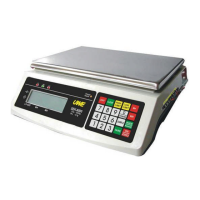
This document describes the OAP Series Electronic Price Computing Scale, an operation manual detailing its installation, features, and maintenance.
The OAP Series Electronic Price Computing Scale is designed for accurate weighing and price computation. It features a built-in exchange rate between several national currencies and the Euro, making it suitable for international trade. The scale is equipped with a rechargeable battery, allowing for portable operation, and can also be powered by an adaptor. It includes a memory function for storing and recalling unit prices (PLUs), which streamlines continuous transactions. The scale's primary function is to display weight, unit price, and total price, with the ability to convert total price to Euro value.
Installation and Setup: Before first use, users must check that all accessories, including the operation manual, scale, platter, power adaptor, and dust cover, are present. The platter should be carefully inserted into the scale without excessive force. For initial power-on, the main adaptor must be plugged into a wall outlet and the scale charged for at least 8 hours. It is crucial to verify that the input voltage of the power adaptor matches the output voltage of the outlet; if not, the adaptor should not be plugged in, and the dealer should be contacted immediately. Packing materials should be retained for future transportation.
The scale must be placed on a strong and level surface to ensure accurate weighing results. Adjustable feet underneath the scale can be used to achieve a level position, guided by a bubble indicator.
Internal Settings: The scale contains built-in exchange rates between national currencies and the Euro. Before initial use, users should check and confirm that the country setting, Euro exchange rate against the local currency, and power-on unit price base (Euro or national currency) are correct. This is done by turning the scale off, pressing and holding the TARE key while turning the scale on, navigating to F.3 using the TARE key, and then pressing NC/EURO to view the current settings. The @NC key sets the power-on unit to national currency, while the @EURO key sets it to Euro. The ZERO key returns the scale to operation status. It is critical not to use the scale if the country code or Euro exchange rate settings are incorrect, and to contact the dealer immediately.
The scale also features an Auto Power Off function, which turns the scale off automatically after 4 minutes of inactivity. This function can be enabled or disabled by navigating to F.4 in the internal settings and pressing ZERO for enable or NC/EURO for disable.
Backlight Settings (Option): The backlight can be disabled, set to power-saving mode, or continuous mode. To disable, press 0 then ZERO. For power-saving mode, press 1 then ZERO; in this mode, the backlight turns off after 20 seconds of idle time and reactivates with new weight detection or key press. For continuous mode, press 2 then ZERO; the backlight remains on until manually turned off or a new backlight command is entered. Backlight settings should only be changed before entering a unit price.
Unit Price Lookup (PLU): The scale supports 99 PLU locations. Locations 01 to 09 are accessed via DIRECT PLU KEYS, while locations 10 to 99 require entering a 2-digit number using numeric keys.
Storing a Unit Price to PLU: First, select the unit price base (Euro or national currency). Then, key in the unit price value, which will appear on the UNIT PRICE PANEL. Press PLU SET, and the TOTAL PRICE PANEL will display "PLU?". Enter a 2-digit PLU location number. The scale will store the unit price in memory within two seconds. Pressing CL twice or PLU SET again allows for quitting or entering a new PLU location.
Recall the Unit Price from PLU: For locations 01-09, press the DIRECT PLU KEYS. For locations 10-99, press PLU RECALL, and the TOTAL PRICE PANEL will display "PLU?". Enter the 2-digit PLU location number. The recalled unit price will be displayed on the UNIT PRICE PANEL. If the PLU's unit price base contradicts the scale's default setting, a zero unit price will be displayed.
Clearing Unit Price from PLU: A stored unit price can be cleared by entering a zero or a new unit price.
Before Weighing: Ensure the platter is firmly inserted, the scale is on a level and strong surface, and the scale is turned on.
Setting Displayed Value to Zero: If the scale does not display zero when unloaded, press ZERO. The ZERO INDICATOR will appear.
Transaction Weighing: Place the article on the platter; its weight will be shown on the Weight Window. Select the correct unit price base (national currency or Euro) using @EURO or @NC. The corresponding UNIT PRICE INDICATOR will appear on the UNIT PRICE and TOTAL PRICE PANELS. Enter the unit price using numeric keys, DIRECT PLU RECALL KEY, or PLU RECALL KEY followed by a 2-digit PLU location. The total price will then be displayed on the TOTAL PRICE PANEL.
Showing Price to Pay in Euro: Press NC/EURO. The unit will display "Euro" on the UNIT PRICE PANEL, and the equivalent price in Euro will appear on the TOTAL PRICE PANEL. The unit will revert to national currency mode after about 3 seconds. To keep the Euro price displayed longer, hold NC/EURO. This conversion function is only effective when an appropriate country is selected during setup and when the weight is stable. An audio alarm will sound if the Euro unit price base is already selected when NC/EURO is pressed.
Follow-Up Transactions: After a transaction, remove all loads from the platter. The WEIGHT PANEL will show zero, and the unit price will reset to zero.
Tare Function: To tare off the weight of a container, remove all loads from the platter, ensure the ZERO INDICATOR is on, place the container on the platter, and press TARE. The TARE INDICATOR will appear, and the displayed weight will be the net weight of the article. To clear the tare function, remove all loads from the platter and press TARE again; the TARE INDICATOR will disappear.
Fixed Unit Price Function: This function is useful for continuous transactions with the same unit price. To enable, press F before or after entering the unit price. The fixed unit price will be displayed on the UNIT PRICE PANEL, and the FIXED UNIT PRICE INDICATOR will turn on. If a container is used, tare its weight. Place an article on the platter, and the total price will be displayed. Removing the article leaves the unit price on the UNIT PRICE PANEL, ready for the next transaction. To disable, press F again; the FIXED UNIT PRICE INDICATOR will turn off. Even when disabled, the unit price remains displayed until CL is pressed or a new unit price is entered.
Recharging the Scale: When the LO-BAT indicator appears, the scale needs recharging. Failure to recharge immediately may cause unrecoverable damage to the rechargeable battery. The scale can operate while recharging. The CHARGING INDICATOR is red during recharging and turns green when charging is complete.
Daily Care and Maintenance: The scale should be cleaned with a soft, damp cloth and, if necessary, a mild detergent. Harsh, abrasive materials, acetone, volatile solvents, thinners, or alcohol should not be used for cleaning.
The accuracy of the scale should be verified periodically. In some regions, calibration is restricted to authorized/qualified agents.
Applying the dust cover when operating the scale is good practice.
For transportation or long-term storage, the scale must be placed horizontally, and the platter should be removed. The scale should be stored in a dry and clean place.
Troubleshooting: The manual provides guidance for common issues:
Legal Caution: This unit is legal for trade only when sealed (and/or stamped) and bearing a serial number. Users must not attempt to break the seal or remove the serial number. For more information and after-sales service, the dealer should be contacted.
Environmental Conditions: For the most accurate weighing results, the scale should not be used in environmental conditions that fall beyond those listed in the specifications. Users should not attempt to open the unit or conduct any troubleshooting other than those listed in the manual.
 General
| Calibration | External Calibration |
|---|---|
| Display | LCD |
| Weighing Units | g, oz, lb |
| Platform Size | 300 x 400 mm to 600 x 800 mm |
| Power | AC Adapter |
| Material | Stainless steel |


 To Next Page